<?xml version="1.0" encoding="utf-8"?><feed xmlns="http://www.w3.org/2005/Atom" ><generator uri="https://jekyllrb.com/" version="3.10.0">Jekyll</generator><link href="https://gkorpal.github.io/feed.xml" rel="self" type="application/atom+xml" /><link href="https://gkorpal.github.io/" rel="alternate" type="text/html" /><updated>2026-04-09T22:50:57-07:00</updated><id>https://gkorpal.github.io/feed.xml</id><title type="html">Gaurish Korpal</title><subtitle>NA</subtitle><author><name>Gaurish Korpal</name></author><entry><title type="html">I use Arch btw</title><link href="https://gkorpal.github.io/posts/2025/09/arch/" rel="alternate" type="text/html" title="I use Arch btw" /><published>2025-09-30T00:00:00-07:00</published><updated>2025-09-30T00:00:00-07:00</updated><id>https://gkorpal.github.io/posts/2025/09/arch</id><content type="html" xml:base="https://gkorpal.github.io/posts/2025/09/arch/"><![CDATA[<p>I was introduced to Linux via <a href="https://ubuntu.com/blog/ubuntu-7-04-wins-a-100-best-products-of-2007-award-from-pc-world">Canonical’s advertisement program</a> that it ran with PCWorld magazine, in which the accompanying CD had latest Ubuntu version and other software updates. This led to Linux explorations (including weirdos like <a href="https://distrowatch.com/table.php?distribution=BOSS">BOSS Linux</a>, <a href="https://distrowatch.com/table.php?distribution=puppy">Puppy Linux</a>, <a href="https://distrowatch.com/table.php?distribution=peppermint">Peppermint</a>,…) in VirtualBox running on Windows XP. However, being unable to keep up with Microsoft Windows’ increasing system requirements, I ended up using Lubuntu once Windows XP reached end of life. Since then, over the last 20 years, I have had the pleasure of using the three major Linux distro families: <code class="language-plaintext highlighter-rouge">APT</code> (Debian/Ubuntu/Linux_Mint/Tuxedo_OS/Kali_Linux), <code class="language-plaintext highlighter-rouge">DNF</code> (Fedora/RHEL/CentOS), and <code class="language-plaintext highlighter-rouge">ZYpp</code> (SLE/openSUSE). You can read my long rants about various Linux distros in one of <a href="https://gkorpal.github.io/posts/2020/08/distrohopping/">my old blog post</a>. Long term Linux users might enjoy a <a href="https://wiki.archlinux.org/title/Arch_compared_to_other_distributions">comparison of Arch with other distros</a>, why most of them are <a href="https://www.gnu.org/distros/common-distros.en.html">not endorsed by GNU</a>, and the <a href="https://wiki.archlinux.org/title/GNU">GNU/Linux naming controversy</a>.</p>

<p>Over time, I have developed a sense of what I want and am ready to be responsible for my Thinkpad P16 :)</p>

<p>I learned about the process from the <a href="https://wiki.archlinux.org/title/Installation_guide">official guide</a> and supplemented it with the notes by <a href="https://gist.github.com/mjkstra/96ce7a5689d753e7a6bdd92cdc169bae">Michele Gementi</a>, <a href="https://github.com/silentz/arch-linux-install-guide">Max Pershin</a>, <a href="https://itsfoss.com/install-arch-linux/">Abhishek Prakash</a>, <a href="https://github.com/quantinium3/Guide-to-install-Arch-Linux">quantinium</a>, <a href="https://www.dwarmstrong.org/btrfs-snapshots-rollbacks/">Daniel Wayne Armstrong</a>, <a href="https://wiki.gentoo.org/wiki/Handbook:AMD64/Installation/Disks#Partitioning_the_disk_with_GPT_for_UEFI">Gentoo</a> and <a href="https://help.ubuntu.com/community/SwapFaq">Ubuntu</a>. It took around half-dozen <a href="https://wiki.archlinux.org/title/VirtualBox/Install_Arch_Linux_as_a_guest">test runs in VirtualBox</a> over the course of a month before performing the actual installation. Here is a documentation to get started with <a href="https://wiki.archlinux.org/title/Arch_is_the_best">the best operating system</a>.</p>

<p>I will follow the <a href="https://wiki.archlinux.org/title/Help:Reading">Arch Wiki convention</a>: The numeral or hash sign (<code class="language-plaintext highlighter-rouge">#</code>) indicates that the command needs to be run as <em>root</em>, whereas the dollar sign (<code class="language-plaintext highlighter-rouge">$</code>) shows that the command should be run as a <em>regular user</em>.</p>

<h2 id="prepararation">Prepararation</h2>

<ol>
  <li>Check ArchLinux <a href="https://status.archlinux.org/">website status</a> since they are prone to <a href="https://lists.archlinux.org/archives/list/arch-general@lists.archlinux.org/thread/EU4NXRX6DDJAACOWIRZNU4S5KVXEUI72/">DDoS attacks</a>. I encountered this during my first ever test run of Arch Linux. Also, the services may send an initial connection reset due to the TCP SYN authentication performed by the hosting provider, but subsequent requests should work as expected.
    <ol>
      <li>In the case of downtime for <code class="language-plaintext highlighter-rouge">archlinux.org</code>:
        <ol>
          <li>Mirrors: The mirror list endpoint used in tools like <code class="language-plaintext highlighter-rouge">reflector</code> is hosted on this site. Please default to the mirrors listed in the <code class="language-plaintext highlighter-rouge">pacman-mirrorlist</code> package during an outage.</li>
          <li>ISO: Installation image is available on a lot of the mirrors, for example the DevOps administered <a href="https://geo.mirror.pkgbuild.com/iso/">geomirrors</a>. Please always verify its integrity.</li>
        </ol>
      </li>
      <li>In the case of downtime for <code class="language-plaintext highlighter-rouge">aur.archlinux.org</code>:
        <ol>
          <li>Packages: A mirror of AUR packages is maintained on GitHub. You can retrieve a package using:
            <div class="language-plaintext highlighter-rouge"><div class="highlight"><pre class="highlight"><code> $ git clone --branch &lt;package_name&gt; --single-branch https://github.com/archlinux/aur.git &lt;package_name&gt;
</code></pre></div>            </div>
          </li>
          <li>I will not use any package from <a href="https://wiki.archlinux.org/title/Arch_User_Repository"><code class="language-plaintext highlighter-rouge">AUR</code></a> in this tutorial. It is similar (but superior) to the third-party repositories like <a href="https://launchpad.net/ubuntu/+ppas"><code class="language-plaintext highlighter-rouge">PPA</code></a> for Ubuntu, <a href="https://copr.fedorainfracloud.org/"><code class="language-plaintext highlighter-rouge">COPR</code></a> for Fedora, and <a href="https://build.opensuse.org/"><code class="language-plaintext highlighter-rouge">OBS</code></a> for openSUSE.</li>
        </ol>
      </li>
    </ol>
  </li>
  <li>Download the latest <code class="language-plaintext highlighter-rouge">archlinux-YYYY.MM.DD-x86_64.iso</code>, <code class="language-plaintext highlighter-rouge">sha256sums.txt</code>, and <code class="language-plaintext highlighter-rouge">archlinux-YYYY.MM.DD-x86_64.iso.sig</code> from the <a href="https://archlinux.org/download/#download-mirrors">nearest mirror</a> like <code class="language-plaintext highlighter-rouge">mirror.arizona.edu</code>.</li>
  <li>Verify the integrity and authenticity of your ISO image using Linux (if Windows, use WSL).
    <ol>
      <li>Integrity: Ensure the download image matches the checksum from the <code class="language-plaintext highlighter-rouge">sha256sums.txt</code>
        <div class="language-plaintext highlighter-rouge"><div class="highlight"><pre class="highlight"><code> $ sha256sum -c sha256sums.txt
</code></pre></div>        </div>
        <p>This should output <code class="language-plaintext highlighter-rouge">archlinux-YYYY.MM.DD-x86_64.iso: OK</code>. You may see “No such file or directory” for other files which we didn’t download but their checksums also included.</p>
      </li>
      <li>Authenticity: One should never use a GnuPG version just downloaded from internet to check the integrity; instead use an existing, trusted GnuPG installation, e.g., the one provided by your Linux distribution (if Windows, then use WSL).
        <div class="language-plaintext highlighter-rouge"><div class="highlight"><pre class="highlight"><code> $ gpg --auto-key-locate clear,wkd -v --locate-external-key pierre@archlinux.org
 $ gpg --verify archlinux-YYYY.MM.DD-x86_64.iso.sig archlinux-YYYY.MM.DD-x86_64.iso
</code></pre></div>        </div>
        <p>GPG might give warning <code class="language-plaintext highlighter-rouge">This key is not certified with a trusted signature!</code>, but you can verify it <a href="https://pierre-schmitz.com/gpg-keys/">here</a>.</p>
      </li>
    </ol>
  </li>
  <li>Create a bootable USB drive using <a href="https://www.ventoy.net/en/download.html">Ventoy</a>; remember to verify the checksum of Ventoy itself.</li>
  <li>In UEFI, disable <a href="https://wiki.archlinux.org/title/Unified_Extensible_Firmware_Interface/Secure_Boot">secure boot</a>.</li>
</ol>

<h2 id="from-chroot-to-root">From chroot to root</h2>

<ol>
  <li>Boot from the Live USB drive and select Arch Linux from <a href="https://wiki.archlinux.org/title/Installation_guide#Boot_the_live_environment">the <code class="language-plaintext highlighter-rouge">systemd-boot</code> greeting screen</a> to get logged in on the first virtual console as the root user, and presented with a Zsh shell prompt.</li>
  <li>Verify that the boot mode is UEFI by ensuring that the following command returns 64.
    <div class="language-plaintext highlighter-rouge"><div class="highlight"><pre class="highlight"><code> # cat /sys/firmware/efi/fw_platform_size
</code></pre></div>    </div>
  </li>
  <li>Connect to WiFi using <code class="language-plaintext highlighter-rouge">iwctl</code>.
    <div class="language-plaintext highlighter-rouge"><div class="highlight"><pre class="highlight"><code> # iwctl
 [iwd]# device list
 [iwd]# station &lt;device-name&gt; scan
 [iwd]# station &lt;device-name&gt; get-networks
 [iwd]# station &lt;device-name&gt; connect &lt;Name of WiFi access point&gt;
 [iwd]# exit
 $ ping -c 5 ping.archlinux.org
</code></pre></div>    </div>
  </li>
  <li>Ensure that the system clock is syncronized via Network Time Protocol (NTP).
    <div class="language-plaintext highlighter-rouge"><div class="highlight"><pre class="highlight"><code> # timedatectl set-ntp true
 # timedatectl
</code></pre></div>    </div>
  </li>
  <li>
    <p>Use <code class="language-plaintext highlighter-rouge">cfdisk</code> to create the following GUID Partition Table (GPT), without hibernation feature (suspend-to-disk).</p>

    <table>
      <thead>
        <tr>
          <th>Mount point</th>
          <th>Parition type</th>
          <th>Size</th>
          <th>Partition</th>
        </tr>
      </thead>
      <tbody>
        <tr>
          <td><code class="language-plaintext highlighter-rouge">/efi</code></td>
          <td>EFI System Partition</td>
          <td>1 GiB</td>
          <td><code class="language-plaintext highlighter-rouge">/dev/efi_system_partition</code></td>
        </tr>
        <tr>
          <td><code class="language-plaintext highlighter-rouge">[swap]</code></td>
          <td>Linux swap</td>
          <td>6 GiB</td>
          <td><code class="language-plaintext highlighter-rouge">/dev/swap_partition</code></td>
        </tr>
        <tr>
          <td><code class="language-plaintext highlighter-rouge">/</code></td>
          <td>Linux Filesystem</td>
          <td>(all of the remaining space )</td>
          <td><code class="language-plaintext highlighter-rouge">/dev/root_partition</code></td>
        </tr>
      </tbody>
    </table>

    <p>Can later get the partition names using <code class="language-plaintext highlighter-rouge">fdisk -l</code>.</p>
  </li>
  <li>Format the partitions using <code class="language-plaintext highlighter-rouge">mkfs</code>.
    <div class="language-plaintext highlighter-rouge"><div class="highlight"><pre class="highlight"><code> # mkfs.fat -F 32 /dev/efi_system_partition
 # mkswap /dev/swap_partition
 # mkfs.btrfs /dev/root_partition
</code></pre></div>    </div>
  </li>
  <li>Create the Btrfs filesystem layout <a href="https://wiki.archlinux.org/title/Snapper#Suggested_filesystem_layout">recommended for <code class="language-plaintext highlighter-rouge">snapper</code></a>
    <div class="language-plaintext highlighter-rouge"><div class="highlight"><pre class="highlight"><code> # mount /dev/root_partition /mnt
 # btrfs subvolume create /mnt/@
 # btrfs subvolume create /mnt/@home
 # btrfs subvolume create /mnt/@var_log
 # btrfs subvolume create /mnt/@var_cache
 # btrfs subvolume create /mnt/@var_spool
 # btrfs subvolume create /mnt/@var_tmp
 # btrfs subvolume create /mnt/@snapshots
 # btrfs subvolume list -t /mnt
 # lsblk --fs
 # umount /mnt
</code></pre></div>    </div>
  </li>
  <li>Mount the file systems as we prepare to <a href="https://wiki.archlinux.org/title/Chroot#Running_on_Btrfs">chroot</a> with <a href="https://btrfs.readthedocs.io/en/latest/Administration.html#notes-on-generic-mount-options">Btrfs compression settings</a> optimized for NVMe SSD (Kioxia XG8) and not using <a href="https://wiki.archlinux.org/title/Mutt">Mutt</a>.
    <div class="language-plaintext highlighter-rouge"><div class="highlight"><pre class="highlight"><code> # mount -o noatime,compress=zstd:1,subvol=@ /dev/root_partition /mnt
 # mkdir -p /mnt/{home,.snapshots} /mnt/var/{log,cache,spool,tmp}
 # mount -o noatime,compress=zstd:1,subvol=@home /dev/root_partition /mnt/home
 # mount -o noatime,compress=zstd:1,subvol=@var_log /dev/root_partition /mnt/var/log
 # mount -o noatime,compress=zstd:1,subvol=@var_cache /dev/root_partition /mnt/var/cache
 # mount -o noatime,compress=zstd:1,subvol=@var_spool /dev/root_partition /mnt/var/spool
 # mount -o noatime,compress=zstd:1,subvol=@var_tmp /dev/root_partition /mnt/var/tmp
 # mount -o noatime,compress=zstd:1,subvol=@snapshots /dev/root_partition /mnt/.snapshots
 # mount --mkdir /dev/efi_system_partition /mnt/efi
 # swapon /dev/swap_partition
 # lsblk --fs
</code></pre></div>    </div>
  </li>
  <li>Use <a href="https://man.archlinux.org/man/pacstrap.8"><code class="language-plaintext highlighter-rouge">pacstrap</code></a> to create a new system installation from scratch.
    <div class="language-plaintext highlighter-rouge"><div class="highlight"><pre class="highlight"><code> # pacstrap -K /mnt
</code></pre></div>    </div>
    <p>This installs the <a href="https://archlinux.org/packages/core/any/base/"><code class="language-plaintext highlighter-rouge">base</code> metapackage</a> consisting of basic tools like <a href="https://wiki.archlinux.org/title/Bash"><code class="language-plaintext highlighter-rouge">bash</code></a>, <a href="https://wiki.archlinux.org/title/Systemd"><code class="language-plaintext highlighter-rouge">systemd</code></a>, and <a href="https://wiki.archlinux.org/title/Pacman"><code class="language-plaintext highlighter-rouge">pacman</code></a>. It also copies the LiveUSB’s mirrorlist <code class="language-plaintext highlighter-rouge">/etc/pacman.d/mirrorlist</code> generated using <a href="https://wiki.archlinux.org/title/Reflector"><code class="language-plaintext highlighter-rouge">reflector</code></a> to the new system. During the fifth test run I was <a href="https://bbs.archlinux.org/viewtopic.php?id=308345">bit by a bug</a> in this step.</p>
  </li>
  <li>Generate <a href="https://wiki.archlinux.org/title/Fstab"><code class="language-plaintext highlighter-rouge">fstab</code></a> file with startup instructions
    <div class="language-plaintext highlighter-rouge"><div class="highlight"><pre class="highlight"><code># genfstab -U /mnt &gt;&gt; /mnt/etc/fstab
</code></pre></div>    </div>
    <p>Check the resulting <code class="language-plaintext highlighter-rouge">/mnt/etc/fstab</code> file, and edit it in case of errors and various <a href="https://btrfs.readthedocs.io/en/latest/Administration.html#mount-options">mount options</a> like <code class="language-plaintext highlighter-rouge">discard=async</code> and <code class="language-plaintext highlighter-rouge">ssd</code>.</p>
  </li>
  <li>Switch to the new system’s environment
    <div class="language-plaintext highlighter-rouge"><div class="highlight"><pre class="highlight"><code># arch-chroot /mnt
</code></pre></div>    </div>
    <ol>
      <li>Set up the <a href="https://wiki.archlinux.org/title/System_time">time zone</a>.
        <div class="language-plaintext highlighter-rouge"><div class="highlight"><pre class="highlight"><code> # ls /usr/share/zoneinfo/                                     
 # ls /usr/share/zoneinfo/&lt;Zone&gt;/                              
 # ln -sf /usr/share/zoneinfo/&lt;Zone&gt;/&lt;Subzone&gt; /etc/localtime       
 # hwclock --systohc
</code></pre></div>        </div>
      </li>
      <li>Configure correct region and language specific formatting.
        <ol>
          <li>Install a console text-editors like <a href="https://wiki.archlinux.org/title/Nano"><code class="language-plaintext highlighter-rouge">nano</code></a>:
            <div class="language-plaintext highlighter-rouge"><div class="highlight"><pre class="highlight"><code># pacman -S nano
</code></pre></div>            </div>
          </li>
          <li>Use <code class="language-plaintext highlighter-rouge">nano</code> to edit <code class="language-plaintext highlighter-rouge">/etc/locale.gen</code> and uncomment <code class="language-plaintext highlighter-rouge">en_US.UTF-8 UTF-8</code>.</li>
          <li>Generate the locales.
            <div class="language-plaintext highlighter-rouge"><div class="highlight"><pre class="highlight"><code># locale-gen
</code></pre></div>            </div>
          </li>
          <li>Use <code class="language-plaintext highlighter-rouge">nano</code> to create configuration file <code class="language-plaintext highlighter-rouge">/etc/locale.conf</code> and write <code class="language-plaintext highlighter-rouge">LANG=en_US.UTF-8</code> in it.</li>
        </ol>
      </li>
      <li>Network configuration.
        <ol>
          <li>Use <code class="language-plaintext highlighter-rouge">nano</code> to create  <code class="language-plaintext highlighter-rouge">/etc/hostname</code> and write <code class="language-plaintext highlighter-rouge">&lt;PC-Name&gt;</code> in it.</li>
          <li>Use <code class="language-plaintext highlighter-rouge">nano</code> to edit <code class="language-plaintext highlighter-rouge">/etc/hosts</code> and add the following to it
            <div class="language-plaintext highlighter-rouge"><div class="highlight"><pre class="highlight"><code>127.0.0.1 localhost
::1 localhost
127.0.1.1 &lt;PC-Name&gt; 
</code></pre></div>            </div>
          </li>
          <li>Install and enable <a href="https://wiki.archlinux.org/title/NetworkManager">network manager</a> to run on boot.
            <div class="language-plaintext highlighter-rouge"><div class="highlight"><pre class="highlight"><code># pacman -S networkmanager
# systemctl enable NetworkManager
</code></pre></div>            </div>
          </li>
        </ol>
      </li>
      <li>Create a new <code class="language-plaintext highlighter-rouge">initramfs</code> (<em>init</em>ial <em>RAM</em> <em>f</em>ile <em>s</em>ystem)
        <ol>
          <li>Install userspace utilities for the <a href="https://wiki.archlinux.org/title/File_systems">Btrfs file system</a> (<code class="language-plaintext highlighter-rouge">btrfs-progs</code>) and <a href="https://wiki.archlinux.org/title/Kernel">Linux kernel</a> <code class="language-plaintext highlighter-rouge">linux</code> with <code class="language-plaintext highlighter-rouge">linux-lts</code> as a <a href="https://wiki.archlinux.org/title/System_maintenance#Install_the_linux-lts_package">fallback option</a>. If presented with options for initramfs, choose <code class="language-plaintext highlighter-rouge">mkinitcpio</code>. Note that trying to install kernel without <code class="language-plaintext highlighter-rouge">btrfs-progs</code> will lead to error when <code class="language-plaintext highlighter-rouge">mkinitcpio</code> runs the <code class="language-plaintext highlighter-rouge">fsck</code> hook.</li>
          <li>Install <a href="https://wiki.archlinux.org/title/Linux_firmware">kernel firmware</a> (<code class="language-plaintext highlighter-rouge">linux-firmware</code>) along with additional firmware for <a href="https://wiki.archlinux.org/title/Microcode">Intel CPU</a> (<code class="language-plaintext highlighter-rouge">intel-ucode</code>), <a href="https://wiki.archlinux.org/title/Intel_graphics">Intel iGPU</a> (<code class="language-plaintext highlighter-rouge">mesa</code>, <code class="language-plaintext highlighter-rouge">vulkan-intel</code>), <a href="https://wiki.archlinux.org/title/NVIDIA">NVIDIA dGPU</a> (<code class="language-plaintext highlighter-rouge">nvidia</code>, <code class="language-plaintext highlighter-rouge">nvidia-utils</code>), and <a href="https://gitlab.freedesktop.org/pipewire/pipewire/-/wikis/Filter-Chain#virtual-surround">Dolby Atmos</a> (<code class="language-plaintext highlighter-rouge">pipewire</code>, <code class="language-plaintext highlighter-rouge">pipewire-alsa</code>, <code class="language-plaintext highlighter-rouge">pipewire-pulse</code>, <code class="language-plaintext highlighter-rouge">pipewire-jack</code>, <code class="language-plaintext highlighter-rouge">wireplumber</code>). <strong>Update (Dec 20, 2025):</strong> Use <code class="language-plaintext highlighter-rouge">nvidia-open</code> instead of <code class="language-plaintext highlighter-rouge">nvidia</code>, see <a href="https://archlinux.org/news/nvidia-590-driver-drops-pascal-support-main-packages-switch-to-open-kernel-modules/">news</a>.</li>
          <li>Re-run <a href="https://man.archlinux.org/man/mkinitcpio.8"><code class="language-plaintext highlighter-rouge">mkinitcpio</code></a> to be sure that we have an error free initial ramdisk environment.
            <div class="language-plaintext highlighter-rouge"><div class="highlight"><pre class="highlight"><code># mkinitcpio -P
</code></pre></div>            </div>
            <p>Note that every time a kernel is installed or upgraded, a pacman hook automatically generates a preset file saved in <code class="language-plaintext highlighter-rouge">/etc/mkinitcpio.d/</code> and <code class="language-plaintext highlighter-rouge">-P</code> option process all presets contained in <code class="language-plaintext highlighter-rouge">/etc/mkinitcpio.d</code>.</p>
          </li>
        </ol>
      </li>
      <li>Set root password using <code class="language-plaintext highlighter-rouge">passwd</code> command.</li>
      <li>Install a <a href="https://btrfs.readthedocs.io/en/latest/Administration.html#bootloaders">btrfs-friendly bootloader</a>, like <a href="https://wiki.archlinux.org/title/GRUB">GRUB</a>.
        <div class="language-plaintext highlighter-rouge"><div class="highlight"><pre class="highlight"><code> # pacman -S grub efibootmgr
 # grub-install --target=x86_64-efi --efi-directory=/efi --bootloader-id=GRUB
 # grub-mkconfig -o /boot/grub/grub.cfg
</code></pre></div>        </div>
        <p>Kernel packages are installed under the <code class="language-plaintext highlighter-rouge">/usr/lib/modules/</code> path and subsequently used to copy the vmlinuz executable image to <code class="language-plaintext highlighter-rouge">/boot/</code>.</p>
      </li>
      <li>We can use the bootloader to switch between <code class="language-plaintext highlighter-rouge">linux</code> and <code class="language-plaintext highlighter-rouge">linux-lts</code> kernel. But will set <code class="language-plaintext highlighter-rouge">linux</code> as <a href="https://wiki.archlinux.org/title/GRUB/Tips_and_tricks#Changing_the_default_menu_entry">the default option</a> by editing <code class="language-plaintext highlighter-rouge">/etc/default/grub</code>:
        <div class="language-plaintext highlighter-rouge"><div class="highlight"><pre class="highlight"><code>GRUB_DISABLE_SUBMENU=y
GRUB_DEFAULT="Arch Linux, with Linux linux"
</code></pre></div>        </div>
        <p>Regenerate your configuration file with <code class="language-plaintext highlighter-rouge">grub-mkconfig</code>.</p>
      </li>
      <li>Exit the chroot environment by typing <code class="language-plaintext highlighter-rouge">exit</code> or pressing <kbd>Ctrl</kbd> + <kbd>d</kbd>.</li>
    </ol>
  </li>
  <li>Manually unmount all the partitions
    <div class="language-plaintext highlighter-rouge"><div class="highlight"><pre class="highlight"><code># umount -R /mnt
</code></pre></div>    </div>
  </li>
  <li>Reboot (or <code class="language-plaintext highlighter-rouge">poweroff</code>) the system and remove the installation media
    <div class="language-plaintext highlighter-rouge"><div class="highlight"><pre class="highlight"><code># reboot
</code></pre></div>    </div>
  </li>
</ol>

<h2 id="from-superuser-to-user">From superuser to user</h2>

<ol>
  <li>Login into the new system with the root account (superuser).</li>
  <li>Connect to WiFi using <code class="language-plaintext highlighter-rouge">nmtui</code> or <code class="language-plaintext highlighter-rouge">nmcli</code>.
    <div class="language-plaintext highlighter-rouge"><div class="highlight"><pre class="highlight"><code> # nmcli device wifi connect &lt;Name of WiFi access point&gt; password &lt;password&gt;
</code></pre></div>    </div>
  </li>
  <li>Pacman configuration to automatically <a href="https://wiki.archlinux.org/title/Reflector#systemd_timer">update mirrors</a> and periodically <a href="https://wiki.archlinux.org/title/Pacman#Cleaning_the_package_cache">clear out cache</a>.
    <div class="language-plaintext highlighter-rouge"><div class="highlight"><pre class="highlight"><code> # pacman -S pacman-contrib
 # systemctl enable --now paccache.timer
 # pacman -S reflector
 # systemctl enable --now reflector.timer
</code></pre></div>    </div>
  </li>
  <li>Install <code class="language-plaintext highlighter-rouge">man</code> to have offline access to <a href="https://wiki.archlinux.org/title/Man_page">Arch Linx documentation</a>.
    <div class="language-plaintext highlighter-rouge"><div class="highlight"><pre class="highlight"><code> # pacman -S man-db
</code></pre></div>    </div>
  </li>
  <li>Create a user and add to <a href="https://wiki.archlinux.org/title/Users_and_groups">administration group</a> (<code class="language-plaintext highlighter-rouge">wheel</code>) with <a href="https://man.archlinux.org/man/sudo.8"><code class="language-plaintext highlighter-rouge">sudo</code></a> access. Note that logging in using root account is <a href="https://bbs.archlinux.org/viewtopic.php?id=110630">disabled for GUI</a>.
    <div class="language-plaintext highlighter-rouge"><div class="highlight"><pre class="highlight"><code>  # useradd -mG wheel &lt;user-name&gt;
  # passwd &lt;user-name&gt;
  # pacman -S sudo
  # EDITOR=nano visudo
</code></pre></div>    </div>
    <p>The <a href="https://wiki.archlinux.org/title/Sudo#Using_visudo">last command</a> opens the <code class="language-plaintext highlighter-rouge">/etc/sudoers</code> file using <code class="language-plaintext highlighter-rouge">nano</code>; look for a line which says something like <code class="language-plaintext highlighter-rouge">Uncomment to allow members of group wheel to execute any command</code> and uncomment exactly the line BELOW it, by removing the <code class="language-plaintext highlighter-rouge">#</code>. This will grant superuser priviledges to your user.</p>
  </li>
  <li>Check <a href="https://wiki.archlinux.org/title/NVIDIA#Wayland_configuration">NVIDIA configuration</a> by ensuring that the Direct Rendering Manager (DRM) is enabled.
    <div class="language-plaintext highlighter-rouge"><div class="highlight"><pre class="highlight"><code> # cat /sys/module/nvidia_drm/parameters/modeset
</code></pre></div>    </div>
    <p>This should return <code class="language-plaintext highlighter-rouge">Y</code>.</p>
  </li>
  <li>Install KDE with <a href="https://archlinux.org/news/plasma-640-will-need-manual-intervention-if-you-are-on-x11/">Wayland support</a> following advice from the <a href="https://community.kde.org/Distributions/Packaging_Recommendations">KDE documentation</a> and Arch dependency tree of <a href="https://archlinux.org/packages/extra/x86_64/plasma-desktop/"><code class="language-plaintext highlighter-rouge">plasma-desktop</code></a>. We have consciously excluded <code class="language-plaintext highlighter-rouge">discover</code> from KDE because it can lead to partial upgrades <a href="https://wiki.archlinux.org/title/System_maintenance#Partial_upgrades_are_unsupported">which are unsupported in Arch</a>.
    <ol>
      <li>base: <code class="language-plaintext highlighter-rouge">plasma-{desktop,pa,nm,systemmonitor,firewall}</code>, <code class="language-plaintext highlighter-rouge">kscreen</code>, <code class="language-plaintext highlighter-rouge">bluedevil</code>, <code class="language-plaintext highlighter-rouge">powerdevil</code>, <code class="language-plaintext highlighter-rouge">tlp</code></li>
      <li>keyring (<a href="https://wiki.archlinux.org/title/KDE_Wallet#Unlock_KDE_Wallet_automatically_on_login">PAM</a>): <code class="language-plaintext highlighter-rouge">kwalletmanager</code>, <code class="language-plaintext highlighter-rouge">kwallet-pam</code></li>
      <li>terminal (otherwise will need to use <a href="https://wiki.archlinux.org/title/Linux_console"><code class="language-plaintext highlighter-rouge">tty</code></a>): <code class="language-plaintext highlighter-rouge">konsole</code></li>
      <li>file manager: <code class="language-plaintext highlighter-rouge">dolphin</code>, <code class="language-plaintext highlighter-rouge">dolphin-plugins</code>, <code class="language-plaintext highlighter-rouge">kdegraphics-thumbnailers</code>, <code class="language-plaintext highlighter-rouge">ffmpegthumbs</code></li>
      <li>XDG Desktop Portal (<a href="https://wiki.archlinux.org/title/XDG_Desktop_Portal">Wayland and Firefox integration</a>): <code class="language-plaintext highlighter-rouge">xdg-desktop-portal-gtk</code>, <code class="language-plaintext highlighter-rouge">xdg-desktop-portal-kde</code></li>
      <li>Theme consistency (<a href="https://wiki.archlinux.org/title/Uniform_look_for_Qt_and_GTK_applications#Styles_for_both_Qt_and_GTK">GTK in Qt</a>): <code class="language-plaintext highlighter-rouge">breeze-gtk</code>, <code class="language-plaintext highlighter-rouge">kde-gtk-config</code>
        <div class="language-plaintext highlighter-rouge"><div class="highlight"><pre class="highlight"><code> # pacman -S &lt;space separated list of packages&gt;    
</code></pre></div>        </div>
        <p>You may be prompted to choose between <a href="https://archlinux.org/packages/extra/x86_64/qt6-multimedia-ffmpeg/"><code class="language-plaintext highlighter-rouge">ffmpeg</code></a> or <a href="https://archlinux.org/packages/extra/x86_64/qt6-multimedia-gstreamer/"><code class="language-plaintext highlighter-rouge">gstreamer</code></a> backend for <code class="language-plaintext highlighter-rouge">qt6-multimedia</code>. I chose <code class="language-plaintext highlighter-rouge">ffmpeg</code> because that <a href="https://code.qt.io/cgit/qt/qtmultimedia.git/commit/?id=5a5fc56e06500c427f4db8666aa103151748588e">seems to be the default</a>.</p>
      </li>
    </ol>
  </li>
  <li>Install Simple Desktop Display Manager (SDDM).
    <div class="language-plaintext highlighter-rouge"><div class="highlight"><pre class="highlight"><code> # pacman -S sddm
 # systemctl enable sddm
 # pacman -S --needed sddm-kcm
</code></pre></div>    </div>
  </li>
  <li>Reboot to finalize installation.
    <div class="language-plaintext highlighter-rouge"><div class="highlight"><pre class="highlight"><code> # reboot
</code></pre></div>    </div>
  </li>
</ol>

<h2 id="personalization">Personalization</h2>

<ol>
  <li>Login using user account in SDDM.</li>
  <li>Check if any systemd services have failed or errors in the log files located in <code class="language-plaintext highlighter-rouge">/var/log/</code>.
    <div class="language-plaintext highlighter-rouge"><div class="highlight"><pre class="highlight"><code> $ systemctl --failed
 $ journalctl -b -p 3
</code></pre></div>    </div>
  </li>
  <li>Go to <code class="language-plaintext highlighter-rouge">Settings</code> → <code class="language-plaintext highlighter-rouge">Colors &amp; Themes</code> → <code class="language-plaintext highlighter-rouge">Login Screen (SDDM)</code> → <code class="language-plaintext highlighter-rouge">Breeze</code> → <code class="language-plaintext highlighter-rouge">Change Background</code> → <code class="language-plaintext highlighter-rouge">Apply</code>.</li>
  <li>Install <a href="https://pkgstats.archlinux.de/fun">essential software</a> using the <a href="https://wiki.archlinux.org/title/Pacman">package manager</a>.
    <ol>
      <li>Browser: <code class="language-plaintext highlighter-rouge">firefox</code> (along with extensions: uBlock Origin, Privacy Badger, Decentraleyes, ClearURLs, and password manager)</li>
      <li>Document viewer: <code class="language-plaintext highlighter-rouge">okular</code>, <code class="language-plaintext highlighter-rouge">ebook-tools</code>, <code class="language-plaintext highlighter-rouge">kdegraphics-mobipocket</code>, <code class="language-plaintext highlighter-rouge">unarchiver</code></li>
      <li>Image viewer: <code class="language-plaintext highlighter-rouge">gwenview</code>, <code class="language-plaintext highlighter-rouge">kimageformats</code>, <code class="language-plaintext highlighter-rouge">qt6-imageformats</code></li>
      <li>Video player (<a href="https://wiki.archlinux.org/title/Mpv">mpv</a> and <a href="https://wiki.archlinux.org/title/Yt-dlp">yt-dlp</a> based): <code class="language-plaintext highlighter-rouge">haruna</code>, <code class="language-plaintext highlighter-rouge">yt-dlp</code></li>
      <li>Archiving tool: <code class="language-plaintext highlighter-rouge">ark</code>, <code class="language-plaintext highlighter-rouge">7zip</code></li>
      <li>Screenshot tool: <code class="language-plaintext highlighter-rouge">spectacle</code></li>
      <li>Calculator: <code class="language-plaintext highlighter-rouge">kalk</code></li>
      <li>Text editor: <code class="language-plaintext highlighter-rouge">kate</code></li>
      <li>File searching tool: <code class="language-plaintext highlighter-rouge">kfind</code></li>
      <li>Messaging: <code class="language-plaintext highlighter-rouge">signal-desktop</code></li>
      <li>GPU manager (<a href="https://wiki.archlinux.org/title/NVIDIA_Optimus">NVIDIA</a>): <code class="language-plaintext highlighter-rouge">nvidia-settings</code></li>
      <li>Webcam controls (<a href="https://wiki.archlinux.org/title/Webcam_setup#Graphical">LogiTune</a>): <code class="language-plaintext highlighter-rouge">cameractrls</code></li>
      <li>Wireless mouse (<a href="https://wiki.archlinux.org/title/Logitech_Unifying_Receiver">LogiBolt</a>): <code class="language-plaintext highlighter-rouge">solaar</code></li>
      <li>IDE: <code class="language-plaintext highlighter-rouge">emacs-wayland</code></li>
    </ol>
  </li>
  <li>Battery care configuration using <code class="language-plaintext highlighter-rouge">tlp</code>.
    <div class="language-plaintext highlighter-rouge"><div class="highlight"><pre class="highlight"><code>$ sudo systemctl enable --now tlp.service
$ sudo tlp-stat -s
$ sudo tlp-stat -b
</code></pre></div>    </div>
    <p>We can configure <code class="language-plaintext highlighter-rouge">tlp</code> by editing <a href="https://linrunner.de/tlp/settings/bc-vendors.html">battery care settings</a> in <code class="language-plaintext highlighter-rouge">/etc/tlp.conf</code>.</p>
  </li>
  <li>Configure <a href="https://wiki.archlinux.org/title/Git">Git</a> and GitHub.
    <div class="language-plaintext highlighter-rouge"><div class="highlight"><pre class="highlight"><code> $ sudo pacman -S git openssh
</code></pre></div>    </div>
    <ol>
      <li>Set the name and <a href="https://docs.github.com/en/account-and-profile/setting-up-and-managing-your-personal-account-on-github/managing-email-preferences/setting-your-commit-email-address?platform=linux">email</a> for git commits. Also set default editor and push behavior.
        <div class="language-plaintext highlighter-rouge"><div class="highlight"><pre class="highlight"><code>$ git config --global user.name  "Your Name"
$ git config --global user.email "your.email@github.com"
$ git config --global core.editor "nano -w"
$ git config --global push.default simple
</code></pre></div>        </div>
      </li>
      <li>Configure SSH for GitHub interaction:
        <ol>
          <li>Generate a new public and private SSH key pair using <a href="https://docs.github.com/en/authentication/connecting-to-github-with-ssh/generating-a-new-ssh-key-and-adding-it-to-the-ssh-agent">OpenSSH</a>.</li>
          <li>Add SSH public key to the <a href="https://docs.github.com/en/authentication/connecting-to-github-with-ssh/adding-a-new-ssh-key-to-your-github-account">GitHub account</a>.</li>
        </ol>
      </li>
    </ol>
  </li>
  <li>Configure <code class="language-plaintext highlighter-rouge">rclone</code> for <a href="https://wiki.archlinux.org/title/List_of_applications/Internet#Cloud_synchronization_clients">Google Drive backup</a>.
    <div class="language-plaintext highlighter-rouge"><div class="highlight"><pre class="highlight"><code> $ sudo pacman -S rclone
</code></pre></div>    </div>
    <ol>
      <li>Create your own Google Drive OAuth2 client ID for rclone:
        <ol>
          <li>Log into the <a href="https://console.developers.google.com/">Google API Console</a> with your Google account. It doesn’t matter what Google account you use. (It need not be the same account as the Google Drive you want to access.</li>
          <li>Select a project or create a new project.</li>
          <li>Under “ENABLE APIS AND SERVICES” search for “Drive”, and enable the “Google Drive API”.</li>
          <li>Click “Oauth Consent Screen” in the left panel and select user type “External”. Then add Application name (anything you want) and save.</li>
          <li>Click “Credentials” in the left panel. Then click on “+ CREATE CREDENTIALS” button at the top of the screen, then select “OAuth client ID”. Select Application type as “Desktop app”, enter whaever client anme you want and click create.</li>
          <li>It will show you a client ID and client secret. Use these values in rclone config.</li>
        </ol>
      </li>
      <li>Now <a href="https://rclone.org/drive/">configure rclone</a> for Google Drive via Terminal: <code class="language-plaintext highlighter-rouge">rclone config</code> and follow the steps. Remember to use the Client ID and client secret we created above. Since we created this API for personal use, we won’t be submitting it for verfication. Hence don’t be alarmed by the very scary confirmation screen shown when we connect via your browser for rclone to be able to get its token-id.  Also, if you want to fetch Google Docs as links (instead of converting them to .odt etc) from Google Drive, in “advance-config” set “export-formats” to “link.html”.</li>
      <li>Sync files using “<a href="https://rclone.org/commands/rclone_copy/">copy</a>” and NOT “<a href="https://rclone.org/commands/rclone_sync/">sync</a>”: <code class="language-plaintext highlighter-rouge">rclone copy source:path dest:path [flags]</code>. For example, to sync all files from “New Folder” Google Drive (named: Drive) to PC (folder: home) and view the progress, type: <code class="language-plaintext highlighter-rouge">rclone copy Drive:"New Folder" /home -P</code>.  Google Drive tend to have duplicate files since it allows same names files in same folder, in that case use <a href="https://rclone.org/commands/rclone_dedupe/">dedupe</a> to delete all duplicate files.</li>
    </ol>
  </li>
  <li>Configure snapper for automatic <code class="language-plaintext highlighter-rouge">/</code> snapshots <a href="https://wiki.archlinux.org/title/Snapper#Configuration_of_snapper_and_mount_point">per the Wiki</a>.
    <div class="language-plaintext highlighter-rouge"><div class="highlight"><pre class="highlight"><code> $ sudo su
 # pacman -S snapper
</code></pre></div>    </div>
    <ol>
      <li>Unmount <code class="language-plaintext highlighter-rouge">/.snapshots</code>
        <div class="language-plaintext highlighter-rouge"><div class="highlight"><pre class="highlight"><code># btrfs subvolume list -t /
# lsblk --fs
# umount /.snapshots
# rm -r /.snapshots
</code></pre></div>        </div>
      </li>
      <li>Create a new snapper configuration named <code class="language-plaintext highlighter-rouge">root</code> for the Btrfs subvolume at <code class="language-plaintext highlighter-rouge">/</code>.
        <div class="language-plaintext highlighter-rouge"><div class="highlight"><pre class="highlight"><code> # snapper -c root create-config /
 # btrfs subvolume list -t /
 # btrfs subvolume delete /.snapshots
 # mkdir /.snapshots
 # mount -o noatime,compress=zstd:1,subvol=@snapshots /dev/root_partition /.snapshots
</code></pre></div>        </div>
        <p>This will create a configuration file at <code class="language-plaintext highlighter-rouge">/etc/snapper/configs/root</code>. When you delete config file, then also delete its entry from <a href="https://github.com/openSUSE/snapper/issues/371#issuecomment-1451093540"><code class="language-plaintext highlighter-rouge">/etc/conf.d/snapper</code></a> to read <code class="language-plaintext highlighter-rouge">SNAPPER_CONFIGS=""</code>.</p>
      </li>
      <li>Make this mount permanent by adding an entry to <code class="language-plaintext highlighter-rouge">fstab</code>.
        <div class="language-plaintext highlighter-rouge"><div class="highlight"><pre class="highlight"><code> # btrfs subvolume list -t /
 # lsblk --fs
 # blkid
 # nano /etc/fstab
 # mount -a
 # chmod 750 /.snapshots
 # chown :wheel /.snapshots
</code></pre></div>        </div>
      </li>
      <li>Use <a href="https://wiki.archlinux.org/title/Systemd/Timers">systemd timer units</a> for automatic timeline snapshots and cleanup.
        <div class="language-plaintext highlighter-rouge"><div class="highlight"><pre class="highlight"><code> # systemctl enable --now snapper-timeline.timer
 # systemctl enable --now snapper-cleanup.timer
 # systemctl edit --full snapper-timeline.timer
 # systemctl edit --full snapper-cleanup.timer
</code></pre></div>        </div>
        <p>For taking snapshots use realtime timer <code class="language-plaintext highlighter-rouge">OnCalendar=hourly</code> in <code class="language-plaintext highlighter-rouge">snapper-timeline.timer</code> unit and for cleanup use monotomic timer <code class="language-plaintext highlighter-rouge">OnBootSec=10m</code> and <code class="language-plaintext highlighter-rouge">OnUnitActiveSec=1h</code> in <code class="language-plaintext highlighter-rouge">snapper-cleanup.timer</code> unit. Unlike Timeshift, we will <a href="https://wiki.archlinux.org/title/Cron#Installation">not use cron job</a>.</p>
      </li>
      <li>Set snapshot limits by editing <code class="language-plaintext highlighter-rouge">/etc/snapper/configs/root</code>
        <div class="language-plaintext highlighter-rouge"><div class="highlight"><pre class="highlight"><code># limit for number cleanup
NUMBER_MIN_AGE="1800"
NUMBER_LIMIT="10"
NUMBER_LIMIT_IMPORTANT="5"

# limits for timeline cleanup
TIMELINE_MIN_AGE="1800"
TIMELINE_LIMIT_HOURLY="5"
TIMELINE_LIMIT_DAILY="7"
TIMELINE_LIMIT_WEEKLY="0"
TIMELINE_LIMIT_MONTHLY="0"
TIMELINE_LIMIT_YEARLY="0"

# limits for empty pre-post-pair cleanup
EMPTY_PRE_POST_MIN_AGE="1800"
</code></pre></div>        </div>
        <p>Here 1800 seconds = 30 min.</p>
      </li>
      <li>We can use the <a href="https://github.com/Antynea/grub-btrfs?tab=readme-ov-file#-automatically-update-grub-upon-snapshot-creation-or-deletion"><code class="language-plaintext highlighter-rouge">grub-btrfs</code> daemon</a> to automatically update GRUB upon snapshot creation or deletion, and avoid dependency on LiveUSB for restoring snapshots.
        <div class="language-plaintext highlighter-rouge"><div class="highlight"><pre class="highlight"><code># pacman -S grub-btrfs inotify-tools
# systemctl enable --now grub-btrfsd
</code></pre></div>        </div>
        <p>Then enable booting into read-only snapshots using <a href="https://github.com/Antynea/grub-btrfs/blob/master/initramfs/readme.md">overlay filesystem</a> by adding <code class="language-plaintext highlighter-rouge">grub-btrfs-overlayfs</code> to the end of the <a href="https://wiki.archlinux.org/title/Mkinitcpio#Common_hooks"><code class="language-plaintext highlighter-rouge">HOOKS</code> array</a> in <code class="language-plaintext highlighter-rouge">/etc/mkinitcpio.conf</code> and regenerating the <code class="language-plaintext highlighter-rouge">initramfs</code>.</p>
        <div class="language-plaintext highlighter-rouge"><div class="highlight"><pre class="highlight"><code># nano /etc/mkinitcpio.conf
# mkinitcpio -P
</code></pre></div>        </div>
        <p>If you try to boot from these read-only snapshots available in GRUB menu, the following warning/error might appear:</p>

        <div class="language-bash highlighter-rouge"><div class="highlight"><pre class="highlight"><code><span class="k">*********************</span> WARNING <span class="k">*********************</span>
<span class="k">*</span> The root device is not configured to be mounted <span class="k">*</span>
<span class="k">*</span> read-write! It may be fsck<span class="s1">'d again later.       *
***************************************************
[FAILED] Failed to start Remount Root and Kernel File Systems.
</span></code></pre></div>        </div>
        <p>Here the <code class="language-plaintext highlighter-rouge">WARNING</code> just confirms that our snapshot is read-only and <code class="language-plaintext highlighter-rouge">[FAILED]</code> confirms that systemd failed to mount the underlying read-only root filesystem. Despite this “failure” message, the boot process should continue using OverlayFS’s temporary read-write upper layer, leaving the original Btrfs snapshot untouched.</p>
      </li>
      <li>Use <a href="https://wiki.archlinux.org/title/Snapper#Wrapping_pacman_transactions_in_snapshots"><code class="language-plaintext highlighter-rouge">snap-pac</code></a> to make pacman automatically use snapper to create pre/post snapshots.
        <div class="language-plaintext highlighter-rouge"><div class="highlight"><pre class="highlight"><code># pacman -S snap-pac
</code></pre></div>        </div>
      </li>
      <li>Testing snapshots by installing <a href="https://man.archlinux.org/man/extra/inxi/inxi.1.en"><code class="language-plaintext highlighter-rouge">inxi</code></a>.
        <div class="language-plaintext highlighter-rouge"><div class="highlight"><pre class="highlight"><code># pacman -S inxi
# inxi -Fxz
# snapper -c root list
</code></pre></div>        </div>
      </li>
    </ol>
  </li>
  <li>Reboot and check if things if the things are as expected.</li>
</ol>

<h2 id="maintainance">Maintainance</h2>

<ol>
  <li>Must subscribe to <a href="https://lists.archlinux.org/mailman3/lists/arch-announce.lists.archlinux.org/">the mailing list</a> is for official announcements and check that before updating.</li>
  <li>When refreshing the package database, always do a full upgrade.
    <div class="language-plaintext highlighter-rouge"><div class="highlight"><pre class="highlight"><code># pacman -Syu
</code></pre></div>    </div>
  </li>
  <li>Uninstall pacakge along with its dependecies.
    <div class="language-plaintext highlighter-rouge"><div class="highlight"><pre class="highlight"><code># pacman -Rs &lt;package&gt;
</code></pre></div>    </div>
  </li>
  <li>Recursively remove orphaned packages that were installed as a dependency but now, no other packages depend on them.
    <div class="language-plaintext highlighter-rouge"><div class="highlight"><pre class="highlight"><code># pacman -Qdtq | pacman -Rns -
</code></pre></div>    </div>
  </li>
  <li>Check list all foreign packages that are no longer be in the remote repositories, but still on your local system.
    <div class="language-plaintext highlighter-rouge"><div class="highlight"><pre class="highlight"><code># use pacman -Qm.
</code></pre></div>    </div>
    <p>This list will also include packages that have been installed manually (e.g., from the <code class="language-plaintext highlighter-rouge">AUR</code>).</p>
  </li>
  <li>Use <a href="https://man.archlinux.org/man/nvme.1"><code class="language-plaintext highlighter-rouge">nvme</code></a> to probe the health of <a href="https://wiki.archlinux.org/title/Solid_state_drive/NVMe">SSD</a>.
    <div class="language-plaintext highlighter-rouge"><div class="highlight"><pre class="highlight"><code># pacman -S nvme-cli 
# nvme smart-log /dev/root_partition
</code></pre></div>    </div>
  </li>
  <li>To view a list of snapshots under <code class="language-plaintext highlighter-rouge">root</code> configurations.
    <div class="language-plaintext highlighter-rouge"><div class="highlight"><pre class="highlight"><code># snapper -c root list
</code></pre></div>    </div>
  </li>
  <li>If GUI fails then can use LiveUSB <a href="https://wiki.archlinux.org/title/Chroot">arch-chroot</a> or Desktop environment’s <a href="https://wiki.archlinux.org/title/Keyboard_shortcuts#Xorg_and_Wayland">tty</a>.</li>
  <li>To restore <code class="language-plaintext highlighter-rouge">/</code> using one of snapper’s snapshots, we need access to OverlayFS (either via <a href="https://wiki.archlinux.org/title/USB_flash_installation_medium">LiveUSB</a> or <code class="language-plaintext highlighter-rouge">grub-btrfs</code>) and <a href="https://wiki.archlinux.org/title/Snapper#Restoring_/_to_its_previous_snapshot">follow these steps</a>.
    <ol>
      <li>Mount the toplevel subvolume.
        <div class="language-plaintext highlighter-rouge"><div class="highlight"><pre class="highlight"><code># fdisk -l
# mount /dev/root_partition /mnt
# lsblk --fs
# btrfs subvolume list -t /mnt
</code></pre></div>        </div>
      </li>
      <li>Move <code class="language-plaintext highlighter-rouge">@</code> to another location (e.g. <code class="language-plaintext highlighter-rouge">/@.broken</code>) to save a copy of the current system.
        <div class="language-plaintext highlighter-rouge"><div class="highlight"><pre class="highlight"><code># mv /mnt/@ /mnt/@.broken
# btrfs subvolume list -t /mnt
</code></pre></div>        </div>
      </li>
      <li>Find the <code class="language-plaintext highlighter-rouge">number</code> of the snapshot that you want to recover:
        <div class="language-plaintext highlighter-rouge"><div class="highlight"><pre class="highlight"><code># grep -r '&lt;date&gt;' /mnt/@snapshots/*/info.xml
</code></pre></div>        </div>
      </li>
      <li>Create a read-write snapshot of the read-only snapshot snapper took:
        <div class="language-plaintext highlighter-rouge"><div class="highlight"><pre class="highlight"><code># btrfs subvolume snapshot /mnt/@snapshots/&lt;number&gt;/snapshot /mnt/@
</code></pre></div>        </div>
      </li>
      <li>Check <code class="language-plaintext highlighter-rouge">fstab</code> is correct.
        <div class="language-plaintext highlighter-rouge"><div class="highlight"><pre class="highlight"><code># cat /mnt/etc/fstab
</code></pre></div>        </div>
      </li>
      <li>Unmount the top-level subvolume (ID=5), then mount <code class="language-plaintext highlighter-rouge">@</code> to <code class="language-plaintext highlighter-rouge">/mnt</code> and your ESP or boot partition to the appropriate mount point.
        <div class="language-plaintext highlighter-rouge"><div class="highlight"><pre class="highlight"><code># umount /mnt
# mount -o noatime,compress=zstd:1,subvol=@ /dev/root_partition /mnt
# mount /dev/efi_system_partition /mnt/efi
</code></pre></div>        </div>
      </li>
      <li>If using LiveUSB then Change root to your restored snapshot before regenerating initramfs image.
        <div class="language-plaintext highlighter-rouge"><div class="highlight"><pre class="highlight"><code># arch-chroot /mnt     
# mkinitcpio -P
# exit
# reboot
</code></pre></div>        </div>
      </li>
      <li>If everything is as expected then delete the broken snapshot.
        <div class="language-plaintext highlighter-rouge"><div class="highlight"><pre class="highlight"><code># btrfs subvolume delete /@.broken
</code></pre></div>        </div>
      </li>
    </ol>
  </li>
  <li>Vendor firmware updates (like <a href="https://wiki.archlinux.org/title/Fwupd#Setup_for_UEFI_upgrade">UEFI</a>)
    <div class="language-plaintext highlighter-rouge"><div class="highlight"><pre class="highlight"><code>   # pacman -S fwupd udisks2
   # fwupdmgr get-devices
</code></pre></div>    </div>
  </li>
</ol>]]></content><author><name>Gaurish Korpal</name></author><category term="linux" /><category term="arch" /><category term="thinkpad" /><category term="grub" /><category term="btrfs" /><category term="snapper" /><category term="rclone" /><summary type="html"><![CDATA[I was introduced to Linux via Canonical’s advertisement program that it ran with PCWorld magazine, in which the accompanying CD had latest Ubuntu version and other software updates. This led to Linux explorations (including weirdos like BOSS Linux, Puppy Linux, Peppermint,…) in VirtualBox running on Windows XP. However, being unable to keep up with Microsoft Windows’ increasing system requirements, I ended up using Lubuntu once Windows XP reached end of life. Since then, over the last 20 years, I have had the pleasure of using the three major Linux distro families: APT (Debian/Ubuntu/Linux_Mint/Tuxedo_OS/Kali_Linux), DNF (Fedora/RHEL/CentOS), and ZYpp (SLE/openSUSE). You can read my long rants about various Linux distros in one of my old blog post. Long term Linux users might enjoy a comparison of Arch with other distros, why most of them are not endorsed by GNU, and the GNU/Linux naming controversy.]]></summary></entry><entry><title type="html">Learning Computer Science Basics</title><link href="https://gkorpal.github.io/posts/2022/07/csbasics/" rel="alternate" type="text/html" title="Learning Computer Science Basics" /><published>2022-07-01T00:00:00-07:00</published><updated>2022-07-01T00:00:00-07:00</updated><id>https://gkorpal.github.io/posts/2022/07/csbasics</id><content type="html" xml:base="https://gkorpal.github.io/posts/2022/07/csbasics/"><![CDATA[<p>Cypherpunks write code (<a href="https://www.activism.net/cypherpunk/manifesto.html"><em>A Cypherpunk’s Manifesto</em> - Eric Hughes, 1993</a>). Therefore, I want to work through various problems from <a href="https://projecteuler.net/">Project Euler</a> and <a href="https://cryptopals.com/">Cryptopals</a>. However, currently, I can’t code proficiently in any language.</p>

<h2 id="the-past">The past</h2>
<p>In the past, I have dabbled in programming using different languages:</p>

<table>
  <thead>
    <tr>
      <th>Education level</th>
      <th>Programming language</th>
      <th>IDE/Editor (Operating System)</th>
    </tr>
  </thead>
  <tbody>
    <tr>
      <td>Primary school (classes I to IV)</td>
      <td>Logo</td>
      <td>MSWLogo (Windows 98)</td>
    </tr>
    <tr>
      <td>Middle school (classes V to VIII)</td>
      <td><a href="https://github.com/gkorpal/DreamSpark-SmallBasic">Small Basic</a></td>
      <td>Microsoft Small Basic (Windows XP SP3)</td>
    </tr>
    <tr>
      <td>High school (classes IX to XII)</td>
      <td><a href="https://github.com/gkorpal/learning-Java_GUI">Swing (Java)/SQL</a></td>
      <td>NetBeans/MySQL (Windows 7)</td>
    </tr>
    <tr>
      <td>Undergraduate school</td>
      <td><a href="https://github.com/gkorpal/learning-Cpp_OOP">C++</a></td>
      <td>Code::Blocks (Ubuntu 14.04)</td>
    </tr>
  </tbody>
</table>

<p>Unfortunately, I never spent time honing my programming skills. Therefore, at the beginning of my graduate school, I thought of properly learning <a href="https://gkorpal.github.io/posts/2021/01/higher-arithmetic-computations/">programming in Python</a>. However, most of the <a href="https://github.com/gkorpal/learning-Python_maths">study materials</a> I found were more about “writing code to solve data science problems” rather than “learning to solve problems using programming.”</p>

<h2 id="the-present">The present</h2>

<p>I spent one year learning the basics of computer science following the advice from UArizona Computer Science department students and professors. None of the textbooks were read cover to cover.</p>

<table>
  <thead>
    <tr>
      <th>Topic</th>
      <th>Textbook</th>
      <th>Complementary Material</th>
      <th>Supplementary Material</th>
    </tr>
  </thead>
  <tbody>
    <tr>
      <td>Programming</td>
      <td><em>How to Design Programs</em> by Felleisen, Findler, Flatt, and Krishnamurthi (2nd edition)</td>
      <td><a href="https://htdp.org/2022-2-9/Book/index.html">HTML edition</a>; <a href="https://racket-lang.org/">Racket</a>; Northeastern CS 2500 lecture <a href="https://course.ccs.neu.edu/cs2500/syllabus.html">notes</a> and <a href="https://www.ccs.neu.edu/home/nderbinsky/fundies1/">videos</a>; Program by Design <a href="https://programbydesign.org/materials">resources</a>; UBC CPSC 110 <a href="http://cs110.students.cs.ubc.ca/syllabus.html">resources</a></td>
      <td><em>Structure and Interpretation of Computer Programs</em> by Abelson, Sussman, and Sussman (<a href="https://mitpress.mit.edu/sites/default/files/sicp/index.html">Wizard book</a>, <a href="https://github.com/sarabander/sicp-pdf">PDF edition</a>, Brian Harvey’s lecture <a href="https://people.eecs.berkeley.edu/~bh/61a-pages/">notes</a> and <a href="https://archive.org/details/ucberkeley-webcast-PL3E89002AA9B9879E">videos</a>); Harvard <a href="https://cs50.harvard.edu/x/">CS 50</a>; UC Berkeley CS 61A lecture <a href="https://composingprograms.com/">notes</a></td>
    </tr>
    <tr>
      <td>Algorithms</td>
      <td><em>Introduction to Algorithms</em> by Cormen, Leiserson, Rivest, and Stein (3rd edition)</td>
      <td><a href="https://mitpress.mit.edu/books/introduction-algorithms-third-edition">Online Resources</a>; <em>Problem Solving with Algorithms and Data Structures using Python</em> by Miller and Ranum (<a href="https://runestone.academy/ns/books/published/pythonds/index.html">HTML edition</a>); <em>Introduction to Algorithms</em> by Manber</td>
      <td><em>Algorithm Design</em> by Kleinberg, and Tardos (<a href="https://www.cs.princeton.edu/~wayne/kleinberg-tardos/">slides</a>); <em>Algorithms</em> by Sedgewick and Wayne; <em>Algorithms Illuminated</em> by Tim Roughgarden (<a href="https://algorithmsilluminated.org/">Omnibus Edition</a>); <em>Algorithms</em> by Jeff Erickson (<a href="http://algorithms.wtf">PDF edition</a>); Stanford CS 161 lecture <a href="https://www.youtube.com/channel/UCH4s4ek5zqNvct5oy9_jd_g/featured">videos</a>; UC Berkeley CS 61B lecture <a href="https://inst.eecs.berkeley.edu/~cs61b">notes</a></td>
    </tr>
    <tr>
      <td>Systems</td>
      <td><em>The Elements of Computing Systems</em> by Nisan and Schocken (2nd edition)</td>
      <td><a href="https://www.nand2tetris.org/">Nand2Tetris</a>; Object-Oriented Programming with <a href="https://java-programming.mooc.fi/">Java</a> or <a href="https://programming-22.mooc.fi/">Python</a></td>
      <td><em>Computer Systems: A Programmer’s Perspective</em> by Bryant and O’Hallaron (<a href="https://csapp.cs.cmu.edu/3e/home.html">online resources</a>); <em>Computer Organization and Design</em> by Patterson and Hennessy;  <em>Operating Systems: Three Easy Pieces</em> by Arpaci-Dusseau and Arpaci-Dusseau (<a href="https://pages.cs.wisc.edu/~remzi/OSTEP/">PDF edition</a> and <a href="https://www.cse.iitb.ac.in/~mythili/os/">Vutukuru’s lectures</a>); <em>Operating System Concepts</em> by Silberschatz, Galvin, and Gagne (<a href="https://codex.cs.yale.edu/avi/os-book/OS10/index.html">Dinosaur book</a>); <em>Basics of Compiler Design</em> by Mogensen (<a href="http://hjemmesider.diku.dk/~torbenm/Basics/index.html">PDF edition</a>); <em>Modern Compiler Implementation in ML</em> by Appel (<a href="https://www.cs.princeton.edu/~appel/modern/ml/">Tiger book</a>); <em>Compilers: Principles, Techniques, and Tools</em> by Aho, Lam, Sethi and Ullman (<a href="https://suif.stanford.edu/dragonbook/">Dragon book</a>); <em>Crafting Interpreters</em> by Nystrom (<a href="https://craftinginterpreters.com/contents.html">HTML edition</a>); <em>Engineering a Compiler</em> by Cooper and Torczon (2nd edition); UC Berkeley CS 61C lecture <a href="https://inst.eecs.berkeley.edu/~cs61c/sp15/">notes</a> and <a href="https://archive.org/details/ucberkeley-webcast-PL-XXv-cvA_iCl2-D-FS5mk0jFF6cYSJs_">videos</a></td>
    </tr>
    <tr>
      <td>Networking</td>
      <td><em>Computer Networks: A Systems Approach</em> by Peterson and Davie (5th edition)</td>
      <td><a href="https://book.systemsapproach.org/index.html">HTML edition</a>; <em>C Programming: A Modern Approach</em> by King (2nd edition) (<a href="https://github.com/gkorpal/learning-C_systems">my notes</a>); <a href="https://github.com/mininet/mininet/wiki/Teaching-and-Learning-with-Mininet">Mininet</a></td>
      <td><em>Computer Networking: A Top-Down Approach</em> by Kurose and Ross (<a href="http://gaia.cs.umass.edu/kurose_ross/online_lectures.htm">videos</a> and <a href="https://gaia.cs.umass.edu/kurose_ross/wireshark.php">Wireshark labs</a>); Stanford CS 144 lecture <a href="https://cs144.github.io/">notes</a></td>
    </tr>
    <tr>
      <td>Security</td>
      <td><em>Computer Security: Principles and Practice</em> by Stallings and Brown (4th edition)</td>
      <td><em>Network Security: Private Communication in a Public World</em> by Kaufman, Perlman and Speciner; <a href="https://seedsecuritylabs.org/">SEEDLabs</a></td>
      <td><em>Security in Computing</em> by Pfleeger and Pfleeger; <em>Security Engineering</em> by Anderson (<a href="https://www.cl.cam.ac.uk/~rja14/book.html">drafts</a>); UC Berkeley CS 161 lecture <a href="https://textbook.cs161.org/">notes</a></td>
    </tr>
  </tbody>
</table>

<p>During this one-year journey, I got the opportunity to practice programming in different languages:</p>

<table>
  <thead>
    <tr>
      <th>Language</th>
      <th>Programming Paradigm</th>
      <th>GitHub</th>
    </tr>
  </thead>
  <tbody>
    <tr>
      <td>C</td>
      <td>Procedural</td>
      <td><a href="https://github.com/gkorpal/SoftwareRouter">Software Router</a> and <a href="https://github.com/gkorpal/TLS-VPN">TLS VPN</a></td>
    </tr>
    <tr>
      <td>Racket</td>
      <td>Functional</td>
      <td><a href="https://github.com/gkorpal/HtDP">Beginning Student Language</a></td>
    </tr>
    <tr>
      <td>Python</td>
      <td>Object-Oriented</td>
      <td><a href="https://github.com/gkorpal/Nand2Tetris">Jack VM</a></td>
    </tr>
  </tbody>
</table>

<p>I also learned regular expression usage in AWK (<a href="https://github.com/gkorpal/TLS-VPN/tree/master/practice/secret-key_encryption">Frequency Analysis</a>) and Python (<a href="https://github.com/gkorpal/Nand2Tetris/tree/master/p10p11">Lexical Analysis</a>).</p>

<h2 id="the-future">The future</h2>
<p>Next, I would like to improve my programming skills by</p>
<ul>
  <li>using Python to solve the exercises from <a href="https://projecteuler.net/">Project Euler</a>, <a href="https://id0-rsa.pub/">id0-rsa</a>, <a href="https://cryptopals.com/">Cryptopals</a>, <a href="https://cryptohack.org/">CrytoHack</a>, and other <a href="https://ctftime.org/">CTFs</a>;</li>
  <li>using C++ to solve competitive programming problems from <a href="https://adventofcode.com/">Advent of Code</a> and popular online judges (eg. <a href="https://onlinejudge.org/">UVa</a>, <a href="https://open.kattis.com/">Kattis</a>, <a href="https://codeforces.com/">Codeforces</a>, <a href="https://www.spoj.com/">Sphere</a>, <a href="https://atcoder.jp/">AtCoder</a>, <a href="https://acm.timus.ru/">Timus</a>, <a href="https://dmoj.ca/">DMOJ</a>, <a href="https://marisaoj.com/">Marisa</a>, …);</li>
  <li>contributing to <a href="https://www.firsttimersonly.com/">Open Source projects</a>, especially <a href="https://doc.sagemath.org/html/en/faq/faq-contribute.html">SageMath</a>;</li>
</ul>

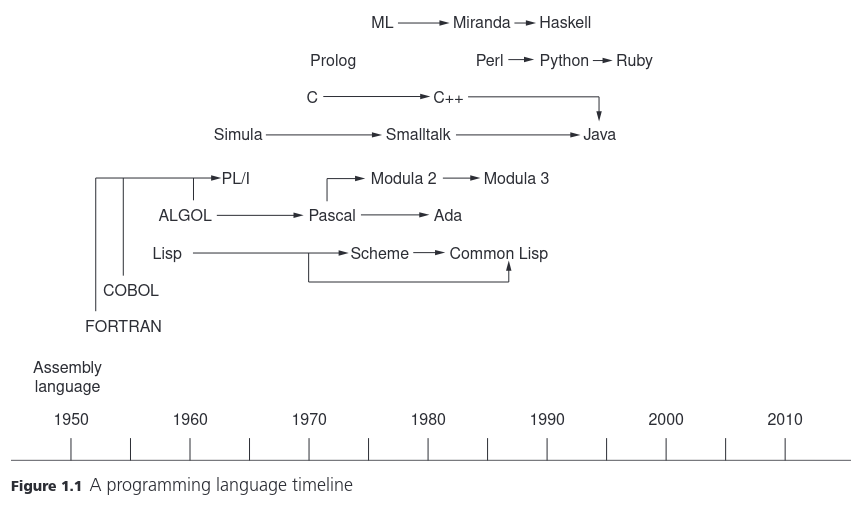
<p>However, there are <a href="https://en.wikipedia.org/wiki/History_of_programming_languages">many more programming languages</a> to choose from. For example, the following are some of the main programming languages developed before the Internet age (source: <em>Programming Languages - Principles and Practice, by Louden &amp; Lambert, 3rd ed</em>)</p>

<p><img align="center" width="600" height="350" src="/images/timeline.png" /></p>

<p>Eventually, I would also like to learn Rust and contribute to <a href="https://cryptography.rs/">modern computer security projects</a>.</p>

<!---- 
and participate in [Capture The Flag (CTF)](https://ctftime.org/) competitions like , [RootMe](https://www.root-me.org/?lang=en), [TryHackMe](https://tryhackme.com/) and [HackTheBox](https://www.hackthebox.com/) (Kali Linux).
---->]]></content><author><name>Gaurish Korpal</name></author><category term="python" /><category term="c" /><category term="racket" /><category term="security" /><category term="computer science" /><category term="engineering" /><category term="programming" /><summary type="html"><![CDATA[Cypherpunks write code (A Cypherpunk’s Manifesto - Eric Hughes, 1993). Therefore, I want to work through various problems from Project Euler and Cryptopals. However, currently, I can’t code proficiently in any language.]]></summary></entry><entry><title type="html">Reading and annotating papers</title><link href="https://gkorpal.github.io/posts/2021/03/tablet/" rel="alternate" type="text/html" title="Reading and annotating papers" /><published>2021-03-15T00:00:00-07:00</published><updated>2021-03-15T00:00:00-07:00</updated><id>https://gkorpal.github.io/posts/2021/03/tablet</id><content type="html" xml:base="https://gkorpal.github.io/posts/2021/03/tablet/"><![CDATA[<p>Following is the comparison of tech specs of my new tablet (USD 315 + taxes) with the older tablet (USD 280 + taxes):</p>

<table>
  <thead>
    <tr>
      <th>Specification</th>
      <th>Samsung Galaxy Tab S6 Lite</th>
      <th>Asus Google Nexus 7 (2nd generation)</th>
    </tr>
  </thead>
  <tbody>
    <tr>
      <td>CPU</td>
      <td>Samsung Exynos 9611 (2.3GHz x 4 cores, Cortex-A73 + 1.7GHz x 4 cores, Cortex-A53)</td>
      <td>Qualcomm Snapdragon S4 Pro APQ8064 (1.5GHz x 4 cores, Krait 300)</td>
    </tr>
    <tr>
      <td>iGPU</td>
      <td>Arm	Mali-G72 (850MHz, Bifrost)</td>
      <td>Qualcomm Adreno 320 (400MHz, Ardeno)</td>
    </tr>
    <tr>
      <td>RAM</td>
      <td>2 x 2GB LPDDR4X</td>
      <td>2GB DDR3L</td>
    </tr>
    <tr>
      <td>Storage</td>
      <td>64GB eMMC</td>
      <td>32GB eMMC</td>
    </tr>
    <tr>
      <td>Battery</td>
      <td>7040 mAh (fast charging)</td>
      <td>3950 mAh (supports wireless charging)</td>
    </tr>
    <tr>
      <td>Ports</td>
      <td>3.5mm headset jack,  Type-C USB 2.0 and microSD card slot (upto 1TB)</td>
      <td>3.5mm headset jack and SlimPort (microUSB)</td>
    </tr>
    <tr>
      <td>Network</td>
      <td>WiFi (802.11 a/b/g/n/ac 2.4+5GHz) and Bluetooth 5.0</td>
      <td>WiFi (802.11 a/b/g/n 2.4GHz+5GHz), Bluetooth 4.0 and NFC (Android Beam)</td>
    </tr>
    <tr>
      <td>Audio</td>
      <td>AKG dual speakers (Dolby Atmos)</td>
      <td>Sterio speakers (Fraunhofer Cingo)</td>
    </tr>
    <tr>
      <td>Display</td>
      <td>10.4” 2000x1200 WUXGA+ 225ppi Wacom digitizer LCD</td>
      <td>7” 1920x1200 WUXGA 323ppi 10 finger multi-touch LCD with scratch resistant Corning Fit glass</td>
    </tr>
    <tr>
      <td>Camera</td>
      <td>8MP rear-facing with auto focus and 5MP front-facing with face unlock support</td>
      <td>5MP rear-facing with auto focus and 1.2MP front-facing</td>
    </tr>
    <tr>
      <td>OS</td>
      <td>Android 10 with One UI 2.5 (<a href="https://security.samsungmobile.com/workScope.smsb">updated quaterly or later</a>)</td>
      <td>Android 4.3 Jelly Bean, upgraded till Android 6 Marshmallow (apps were supported till 2019)</td>
    </tr>
    <tr>
      <td>Warranty</td>
      <td>1 year</td>
      <td>1 year</td>
    </tr>
    <tr>
      <td>Bottomline</td>
      <td>Comes with S Pen which magnetically sticks to the edge of the tablet (Wacom’s battery-free EMR pen with 4096 pressure level sensitivity)</td>
      <td>Designed for portability, can even fit in big pockets. Could easily annotate PDF using Adobe reader and fingers.</td>
    </tr>
    <tr>
      <td>Additional accessories</td>
      <td>Official Book Cover (USD 32) and S Pen nib replacement kit from Note 10 box (eBay, USD 10)</td>
      <td>Official Travel Cover (USD 31)</td>
    </tr>
  </tbody>
</table>

<p>The <a href="https://gkorpal.github.io/files/nexus-7.pdf">Nexus 7</a> is one of the best piece of hardware I ever owned, but it lacked good quality acccesories. Moreover, in my opinion, <a href="https://gkorpal.github.io/files/s6-lite.pdf">Samsung Galaxy Tab S6 Lite</a> is a modified version of <a href="https://gkorpal.github.io/files/nexus-10.pdf">Samsung Google Nexus 10</a> with added Wacom drawing tablet functionality, reduced screen resolution, and removed camera-flash (<a href="https://versus.com/en/google-nexus-10-vs-samsung-galaxy-tab-s6-lite-wi-fi">full comparison</a>). On the other hand, <a href="https://en.wikipedia.org/wiki/Samsung_Galaxy_S_series#Tablets">Samsung Galaxy Tab S series</a> in general have filled the void left by <a href="https://support.google.com/pixel/pixel-c/?hl=en#topic=7186644">Google Pixel C</a> after Google dumped Android in favor of ChromeOS tablet <a href="https://support.google.com/pixelslate/#topic=9116377">Google Pixel Slate</a> which supported Pixelbook Pen (Wacom’s AAAA-battery AES pen).</p>

<p>Initially, since reading was the main purpose of the tablet, I tried replacing my older tablet with <a href="https://en.wikipedia.org/wiki/Amazon_Kindle#Kindle_Paperwhite_(third_generation)">Kindle Paperwhite (3rd generation)</a>. However, its small screen made it impossible to quickly jump between the pages of the large documents. Moreover, to be able to read pdf/DjVu files properly, one first has to optimize them for viewing using <a href="https://www.willus.com/k2pdfopt/">k2pdfopt</a> or <a href="https://decryptronics.github.io/electronics/2020/07/12/jailbreaking-my-kindle-paperwhite-3.html">jailbreak kindle</a> (complicated). Another adavantage of using a tablet PC instead of an e-reader is that nowadays there are many open source online textbooks available, like <a href="https://stacks.math.columbia.edu/">The Stacks project</a> and <a href="https://ncatlab.org/nlab/show/mathematics">nLab</a>.</p>

<!---
For Apple products you pay the premium price for better support but at the same time limited by the company. I feel suffocated by Microsoft/Apple/Amazon devices since you pay them to control your choices, whereas with open-source approach taken by Google, people are allowed to experiment. Moreover, Android updates, like Linux, are modular. For example, Google Pixel 3a (USD 399 + taxes) was released with Android 9 (May 2019) and is supposed to be supported for at least 3 years (May 2022) i.e. until Android 12. What this means is that, it will be safe to use Pixel 3a for 
--->

<table>
  <thead>
    <tr>
      <th>Purpose</th>
      <th>Old tablet app</th>
      <th>New tablet app</th>
    </tr>
  </thead>
  <tbody>
    <tr>
      <td>PDF reader and annotator</td>
      <td>Adobe Acrobat Reader</td>
      <td>Xodo PDF Reader &amp; Editor</td>
    </tr>
    <tr>
      <td>Sync folder with Google Drive</td>
      <td>FolderSync</td>
      <td>Autosync for Google Drive</td>
    </tr>
    <tr>
      <td>Adblocker for in-app ads (including Chrome, not YouTube)</td>
      <td>N/A</td>
      <td><a href="https://kb.adguard.com/en/dns/setup-guide#setting-up-adguard-dns-for-mobile-connections-android-9">AdGuard DNS</a></td>
    </tr>
  </tbody>
</table>

<h1 id="review">Review</h1>

<p>Took some time to get used to writing on bigger screen than Nexus 7.</p>

<p><code class="language-plaintext highlighter-rouge">Settings &gt; Display &gt; Navigation bar &gt; Swipe gestures &gt; Swipe from sides and bottom</code></p>

<p>Also, enable “Block gestures with S Pen” and in Xodo app enable “Stylus as Pen”</p>

<p>Cons: low resolution, speakers position only good for landscape viewing, front camera is only good for portrait use.</p>]]></content><author><name>Gaurish Korpal</name></author><category term="tablet" /><category term="android" /><category term="pdf" /><category term="papers" /><category term="reading" /><category term="online" /><category term="writing" /><summary type="html"><![CDATA[Following is the comparison of tech specs of my new tablet (USD 315 + taxes) with the older tablet (USD 280 + taxes):]]></summary></entry><entry><title type="html">Higher Arithmetic Computations</title><link href="https://gkorpal.github.io/posts/2021/01/higher-arithmetic-computations/" rel="alternate" type="text/html" title="Higher Arithmetic Computations" /><published>2021-01-11T00:00:00-08:00</published><updated>2021-01-11T00:00:00-08:00</updated><id>https://gkorpal.github.io/posts/2021/01/higher-arithmetic-computations</id><content type="html" xml:base="https://gkorpal.github.io/posts/2021/01/higher-arithmetic-computations/"><![CDATA[<p>In this post, I discuss the options available for doing computational experiments in advanced number theory.</p>

<h1 id="the-free-rein-of-proprietary-softwares">The free rein of proprietary softwares</h1>

<p>In the world of (abstract) mathematical computations, proprietary softwares tend to be more advanced than the open source alternatives. This is mainly because of the lack of industrial support, i.e. nobody can make money by having a better abstract math computation system (see <a href="https://dlmf.nist.gov/software/">DLMF</a> and <a href="https://numfocus.org/sponsored-projects">NumFOCUS</a> list). Following is the list of current market leaders and their open-source competitors/clones:</p>

<table>
  <thead>
    <tr>
      <th>Proprietary software</th>
      <th>Speciality</th>
      <th>Open-source alternative</th>
      <th>Equivalent/complementary <a href="https://wiki.python.org/moin/Libraries">Python libraries</a></th>
    </tr>
  </thead>
  <tbody>
    <tr>
      <td>Desmos/TI-89 (<a href="https://en.wikipedia.org/wiki/MuMATH">muMATH</a>/<a href="https://en.wikipedia.org/wiki/Derive_(computer_algebra_system)">Derive</a>)</td>
      <td>Technical computations</td>
      <td><a href="https://en.wikipedia.org/wiki/Genius_(mathematics_software)">Genius</a>/<a href="https://en.wikipedia.org/wiki/KAlgebra">KAlgebra</a>/<a href="https://en.wikipedia.org/wiki/Qalculate!">Qalculate!</a></td>
      <td><a href="https://docs.python.org/3/library/index.html">Standard Library</a> (math + decimal + fractions + turtle + tkinter + … )</td>
    </tr>
    <tr>
      <td>MATLAB (<a href="https://en.wikipedia.org/wiki/MuPAD">MuPAD</a>)</td>
      <td>Numerical computations</td>
      <td>GNU Octave/Scilab</td>
      <td><a href="https://scipy.org/faq/#numpy-vs-scipy-vs-other-packages">SciPy</a> (NumPy + Matplotlib + …)</td>
    </tr>
    <tr>
      <td>SAS/SPSS/Stata/Minitab</td>
      <td>Statistical computations</td>
      <td>R/Stan/PSPP/<a href="https://jasp-stats.org/">JASP</a></td>
      <td><a href="https://www.statsmodels.org/stable/index.html">statsmodels</a> (pandas + Patsy + Seaborn + …)</td>
    </tr>
    <tr>
      <td>Maple/Mathematica (<a href="https://en.wikipedia.org/wiki/Axiom_(computer_algebra_system)">Axiom</a> and <a href="https://en.wikipedia.org/wiki/Macsyma">Macsyma</a>)</td>
      <td>Symbolic computations (general-purpose CAS)</td>
      <td><a href="https://en.wikipedia.org/wiki/Maxima_(software)">Maxima</a>/FriCAS</td>
      <td><a href="https://www.sympy.org/en/index.html">SymPy</a> (mpmath + Matplotlib + …)</td>
    </tr>
    <tr>
      <td>Magma (<a href="https://mathshistory.st-andrews.ac.uk/HistTopics/CGT_history/">Cayley</a> + <a href="https://web.archive.org/web/20120223154242/https://page.math.tu-berlin.de/~kant/kash.html">KANT V4</a>)</td>
      <td><a href="http://magma.maths.usyd.edu.au/magma/overview/2/19/1/#subsection_1_1">Structural computations</a> (specialized CAS for mathematical structures from abstract algebra, algebraic geometry, and  finite incidence geometry)</td>
      <td>OSCAR (GAP + Nemo + Polymake + Singular)</td>
      <td><a href="https://doc.sagemath.org/html/en/reference/spkg/">SageMath</a> (CyPari2 +  fpylll + JuPyMake + PySingular + Pynac + sagetex + SymEngine.py + …)</td>
    </tr>
  </tbody>
</table>

<p>However, closed-source projects tend to die in a decade or two (see the comments by <a href="https://web.archive.org/web/20230302162018/https://sites.math.rutgers.edu/~zeilberg/fb26.html">Tim Daly</a>). For up-to-date information, check out <a href="https://www.issac-conference.org/">ISSAC</a> (<a href="https://www.sigsam.org/">SIGSAM</a>), <a href="https://fachgruppe-computeralgebra.de/rundbrief/">Computeralgebra-Rundbrief</a>, <a href="https://icms-conference.org/">ICMS</a>, <a href="https://www.jstatsoft.org/index">JSS</a>, and <a href="https://zbmath.org/software/">swMATH</a>.</p>

<p>I must point out that RStudio is the only open-source alternative that has been able to overtake the proprietary alternatives, mainly because <a href="https://gkorpal.github.io/files/bp.pdf">statistical computations can help you make money</a>. Moreover, though the <a href="https://www.anaconda.com/products/individual">Anaconda distribution</a> has become the standard open-source alternative to all proprietary computational softwares, there still isn’t any Python library for “structural computations” (Galois representations, isomorphisms, counting points on varieties, etc.). I believe that this is because SageMath’s <a href="https://gkorpal.github.io/files/icms_2010.pdf">motto</a> “building the car instead of reinventing the wheel” turned it into bloatware since they <a href="https://doc.sagemath.org/html/en/reference/spkg/">integrated other well-developed open source programs</a> like R, FriCAS, Maxima, and SymPy using Python (<a href="https://flow.byu.edu/posts/sci-prog-lang">the glue language of scientific computing</a>), instead of just building the Python libraries (like <a href="https://github.com/sagemath/cypari2">CyPari2</a>) which would act as an <a href="https://wiki.sagemath.org/magma">alternative to Magma</a>, fulfilling the original motto <a href="https://gkorpal.github.io/files/focm11.pdf">“Software for Arithmetic Geometry Experimentation”</a>. To overcome this <a href="https://sagemath.blogspot.com/2014/08/what-is-sagemathcloud-lets-clear-some.html">failure</a>, SageMath evolved into a cloud-based subscription service called <a href="https://cocalc.com/index.html">CoCalc</a> to generate revenue for funding the massive project. However, the main contributions seem to come from the developments related to the <a href="https://www.lmfdb.org/acknowledgment">LMFDB project</a>. It might also be useful to look at the <a href="https://antsmath.org/">ANTS proceedings</a>.</p>

<h1 id="mix-and-match">Mix and match</h1>

<p>Open-source softwares has been a lifesaver for students in countries like India, where our universities couldn’t afford the proprietary softwares. I learned numerical analysis on <a href="https://www.gnu.org/software/octave/">GNU Octave</a> and number theory on <a href="https://www.sagemath.org/">SageMath</a>. Note that, there exist computer algebra systems that follow the philosophy of accepting a given general-purpose programming language and extending it by a set of algebraic capabilities:</p>

<table>
  <thead>
    <tr>
      <th>Programming language</th>
      <th>CAS library</th>
    </tr>
  </thead>
  <tbody>
    <tr>
      <td>C</td>
      <td><a href="https://gitlab.inria.fr/enge/cm">CM (with fastECPP)</a>, <a href="https://gitlab.inria.fr/cmh/cmh">CMH</a>, <a href="https://math.mit.edu/~drew/ffpoly.html">ffpoly</a>, <a href="https://flintlib.org/">FLINT</a> (<a href="https://arblib.org/">Arb</a> + <a href="https://github.com/flintlib/antic">Antic</a> + <a href="https://fredrikj.net/calcium/">Calcium</a>), <a href="https://gitlab.inria.fr/zimmerma/ecm">GMP-ECM</a>, <a href="https://cs.uwaterloo.ca/~astorjoh/iml.html">IML</a>, <a href="https://sourceforge.net/projects/msieve/">Msieve</a>, <a href="https://msolve.lip6.fr/">msolve</a>, <a href="https://pari.math.u-bordeaux.fr/">PARI</a>, <a href="https://github.com/GunterMueller/SiMATH">SIMATH</a> (evolved into <a href="https://nzmath.sourceforge.io/">NZMATH</a>), <a href="https://www.algorithm.uni-bayreuth.de/en/research/SYMMETRICA/">Symmetrica</a>, <a href="https://web.maths.unsw.edu.au/~davidharvey/code/zn_poly/">zn_poly</a></td>
    </tr>
    <tr>
      <td>C++</td>
      <td><a href="https://gitlab.inria.fr/lbuse/ASurfExt">ASurfExt</a>, <a href="https://tthsqe12.github.io/castle.html">castle</a>, <a href="https://cocoa.dima.unige.it/cocoa/cocoalib/">CoCoALib</a>, <a href="http://homepages.warwick.ac.uk/staff/J.E.Cremona/mwrank/">eclib</a>, <a href="https://github.com/keeganryan/flatter">flatter</a>, <a href="https://github.com/fplll/fplll">fplll</a>, <a href="https://gitlab.inria.fr/gf2x/gf2x">gf2x</a>, <a href="https://xcas.univ-grenoble-alpes.fr/en.html">Giac/Xcas</a>, <a href="https://www.ginac.de/">GiNaC</a>, <a href="https://casys.gricad-pages.univ-grenoble-alpes.fr/givaro/">Givaro</a>, <a href="https://wstein.org/Tables/hecke-cpp.html">HECKE</a>, <a href="http://kmgnfs.cti.gr/kmGNFS/Home.html">kmGNFS</a>, <a href="https://github.com/mkoeppe/LiDIA">LiDIA</a>, <a href="https://linalg.org/">LinBox</a>, <a href="https://libntl.org/">NTL</a>, <a href="https://polymake.org/doku.php/callable">polymake</a>, <a href="https://github.com/kimwalisch/primesieve">primesieve</a>, <a href="https://issc.uj.ac.za/symbolic/symbolic.html">SymbolicC++</a>, <a href="https://github.com/symengine/symengine">SymEngine</a></td>
    </tr>
    <tr>
      <td>Haskell</td>
      <td><a href="https://hackage.haskell.org/package/arithmoi">arithmoi</a>, <a href="https://hackage.haskell.org/package/computational-algebra">computational-algebra</a>, <a href="https://homepages.inf.ed.ac.uk/wadler/realworld/docon2.html">DoCon</a>, <a href="https://hackage.haskell.org/package/hgal">hgal</a>, <a href="https://hackage.haskell.org/package/mod">mod</a>, <a href="https://hackage.haskell.org/package/poly">poly</a></td>
    </tr>
    <tr>
      <td>Julia</td>
      <td><a href="https://www.nemocas.org/">Nemo</a> (FLINT wrapper with <a href="https://github.com/Nemocas/AbstractAlgebra.jl">AlbstractAlgebra</a>, <a href="https://github.com/thofma/Hecke.jl">Hecke</a>, <a href="https://gitlab.com/mraum/modularforms.jl">ModularForms</a>), <a href="https://github.com/JuliaSymbolics/Symbolics.jl">Symbolics</a></td>
    </tr>
  </tbody>
</table>

<p>That is, people have tried achieving a full-fledged CAS in many other programming languages, but all of them are half-baked due to the lack of contributors. In fact, using GiNaC we can get a <a href="https://wiki.octave.org/wiki/index.php?title=Code&amp;mobileaction=toggle_view_mobile#Octave_interfaces_to_GiNaC">symbolic extension</a> for GNU Octave (nowadays can also <a href="https://github.com/cbm755/octsympy">use SymPy</a>) and its fork <a href="https://github.com/pynac/pynac">Pynac</a> provides the backend for symbolic expressions in SageMath (before that Maxima was used).  Moreover, SymEngine is planned to be used as an <a href="https://www.sympy.org/en/roadmap.html">optional fast symbolic core for SymPy</a> since it is <a href="http://sciruby.com/blog/2015/08/17/ruby-wrappers-for-symengine/">much faster than Pynac and a bit faster than GiNaC</a>. However, for doing computational experiments in higher arithmetic we will have to learn multiple languages:</p>

<blockquote>
  <p>Any mathematician who is serious about doing extensive computational work in algebraic number theory and arithmetic geometry is strongly urged to become familiar with all three systems [Sage, Pari, and Magma] since they all have their pros and cons. Pari is sleek and small, Magma has much unique functionality for computations in arithmetic geometry, and Sage has a wide range of functionality in most areas of mathematics, a large developer community, and much unique new code. – <a href="https://doc.sagemath.org/html/en/thematic_tutorials/explicit_methods_in_number_theory/introduction.html#the-sage-pari-magma-ecosystem">SageMath October 2008 Bordeaux meeting</a></p>
</blockquote>

<p>There is similar advice from Andrew Sutherland and John Voight in <a href="https://www.galoisrepresentations.com/2020/06/16/tips-on-becoming-a-computational-number-theorist/">this blog post by Frank Calegari</a>.</p>

<h2 id="python-general-purpose-programming-language-open-source">Python: General-purpose programming language (open-source)</h2>

<!-----
|Graduate school | Python | Vim with `python-mode` plugin (Fedora 33) | 
----->

<p>During my undergraduate studies, I had the perception that C++ is “the langauge” for scientific computations (see the table above). In fact, the C/C++ libraries like <a href="https://gmplib.org/">GMP</a>, <a href="https://www.mpfr.org/">MPFR</a>, and <a href="http://www.multiprecision.org/mpc/">GNU MPC</a> serve as the foundations for various other higher arithmetic computation libraries. However, with the advent of Cython (not to be confused with CPython, which is the original <a href="https://wiki.python.org/moin/PythonImplementations">Python implementation</a>), Python has become “the new langauge” for scientific computations. The key advantage of Python over C++ is that Python provides better code readability than C++ (like using whitespaces instead of curly braces). In fact, all these C/C++ libraries can now be <a href="https://doc.sagemath.org/html/en/reference/spkg/">accessed via SageMath</a> using <a href="https://doc.sagemath.org/html/en/tutorial/afterword.html">Python-based syntax</a>. For example, in 2016, Robert J. Lemke Oliver <a href="https://web.archive.org/web/20210423201238/https://rlemke01.math.tufts.edu/code/primebias.html">used SageMath and C++</a> to verify the observations by Kannan Soundarajan, leading to the famous discovery of <a href="https://www.quantamagazine.org/mathematicians-discover-prime-conspiracy-20160313/">biases in the distribution of consecutive primes</a>.</p>

<p>To begin the Python journey, we will need the following packages:</p>

<table>
  <thead>
    <tr>
      <th>Software Program</th>
      <th>dnf Package</th>
    </tr>
  </thead>
  <tbody>
    <tr>
      <td><a href="https://fedoralovespython.org/">Python3</a></td>
      <td><code class="language-plaintext highlighter-rouge">python3</code></td>
    </tr>
    <tr>
      <td><a href="https://developer.fedoraproject.org/tech/languages/python/scipy.html">SymPy*</a></td>
      <td><code class="language-plaintext highlighter-rouge">python3-sympy</code></td>
    </tr>
    <tr>
      <td><a href="https://pari.math.u-bordeaux.fr/Events/PARI2019/talks/jeroen.html">CyPARI2**</a></td>
      <td><code class="language-plaintext highlighter-rouge">python3-cypari2</code></td>
    </tr>
  </tbody>
</table>

<p>*Note that Fedora will automatically install the required dependecies like <code class="language-plaintext highlighter-rouge">mpmath</code>, <code class="language-plaintext highlighter-rouge">Cython</code>, <code class="language-plaintext highlighter-rouge">matplotlib</code> etc.</p>

<p>**Requires the actual PARI/GP package and the PARI library development package.</p>

<p>If you want GUI version of Python development environment then can get <a href="https://docs.python.org/3/library/idle.html">IDLE</a> by installing the package <code class="language-plaintext highlighter-rouge">python3-idle</code>. We will use Vim as the text editor for writing <a href="https://docs.python.org/3/tutorial/modules.html">Python scripts</a>. Note that <a href="https://unix.stackexchange.com/a/27795/420307">we don’t need</a> to add a file extension, however for proper syntax highlighting we will use the file extension <code class="language-plaintext highlighter-rouge">.py</code>. Therefore, it would be helpful to install the <code class="language-plaintext highlighter-rouge">python-mode</code> plugin (<a href="https://github.com/python-mode/python-mode">instructions</a>). Following are some the key mappings for some of the <code class="language-plaintext highlighter-rouge">python-mode</code> commands (<a href="https://github.com/python-mode/python-mode/blob/develop/doc/pymode.txt">documentation</a>):</p>

<table>
  <thead>
    <tr>
      <th>Key mapping</th>
      <th>Python-mode command  (normal mode)</th>
      <th>Output</th>
    </tr>
  </thead>
  <tbody>
    <tr>
      <td><code class="language-plaintext highlighter-rouge">\\r</code></td>
      <td>:PymodeRun</td>
      <td>Run current code script buffer or selection</td>
    </tr>
    <tr>
      <td>(<kbd>Ctrl</kbd>+<kbd>w</kbd>) + <kbd>z</kbd></td>
      <td>:pclose</td>
      <td>Close the code preview window (<a href="https://stackoverflow.com/a/52464433/">not in doc</a>)</td>
    </tr>
    <tr>
      <td><kbd>Shift</kbd> + <kbd>k</kbd></td>
      <td>:PymodeDoc</td>
      <td>Show documentation for current word</td>
    </tr>
    <tr>
      <td><kbd>Ctrl</kbd> + <kbd>p</kbd></td>
      <td>Usual Vim key binding</td>
      <td>Auto-complete a word that has already been typed once in the document</td>
    </tr>
  </tbody>
</table>

<p>Note that the text-wrap is disabled by default, with the maximum line length of 79 characters. Moreover, it uses <code class="language-plaintext highlighter-rouge">pylint</code> to check code at every save. I couldn’t figureout how to use code completion via <code class="language-plaintext highlighter-rouge">rope</code>.</p>

<p>One can learn the basics by going through <a href="http://anh.cs.luc.edu/python/hands-on/3.1/">Hands-on Python Tutorial</a> by Andrew N. Harrington or skimming through the <a href="https://docs.python.org/3/tutorial/">tutorial available in the official documentation</a>. If you prefer video lectures, then the MIT OCW <a href="https://ocw.mit.edu/6-0001F16">Introduction to Computer Science and Programming in Python</a> is a good option (many other free tutorials are also there <a href="https://realpython.com/python-youtube-channels/">on YouTube</a>).</p>

<blockquote>
  <p>Python is a <a href="https://docs.python.org/3/howto/functional.html">multi-paradigm</a>, <a href="https://www.python-course.eu/passing_arguments.php">call by object</a>, statically scoped, <a href="https://wiki.python.org/moin/Why%20is%20Python%20a%20dynamic%20language%20and%20also%20a%20strongly%20typed%20language">both dynamically and strongly typed</a> programming language.</p>
</blockquote>

<p>Therefore, though Python is an object-oriented language, it doesn’t imply that it doesn’t support other programming paradigms (<a href="https://en.wikipedia.org/wiki/Object-based_language">wikipedia</a>). Also, it would be wise to keep in mind the <a href="https://docs.oracle.com/cd/E19957-01/806-3568/ncg_goldberg.html">floating point arithmetic limitations</a> that these  general purpose programming languages. For example, if using Python as a calculator, we will get <a href="https://docs.python.org/3/tutorial/floatingpoint.html">“wrong” answers when using decimals</a>:</p>

<div class="language-python highlighter-rouge"><div class="highlight"><pre class="highlight"><code><span class="c1"># Python3 examples
</span><span class="o">&gt;&gt;&gt;</span> <span class="mf">3.3</span> <span class="o">-</span> <span class="mf">1.1</span>  <span class="c1"># Do not depend on the exactness of floating point arithmetic, even for apparently simple expressions! 
</span><span class="mf">2.1999999999999997</span>
<span class="o">&gt;&gt;&gt;</span> <span class="mf">0.1</span><span class="o">+</span><span class="mf">0.2</span>  <span class="c1"># so here 0.3 is not equal to 0.1 + 0.2
</span><span class="mf">0.30000000000000004</span>
<span class="o">&gt;&gt;&gt;</span> <span class="nb">format</span><span class="p">(.</span><span class="mi">1</span><span class="p">,</span> <span class="s">'.20f'</span><span class="p">)</span>  <span class="c1"># 0.1 does not has exact representation in binary floating point
</span><span class="s">'0.10000000000000000555'</span>
</code></pre></div></div>
<p>To familiarize yourself with the useful maths libraries in Python (for example, <code class="language-plaintext highlighter-rouge">mpmath</code> provides support for <a href="https://mpmath.org/doc/current/technical.html#decimal-issues">arbitrary-precision floating point arithmetic</a>, one can use the notes for the <a href="https://maths-with-python.readthedocs.io/en/latest/index.html">Maths with Python</a> course at the University of Southampton or <a href="https://www.math.purdue.edu/~bradfor3/ProgrammingFundamentals/">Fundamentals of Computer Programming</a> course by Clinton Bradford at Purdue University. If you prefer video lectures, then the MIT OCW <a href="http://ocw.mit.edu/6-0002F16">Introduction to Computational Thinking and Data Science</a> is a good option. For example, we can get “correct” answers for float arithmetic by using <code class="language-plaintext highlighter-rouge">decimal</code> module:</p>

<div class="language-python highlighter-rouge"><div class="highlight"><pre class="highlight"><code><span class="c1"># trying to bypass float arithmetic problem
</span><span class="o">&gt;&gt;&gt;</span> <span class="kn">from</span> <span class="nn">decimal</span> <span class="kn">import</span> <span class="o">*</span>
<span class="o">&gt;&gt;&gt;</span> <span class="n">Decimal</span><span class="p">(</span><span class="s">'3.3'</span><span class="p">)</span> <span class="o">-</span> <span class="n">Decimal</span><span class="p">(</span><span class="s">'1.1'</span><span class="p">)</span>
<span class="n">Decimal</span><span class="p">(</span><span class="s">'2.2'</span><span class="p">)</span>
<span class="o">&gt;&gt;&gt;</span> <span class="n">Decimal</span><span class="p">(</span><span class="s">'0.1'</span><span class="p">)</span> <span class="o">+</span> <span class="n">Decimal</span><span class="p">(</span><span class="s">'0.2'</span><span class="p">)</span>
<span class="n">Decimal</span><span class="p">(</span><span class="s">'0.3'</span><span class="p">)</span>
<span class="o">&gt;&gt;&gt;</span> <span class="n">Decimal</span><span class="p">(</span><span class="s">'0.1'</span><span class="p">)</span> <span class="o">==</span> <span class="mf">0.1</span>
<span class="bp">False</span>
<span class="o">&gt;&gt;&gt;</span> <span class="n">Decimal</span><span class="p">(</span><span class="s">'3.5'</span><span class="p">)</span> <span class="o">==</span> <span class="mf">3.5</span>
<span class="bp">True</span>
</code></pre></div></div>

<h3 id="examples">Examples</h3>

<p>For elementary numer theory examples, you can use either the course notes for this <a href="https://github.com/Robert-Campbell-256/Number-Theory-Python">(very) short course in Number Theory by Robert Campbell</a> at the University of Maryland, Baltimore County (<a href="http://www.math.umbc.edu/~campbell/NumbThy/">course website</a>) or the the companion website for the book <a href="http://illustratedtheoryofnumbers.com/prog.html">“An Illustrated Theory of Numbers” by Martin H. Weissman</a>. However, here we will take some examples from <a href="https://sagecell.sagemath.org/">SageMath</a> and solve them using Python libraries.</p>

<ul>
  <li>
    <p>Plotting elliptic curves over affine plane</p>

    <ul>
      <li>SageMath script and output
        <div class="language-python highlighter-rouge"><div class="highlight"><pre class="highlight"><code> <span class="n">p</span><span class="o">=</span><span class="n">plot</span><span class="p">(</span><span class="n">EllipticCurve</span><span class="p">([</span><span class="mi">0</span><span class="p">,</span><span class="mi">0</span><span class="p">,</span><span class="mi">0</span><span class="p">,</span><span class="mi">3</span><span class="p">,</span><span class="mi">0</span><span class="p">]),</span> <span class="n">gridlines</span><span class="o">=</span><span class="s">'true'</span><span class="p">,</span> <span class="n">color</span><span class="o">=</span><span class="n">hue</span><span class="p">(</span><span class="mf">0.7</span><span class="p">),</span><span class="n">xmin</span><span class="o">=-</span><span class="mi">4</span><span class="p">,</span> <span class="n">xmax</span><span class="o">=</span><span class="mi">4</span><span class="p">,</span> <span class="n">ymin</span><span class="o">=-</span><span class="mi">3</span><span class="p">,</span> <span class="n">ymax</span><span class="o">=</span><span class="mi">3</span><span class="p">,</span> <span class="n">legend_label</span><span class="o">=</span><span class="s">'$y^2=x^3+3x$'</span><span class="p">)</span>
 <span class="n">p</span><span class="o">+=</span><span class="n">plot</span><span class="p">(</span><span class="n">EllipticCurve</span><span class="p">([</span><span class="mi">0</span><span class="p">,</span><span class="mi">0</span><span class="p">,</span><span class="mi">0</span><span class="p">,</span><span class="mi">2</span><span class="p">,</span><span class="mi">0</span><span class="p">]),</span> <span class="n">gridlines</span><span class="o">=</span><span class="s">'true'</span><span class="p">,</span> <span class="n">color</span><span class="o">=</span><span class="s">'cornflowerblue'</span><span class="p">,</span><span class="n">xmin</span><span class="o">=-</span><span class="mi">4</span><span class="p">,</span> <span class="n">xmax</span><span class="o">=</span><span class="mi">4</span><span class="p">,</span> <span class="n">ymin</span><span class="o">=-</span><span class="mi">3</span><span class="p">,</span> <span class="n">ymax</span><span class="o">=</span><span class="mi">3</span><span class="p">,</span> <span class="n">legend_label</span><span class="o">=</span><span class="s">'$y^2=x^3+2x$'</span><span class="p">)</span>
 <span class="n">p</span><span class="o">+=</span><span class="n">plot</span><span class="p">(</span><span class="n">EllipticCurve</span><span class="p">([</span><span class="mi">0</span><span class="p">,</span><span class="mi">0</span><span class="p">,</span><span class="mi">0</span><span class="p">,</span><span class="mi">1</span><span class="p">,</span><span class="mi">0</span><span class="p">]),</span> <span class="n">gridlines</span><span class="o">=</span><span class="s">'true'</span><span class="p">,</span> <span class="n">color</span><span class="o">=</span><span class="s">'red'</span><span class="p">,</span><span class="n">xmin</span><span class="o">=-</span><span class="mi">4</span><span class="p">,</span> <span class="n">xmax</span><span class="o">=</span><span class="mi">4</span><span class="p">,</span> <span class="n">ymin</span><span class="o">=-</span><span class="mi">3</span><span class="p">,</span> <span class="n">ymax</span><span class="o">=</span><span class="mi">3</span><span class="p">,</span> <span class="n">legend_label</span><span class="o">=</span><span class="s">'$y^2=x^3+x$'</span><span class="p">)</span>
 <span class="n">p</span><span class="o">+=</span><span class="n">plot</span><span class="p">(</span><span class="n">EllipticCurve</span><span class="p">([</span><span class="mi">0</span><span class="p">,</span><span class="mi">0</span><span class="p">,</span><span class="mi">0</span><span class="p">,</span><span class="o">-</span><span class="mi">1</span><span class="p">,</span><span class="mi">0</span><span class="p">]),</span> <span class="n">gridlines</span><span class="o">=</span><span class="s">'true'</span><span class="p">,</span> <span class="n">color</span><span class="o">=</span><span class="s">'orange'</span><span class="p">,</span><span class="n">xmin</span><span class="o">=-</span><span class="mi">4</span><span class="p">,</span> <span class="n">xmax</span><span class="o">=</span><span class="mi">4</span><span class="p">,</span> <span class="n">ymin</span><span class="o">=-</span><span class="mi">3</span><span class="p">,</span> <span class="n">ymax</span><span class="o">=</span><span class="mi">3</span><span class="p">)</span>
 <span class="n">p</span><span class="o">+=</span><span class="n">plot</span><span class="p">(</span><span class="n">EllipticCurve</span><span class="p">([</span><span class="mi">0</span><span class="p">,</span><span class="mi">0</span><span class="p">,</span><span class="mi">0</span><span class="p">,</span><span class="o">-</span><span class="mi">2</span><span class="p">,</span><span class="mi">0</span><span class="p">]),</span> <span class="n">gridlines</span><span class="o">=</span><span class="s">'true'</span><span class="p">,</span> <span class="n">color</span><span class="o">=</span><span class="n">hue</span><span class="p">(</span><span class="mf">0.2</span><span class="p">),</span><span class="n">xmin</span><span class="o">=-</span><span class="mi">4</span><span class="p">,</span> <span class="n">xmax</span><span class="o">=</span><span class="mi">4</span><span class="p">,</span> <span class="n">ymin</span><span class="o">=-</span><span class="mi">3</span><span class="p">,</span> <span class="n">ymax</span><span class="o">=</span><span class="mi">3</span><span class="p">,</span> <span class="n">legend_label</span><span class="o">=</span><span class="s">'$y^2=x^3-2x$'</span><span class="p">)</span>
 <span class="n">p</span><span class="o">+=</span><span class="n">plot</span><span class="p">(</span><span class="n">EllipticCurve</span><span class="p">([</span><span class="mi">0</span><span class="p">,</span><span class="mi">0</span><span class="p">,</span><span class="mi">0</span><span class="p">,</span><span class="o">-</span><span class="mi">3</span><span class="p">,</span><span class="mi">0</span><span class="p">]),</span> <span class="n">gridlines</span><span class="o">=</span><span class="s">'true'</span><span class="p">,</span> <span class="n">color</span><span class="o">=</span><span class="n">hue</span><span class="p">(</span><span class="mf">0.3</span><span class="p">),</span><span class="n">xmin</span><span class="o">=-</span><span class="mi">4</span><span class="p">,</span> <span class="n">xmax</span><span class="o">=</span><span class="mi">4</span><span class="p">,</span> <span class="n">ymin</span><span class="o">=-</span><span class="mi">3</span><span class="p">,</span> <span class="n">ymax</span><span class="o">=</span><span class="mi">3</span><span class="p">,</span> <span class="n">legend_label</span><span class="o">=</span><span class="s">'$y^2=x^3-3x$'</span><span class="p">)</span>
 <span class="n">p</span><span class="p">.</span><span class="n">set_legend_options</span><span class="p">(</span><span class="n">shadow</span><span class="o">=</span><span class="bp">False</span><span class="p">,</span> <span class="n">loc</span><span class="o">=</span><span class="mi">2</span><span class="p">)</span>
 <span class="n">show</span><span class="p">(</span><span class="n">p</span><span class="p">)</span>
 <span class="n">p</span><span class="p">.</span><span class="n">axes_labels</span><span class="p">([</span><span class="s">'$x$'</span><span class="p">,</span><span class="s">'$y$'</span><span class="p">])</span>
 <span class="n">p</span><span class="p">.</span><span class="n">save</span><span class="p">(</span><span class="s">'ec.pdf'</span><span class="p">)</span>
</code></pre></div>        </div>
        <p><img src="https://gkorpal.github.io/images/sage1.png" alt="ec" /></p>
      </li>
      <li>Python script and output</li>
    </ul>

    <p><a href="https://stackoverflow.com/questions/19756043/python-matplotlib-elliptic-curves">to-do</a></p>
  </li>
  <li>
    <p>Plotting elliptic curve modulo prime</p>

    <ul>
      <li>SageMath script and output</li>
    </ul>

    <div class="language-python highlighter-rouge"><div class="highlight"><pre class="highlight"><code>  <span class="n">E</span><span class="o">=</span><span class="n">EllipticCurve</span><span class="p">(</span><span class="n">GF</span><span class="p">(</span><span class="mi">1021</span><span class="p">),[</span><span class="mi">0</span><span class="p">,</span><span class="o">-</span><span class="mi">1</span><span class="p">,</span><span class="o">-</span><span class="mi">1</span><span class="p">,</span><span class="mi">0</span><span class="p">,</span><span class="mi">0</span><span class="p">])</span>
  <span class="n">A</span><span class="o">=</span><span class="n">E</span><span class="p">.</span><span class="n">plot</span><span class="p">()</span>
  <span class="n">show</span><span class="p">(</span><span class="n">A</span><span class="p">)</span>
  <span class="n">A</span><span class="p">.</span><span class="n">save</span><span class="p">(</span><span class="s">'v1.pdf'</span><span class="p">)</span>
</code></pre></div>    </div>

    <p><img src="https://gkorpal.github.io/images/sage2.png" alt="ec2" /></p>

    <ul>
      <li>Python script and output</li>
    </ul>

    <p><a href="https://github.com/jimmysong/programmingbitcoin/blob/master/ch03.asciidoc">to-do</a></p>
  </li>
  <li>
    <p>Comparing the prime counting functions</p>

    <ul>
      <li>SageMath script and output</li>
    </ul>

    <div class="language-python highlighter-rouge"><div class="highlight"><pre class="highlight"><code> <span class="n">P</span> <span class="o">=</span> <span class="n">plot</span><span class="p">(</span><span class="n">Li</span><span class="p">(</span><span class="n">x</span><span class="p">),</span> <span class="p">(</span><span class="n">x</span><span class="p">,</span><span class="mi">2</span><span class="p">,</span><span class="mi">10000</span><span class="p">),</span> <span class="n">linestyle</span><span class="o">=</span><span class="s">"--"</span><span class="p">,</span> <span class="n">thickness</span><span class="o">=</span><span class="mi">2</span><span class="p">,</span> <span class="n">rgbcolor</span><span class="o">=</span><span class="p">(</span><span class="mi">0</span><span class="p">,</span><span class="mi">0</span><span class="p">,</span><span class="mi">0</span><span class="p">),</span> <span class="n">legend_label</span><span class="o">=</span><span class="s">'$</span><span class="se">\\</span><span class="s">mathrm{Li}(x)$'</span><span class="p">)</span>
 <span class="n">Q</span> <span class="o">=</span> <span class="n">plot</span><span class="p">(</span><span class="n">prime_pi</span><span class="p">(</span><span class="n">x</span><span class="p">),</span> <span class="p">(</span><span class="n">x</span><span class="p">,</span><span class="mi">2</span><span class="p">,</span><span class="mi">10000</span><span class="p">),</span><span class="n">thickness</span><span class="o">=</span><span class="mi">2</span><span class="p">,</span> <span class="n">rgbcolor</span><span class="o">=</span><span class="p">(</span><span class="mi">0</span><span class="p">,</span><span class="mi">0</span><span class="p">,</span><span class="mi">0</span><span class="p">),</span> <span class="n">legend_label</span><span class="o">=</span><span class="s">'$</span><span class="se">\\</span><span class="s">pi(x)$'</span><span class="p">)</span>
 <span class="n">R</span> <span class="o">=</span> <span class="n">plot</span><span class="p">(</span><span class="n">x</span><span class="o">/</span><span class="n">log</span><span class="p">(</span><span class="n">x</span><span class="p">),</span> <span class="p">(</span><span class="n">x</span><span class="p">,</span><span class="mi">2</span><span class="p">,</span><span class="mi">10000</span><span class="p">),</span> <span class="n">linestyle</span><span class="o">=</span><span class="s">":"</span><span class="p">,</span> <span class="n">thickness</span><span class="o">=</span><span class="mi">3</span><span class="p">,</span> <span class="n">rgbcolor</span><span class="o">=</span><span class="p">(</span><span class="mi">0</span><span class="p">,</span><span class="mi">0</span><span class="p">,</span><span class="mi">0</span><span class="p">),</span> <span class="n">legend_label</span><span class="o">=</span><span class="s">'$x/</span><span class="se">\\</span><span class="s">log(x)$'</span><span class="p">)</span>
 <span class="p">(</span><span class="n">P</span><span class="o">+</span><span class="n">Q</span><span class="o">+</span><span class="n">R</span><span class="p">)</span>
</code></pre></div>    </div>

    <p><img src="https://gkorpal.github.io/images/sage5.png" alt="prime" /></p>

    <ul>
      <li>Python script and output</li>
    </ul>

    <p><a href="https://docs.sympy.org/latest/modules/ntheory.html">to-do</a></p>
  </li>
  <li>
    <p>Plotting Riemann zeta function for real inputs (trivial zeros)</p>

    <ul>
      <li>SageMath script and output</li>
    </ul>

    <div class="language-python highlighter-rouge"><div class="highlight"><pre class="highlight"><code>  <span class="n">p</span><span class="o">=</span><span class="n">plot</span><span class="p">(</span><span class="n">zeta</span><span class="p">(</span><span class="n">x</span><span class="p">),</span> <span class="p">(</span><span class="n">x</span><span class="p">,</span><span class="o">-</span><span class="mi">13</span><span class="p">,</span><span class="o">-</span><span class="mi">1</span><span class="p">),</span> <span class="n">legend_label</span><span class="o">=</span><span class="s">'$</span><span class="se">\\</span><span class="s">zeta(x)$'</span><span class="p">)</span>
  <span class="n">show</span><span class="p">(</span><span class="n">p</span><span class="p">)</span>
</code></pre></div>    </div>

    <p><img src="https://gkorpal.github.io/images/sage3.png" alt="ec3" /></p>

    <ul>
      <li>Python script and output</li>
    </ul>

    <p><a href="https://docs.sympy.org/latest/modules/functions/special.html#module-sympy.functions.special.zeta_functions">to-do</a></p>
  </li>
  <li>
    <p>Plotting  the  real  and  imaginary  parts  of  the  Riemann  zeta  function $\zeta(1/2 + it)$  for $0 &lt; t &lt; 30$</p>

    <ul>
      <li>SageMath script and output</li>
    </ul>

    <div class="language-python highlighter-rouge"><div class="highlight"><pre class="highlight"><code>  <span class="n">i</span> <span class="o">=</span> <span class="n">CDF</span><span class="p">.</span><span class="n">gen</span><span class="p">()</span>
  <span class="n">v</span> <span class="o">=</span> <span class="p">[</span><span class="n">zeta</span><span class="p">(</span><span class="mf">0.5</span> <span class="o">+</span> <span class="n">n</span><span class="o">/</span><span class="mi">10</span> <span class="o">*</span> <span class="n">i</span><span class="p">)</span> <span class="k">for</span> <span class="n">n</span> <span class="ow">in</span> <span class="nb">range</span><span class="p">(</span><span class="mi">300</span><span class="p">)]</span>
  <span class="n">L</span> <span class="o">=</span> <span class="p">[(</span><span class="n">z</span><span class="p">.</span><span class="n">real</span><span class="p">(),</span> <span class="n">z</span><span class="p">.</span><span class="n">imag</span><span class="p">())</span> <span class="k">for</span> <span class="n">z</span> <span class="ow">in</span> <span class="n">v</span><span class="p">]</span>
  <span class="n">line</span><span class="p">(</span><span class="n">L</span><span class="p">)</span>
</code></pre></div>    </div>

    <p><img src="https://gkorpal.github.io/images/sage4.png" alt="ec4" /></p>
  </li>
  <li>
    <p>Comparing the argument and absolute values of Riemann zeta function $\zeta(1/2 + it)$  for $0 \leq  t \leq 50$</p>

    <ul>
      <li>SageMath script and output</li>
    </ul>

    <div class="language-python highlighter-rouge"><div class="highlight"><pre class="highlight"><code>  <span class="n">i</span> <span class="o">=</span> <span class="n">CDF</span><span class="p">.</span><span class="mi">0</span>
  <span class="n">p1</span> <span class="o">=</span> <span class="n">plot</span><span class="p">(</span><span class="k">lambda</span> <span class="n">t</span><span class="p">:</span>  <span class="n">arg</span><span class="p">(</span><span class="n">zeta</span><span class="p">(</span><span class="mf">0.5</span><span class="o">+</span><span class="n">t</span><span class="o">*</span><span class="n">i</span><span class="p">)),</span> <span class="mi">1</span><span class="p">,</span> <span class="mi">50</span><span class="p">,</span><span class="n">linestyle</span><span class="o">=</span><span class="s">"--"</span><span class="p">,</span> <span class="n">rgbcolor</span><span class="o">=</span><span class="p">(</span><span class="mi">0</span><span class="p">,</span><span class="mi">0</span><span class="p">,</span><span class="mi">0</span><span class="p">),</span> <span class="n">legend_label</span><span class="o">=</span><span class="s">'$</span><span class="se">\\</span><span class="s">mathrm{arg}(</span><span class="se">\\</span><span class="s">zeta(0.5+it))$'</span><span class="p">)</span>
  <span class="n">p2</span> <span class="o">=</span> <span class="n">plot</span><span class="p">(</span><span class="k">lambda</span> <span class="n">t</span><span class="p">:</span>  <span class="nb">abs</span><span class="p">(</span><span class="n">zeta</span><span class="p">(</span><span class="mf">0.5</span><span class="o">+</span><span class="n">t</span><span class="o">*</span><span class="n">i</span><span class="p">)),</span> <span class="mi">1</span><span class="p">,</span> <span class="mi">50</span><span class="p">,</span> <span class="n">rgbcolor</span><span class="o">=</span><span class="p">(</span><span class="mi">0</span><span class="p">,</span><span class="mi">0</span><span class="p">,</span><span class="mi">0</span><span class="p">),</span> <span class="n">legend_label</span><span class="o">=</span><span class="s">'$|</span><span class="se">\\</span><span class="s">zeta(0.5+it)|$'</span><span class="p">)</span>
  <span class="n">p1</span><span class="o">+</span><span class="n">p2</span>
</code></pre></div>    </div>
    <p><img src="https://gkorpal.github.io/images/sage6a.png" alt="prime" /></p>
  </li>
  <li>
    <p>Plotting complex valued functions</p>

    <ul>
      <li>SageMath script and output</li>
    </ul>

    <div class="language-python highlighter-rouge"><div class="highlight"><pre class="highlight"><code>  <span class="n">complex_plot</span><span class="p">(</span><span class="n">x</span><span class="o">^</span><span class="mi">4</span><span class="o">-</span><span class="mi">1</span><span class="p">,(</span><span class="o">-</span><span class="mi">5</span><span class="p">,</span><span class="mi">5</span><span class="p">),(</span><span class="o">-</span><span class="mi">5</span><span class="p">,</span><span class="mi">5</span><span class="p">))</span>
</code></pre></div>    </div>
    <p><img src="https://gkorpal.github.io/images/sage7.png" alt="prime" /></p>
  </li>
  <li>
    <p>Ideal factorization</p>

    <ul>
      <li>SageMath script and output</li>
    </ul>

    <div class="language-python highlighter-rouge"><div class="highlight"><pre class="highlight"><code>  <span class="n">K</span><span class="p">.</span><span class="o">&lt;</span><span class="n">a</span><span class="o">&gt;=</span><span class="n">NumberField</span><span class="p">(</span><span class="n">x</span><span class="o">^</span><span class="mi">3</span><span class="o">-</span><span class="mi">19</span><span class="p">)</span>
  <span class="n">I</span> <span class="o">=</span> <span class="n">K</span><span class="p">.</span><span class="n">ideal</span><span class="p">(</span><span class="mi">3</span><span class="p">)</span>
  <span class="n">F</span> <span class="o">=</span> <span class="n">I</span><span class="p">.</span><span class="n">factor</span><span class="p">()</span>
  <span class="n">F</span>
</code></pre></div>    </div>

    <div class="language-plaintext highlighter-rouge"><div class="highlight"><pre class="highlight"><code>  (Fractional ideal (3, 1/3*a^2 + 1/3*a + 1/3))^2 * (Fractional ideal (3, 1/3*a^2 + 1/3*a - 2/3))
</code></pre></div>    </div>

    <ul>
      <li>Python script and output</li>
    </ul>

    <p><a href="https://cypari2.readthedocs.io/en/latest/pari_instance.html">to-do</a></p>

    <p><a href="https://docs.sympy.org/latest/modules/polys/agca.html">to-do</a></p>
  </li>
</ul>

<h2 id="magma-domain-specific-programming-language-proprietary">Magma: Domain-specific programming language (proprietary)</h2>

<p>There exist individual C/C++ libraries, like <a href="http://www.flintlib.org/">FLINT</a> and <a href="https://bitbucket.org/malb/m4ri/wiki/Performance">m4ri</a>, which are much more efficient than Magma. In fact, Magma itself uses some of the C/C++ libraries like  <a href="http://math-atlas.sourceforge.net/">ATLAS</a>, <a href="https://gmplib.org/">GMP</a>, <a href="https://gforge.inria.fr/projects/ecm/">GMP-ECM</a>, <a href="http://www.multiprecision.org/mpc/">MPC</a>, and <a href="http://www.mpfr.org/">MPFR</a>. However, there aren’t enough libraries available to enable SageMath completely replace Magma.</p>

<p>In the USA, because of the <a href="http://magma.maths.usyd.edu.au/magma/simons_details">Simons Foundation Agreement</a>, you can get access to Magma for free by contacting your department’s IT support staff. You should be able to access its full-version on your department’s computer clusters and student-version on your personal computer (<a href="http://magma.maths.usyd.edu.au/magma/faq/install">installation steps</a>). Note that the student-version is available only for the outdated <a href="http://magma.maths.usyd.edu.au/magma/download/all/">32-bit architecture</a>, therefore you might also need to <a href="https://unix.stackexchange.com/q/75054/">install additonal packages</a> like <code class="language-plaintext highlighter-rouge">glibc.i686</code> in Fedora (<a href="https://stackoverflow.com/a/25269017/">details</a>) or <code class="language-plaintext highlighter-rouge">ia32-libs-multiarch</code> in Ubuntu (<a href="https://stackoverflow.com/a/3949268/">details</a>).</p>

<p>We will use Vim as the text editor for writing Magma scripts. Note that, just like for Python scripts, we don’t need to add any specific filename extensions to the text files in order to be able to “load them” in Magma (<a href="https://gkorpal.github.io/files/magma.pdf">details</a>). However, one can use filename extension <code class="language-plaintext highlighter-rouge">.m</code> to get Objective-C syntax highlighting (<code class="language-plaintext highlighter-rouge">objc.vim</code>) and to be consistent with the extension used for magma package files (<a href="https://gkorpal.github.io/files/msri_magma.pdf">details</a>). Moreover, we can run the code without having to leave the text editor by adding the following to <code class="language-plaintext highlighter-rouge">.vimrc</code> file (<a href="https://stackoverflow.com/questions/3166413/execute-a-script-directly-within-vim-mvim-gvim">source</a>):</p>

<div class="language-vim highlighter-rouge"><div class="highlight"><pre class="highlight"><code><span class="nb">map</span> <span class="p">&lt;</span>F2<span class="p">&gt;</span> <span class="p">:</span><span class="k">w</span><span class="p">&lt;</span>CR<span class="p">&gt;:!</span>magma %<span class="p">&lt;</span>CR<span class="p">&gt;</span> "once you press <span class="p">&lt;</span>F2<span class="p">&gt;</span> <span class="k">in</span> normal <span class="k">mode</span><span class="p">,</span> it <span class="k">first</span> saves your <span class="k">file</span> <span class="nb">and</span> then run the <span class="k">file</span> with magma<span class="p">.</span>
imap <span class="p">&lt;</span>F2<span class="p">&gt;</span> <span class="p">&lt;</span>Esc<span class="p">&gt;:</span><span class="k">w</span><span class="p">&lt;</span>CR<span class="p">&gt;:!</span>magma %<span class="p">&lt;</span>CR<span class="p">&gt;</span> "once you press <span class="p">&lt;</span>F2<span class="p">&gt;</span> <span class="k">in</span> <span class="nb">insert</span> <span class="k">mode</span><span class="p">,</span> it <span class="k">first</span> leaves <span class="nb">insert</span> <span class="k">mode</span><span class="p">,</span> then saves the <span class="k">file</span> <span class="nb">and</span> then run the <span class="k">file</span> with magma<span class="p">.</span>
</code></pre></div></div>

<p>One can learn the basics by going through the <a href="http://magma.maths.usyd.edu.au/magma/pdf/first.pdf">“First Steps in Magma”</a> or skimming through the first chapter of the <a href="http://magma.maths.usyd.edu.au/magma/handbook/part/1">“Handbook of Magma Functions”</a>, you will be ready to start using Magma for solving math problems. Note that Magma supports the old-school <a href="https://hackr.io/blog/programming-paradigms">procedural programming paradigm</a> with an ability to implement functional style.</p>

<blockquote>
  <p>Magma is an imperative, call by value, statically scoped, dynamically typed programming language, with an <a href="https://stackoverflow.com/a/721107/6687333">essentially functional subset</a>.</p>
</blockquote>

<h3 id="examples-1">Examples</h3>

<p>For some elementary numer theory examples, see the <a href="http://legacy-www.math.harvard.edu/computing/magma/index.html">Micro introduction into Magma</a> available on the legacy website of Harvard University’s Department of Mathematics. However, we will take some examples from <a href="https://sagecell.sagemath.org/">SageMath</a> and solve them using <a href="http://magma.maths.usyd.edu.au/calc/">Magma</a>. Note that, unlike SageMath, Magma doesn’t have access to any plotting library like matplotlib. Therefore, we can’t reproduce the graphical examples we saw above.</p>

<ul>
  <li>
    <p>Ideal factorization</p>

    <ul>
      <li>SageMath script and output (<a href="https://doc.sagemath.org/html/en/reference/number_fields/sage/rings/number_field/number_field.html">doc</a>)</li>
    </ul>

    <div class="language-python highlighter-rouge"><div class="highlight"><pre class="highlight"><code>  <span class="n">K</span><span class="p">.</span><span class="o">&lt;</span><span class="n">a</span><span class="o">&gt;=</span><span class="n">NumberField</span><span class="p">(</span><span class="n">x</span><span class="o">^</span><span class="mi">3</span><span class="o">-</span><span class="mi">19</span><span class="p">)</span>
  <span class="n">I</span> <span class="o">=</span> <span class="n">K</span><span class="p">.</span><span class="n">ideal</span><span class="p">(</span><span class="mi">3</span><span class="p">)</span>
  <span class="n">F</span> <span class="o">=</span> <span class="n">I</span><span class="p">.</span><span class="n">factor</span><span class="p">()</span>
  <span class="n">F</span>
</code></pre></div>    </div>

    <div class="language-plaintext highlighter-rouge"><div class="highlight"><pre class="highlight"><code>  (Fractional ideal (3, 1/3*a^2 + 1/3*a + 1/3))^2 * (Fractional ideal (3, 1/3*a^2 + 1/3*a - 2/3))
</code></pre></div>    </div>

    <ul>
      <li>Magma script and output</li>
    </ul>

    <div class="language-objc highlighter-rouge"><div class="highlight"><pre class="highlight"><code>  <span class="n">R</span><span class="o">&lt;</span><span class="n">x</span><span class="o">&gt;:=</span><span class="n">PolynomialRing</span><span class="p">(</span><span class="n">Integers</span><span class="p">());</span>
  <span class="n">f</span><span class="o">:=</span><span class="n">x</span><span class="o">^</span><span class="mi">3</span> <span class="o">-</span> <span class="mi">19</span><span class="p">;</span>
  <span class="n">K</span><span class="o">&lt;</span><span class="n">y</span><span class="o">&gt;:=</span><span class="n">NumberField</span><span class="p">(</span><span class="n">f</span><span class="p">);</span>
  <span class="n">O</span><span class="o">:=</span><span class="n">MaximalOrder</span><span class="p">(</span><span class="n">K</span><span class="p">);</span>
  <span class="n">I</span><span class="o">:=</span><span class="mi">3</span><span class="o">*</span><span class="n">O</span><span class="p">;</span>
  <span class="n">Factorization</span><span class="p">(</span><span class="n">I</span><span class="p">);</span>
</code></pre></div>    </div>

    <div class="language-plaintext highlighter-rouge"><div class="highlight"><pre class="highlight"><code>  [
  &lt;Prime Ideal of O
  Two element generators:
      [3, 0, 0]
      [2, 0, 2], 1&gt;,
  &lt;Prime Ideal of O
  Two element generators:
      [3, 0, 0]
      [0, 2, 1], 2&gt;
  ]
</code></pre></div>    </div>
  </li>
</ul>

<h1 id="conclusion">Conclusion</h1>

<p>William Stein has played a key role in starting this <a href="https://gkorpal.github.io/files/rnoti-p540.pdf">open-source mathematical software revolution</a>. For example, there exist free online textbooks which use SageMath to teach <a href="http://math.gordon.edu/ntic/">elementary number theory</a>, <a href="http://linear.pugetsound.edu/">linear algebra</a>, <a href="http://abstract.pugetsound.edu/">abstract algebra</a>, <a href="https://github.com/rbeezer/eagts">graph theory</a>, and <a href="https://nordstromjf.github.io/">game theory</a>. However, it would have been great if the academic community could understand the value of <a href="https://gkorpal.github.io/files/history.pdf">open-source Python-based Magma</a>.</p>

<p>Fortunately, the <a href="https://www.oscar-system.org/about/">OSCAR project</a>, supported by the German Research Foundation (DFG) since January 2017, has the potential of becoming an <a href="https://arxiv.org/abs/1705.06134">open-source Julia-based Magma</a>. I believe that unlike SageMath, OSCAR will be able to replace Magma, since like Magma is maintained by the Computational Algebra Group at the University of Sydney, OSCAR is maintained by the Algebra, Geometry and Computer Algebra group at TU Kaiserslautern (<a href="https://www.oscar-system.org/news/2018/08/03/PuiseuxSeries/">usecase example</a>). Moreover, Julia has simple syntax like Python (Python equivalent is CPython: interpreted language for fast software development), is <a href="https://julialang.org/blog/2012/02/why-we-created-julia/">as fast as C++</a> (Python equivalent is Cython: compiled language for fast computations) and uses a <a href="https://carolchen.me/blog/jits-intro/#julia-a-jit-compiler-that-s-just-in-time">LLVM just-in-time (JIT) compiler</a> similar to the <a href="https://carolchen.me/blog/jits-impls/#an-introduction-to-jvms">JVM JIT compiler</a> of Java (Python equivalent is <a href="https://carolchen.me/blog/jits-impls/#meta-tracing">PyPy, similar to LuaJIT</a>: dynamic language for fast computations).</p>

<p>In my opinion, the research papers funded by public taxes should be freely available (like free beer) and the softwares needed to do tax-funded research should also be freely available (like free speech). Recently, there has been a surge in researchers using SageMath or Python for doing computations in higher arithmetic. For example, <a href="https://arxiv.org/abs/2004.09046">this arithmetic geometry paper</a> uses Python for computations.</p>]]></content><author><name>Gaurish Korpal</name></author><category term="sagemath" /><category term="python" /><category term="magma" /><category term="open-source" /><category term="number theory" /><category term="arithmetic" /><category term="computations" /><category term="geometry" /><category term="plots" /><category term="sympy" /><category term="matplotlib" /><category term="mpmath" /><category term="numpy" /><summary type="html"><![CDATA[In this post, I discuss the options available for doing computational experiments in advanced number theory.]]></summary></entry><entry><title type="html">Drawing graphs and diagrams using pdfLaTeX</title><link href="https://gkorpal.github.io/posts/2020/11/graphs-and-diagrams-latex/" rel="alternate" type="text/html" title="Drawing graphs and diagrams using pdfLaTeX" /><published>2020-11-07T00:00:00-08:00</published><updated>2020-11-07T00:00:00-08:00</updated><id>https://gkorpal.github.io/posts/2020/11/graphs-and-diagrams-latex</id><content type="html" xml:base="https://gkorpal.github.io/posts/2020/11/graphs-and-diagrams-latex/"><![CDATA[<p>Here is a collection of options available for embedding vector graphics in LaTeX when using pdfLaTeX. We can always use simple mathematical programs like GeoGebra for 2D and 3D graphs and drawing programs like Google Drawing for diagrams. These graphs and diagrams can be exported as png or jpg (raster graphics) and then inserted in pdf using <code class="language-plaintext highlighter-rouge">graphicx</code> package.</p>

<div class="language-latex highlighter-rouge"><div class="highlight"><pre class="highlight"><code><span class="k">\usepackage</span><span class="p">{</span>graphicx<span class="p">}</span> <span class="c">%add images</span>
<span class="k">\graphicspath</span><span class="p">{</span> <span class="p">{</span>./figures/<span class="p">}</span> <span class="p">}</span> <span class="c">%images are kept in a folder under the directory of the main document.</span>
<span class="k">\usepackage</span><span class="p">{</span>subcaption<span class="p">}</span> <span class="c">%to add multiple subfigures.</span>
</code></pre></div></div>
<p>However, for better integration into the pdf document we should be using vector graphics and it can be done with the help of following programs/packages:</p>

<table>
  <thead>
    <tr>
      <th>Software Program</th>
      <th>dnf Package</th>
    </tr>
  </thead>
  <tbody>
    <tr>
      <td><a href="https://developer.fedoraproject.org/tech/languages/python/scipy.html">Matplotlib</a></td>
      <td><code class="language-plaintext highlighter-rouge">python3-matplotlib</code></td>
    </tr>
    <tr>
      <td><a href="https://inkscape.org/">Inkscape</a></td>
      <td><code class="language-plaintext highlighter-rouge">inkscape</code></td>
    </tr>
  </tbody>
</table>

<h1 id="graphs">Graphs</h1>

<h2 id="pgfplots">pgfplots</h2>

<p>For including 2D and 3D plots, we can use the <code class="language-plaintext highlighter-rouge">pgfplots</code> package. Read the <a href="http://pgfplots.sourceforge.net/">documentation</a>. First include the following in the preamble:</p>

<div class="language-latex highlighter-rouge"><div class="highlight"><pre class="highlight"><code><span class="k">\usepackage</span><span class="p">{</span>pgfplots<span class="p">}</span> <span class="c">%draws function plots using pgf/tikz</span>
<span class="k">\pgfplotsset</span><span class="p">{</span>compat=1.16<span class="p">}</span> <span class="c">%running latest version of pgfplots</span>
<span class="k">\usepgfplotslibrary</span><span class="p">{</span>external<span class="p">}</span> <span class="c">%avoid recompiling unchanged graphs</span>
<span class="k">\tikzexternalize</span><span class="na">[prefix=./figures/]</span> <span class="c">%images will be stored in a folder under the working directory to avoid recompling unchanged files</span>
</code></pre></div></div>

<p>For example, we can plot 3D surfaces by following methods:</p>

<div class="language-latex highlighter-rouge"><div class="highlight"><pre class="highlight"><code><span class="nt">\begin{tikzpicture}</span> <span class="c">%https://tex.stackexchange.com/a/359914/</span>
<span class="nt">\begin{axis}</span>[title=<span class="p">$</span><span class="nb">f</span><span class="p">^{</span><span class="o">-</span><span class="m">1</span><span class="p">}</span><span class="o">(-</span><span class="m">1</span><span class="o">)</span><span class="p">$</span>: Hyperboloid of 1 sheet,axis equal]
<span class="k">\addplot</span>3[surf,domain=0:360,y domain=-2:2] (<span class="p">{</span>cosh(y)*cos(x)<span class="p">}</span>,<span class="p">{</span>cosh(y)*sin(x)<span class="p">}</span>,<span class="p">{</span>sinh(y)<span class="p">}</span>);
<span class="nt">\end{axis}</span>
<span class="nt">\end{tikzpicture}</span>
</code></pre></div></div>

<p><img src="https://gkorpal.github.io/images/hy1.png" alt="alt text" /></p>

<div class="language-latex highlighter-rouge"><div class="highlight"><pre class="highlight"><code>  <span class="nt">\begin{tikzpicture}</span><span class="c">%https://tex.stackexchange.com/a/28775/</span>
  <span class="nt">\begin{axis}</span>[title=<span class="p">$</span><span class="nb">f</span><span class="p">^{</span><span class="o">-</span><span class="m">1</span><span class="p">}</span><span class="o">(</span><span class="m">0</span><span class="o">)</span><span class="p">$</span>: Double cone, domain=0:5, y domain=0:2*pi,xmin=-10, xmax=10, ymin=-10, ymax=10, samples=20]
  <span class="k">\addplot</span>3 [surf,z buffer=sort] (<span class="p">{</span>x*cos(deg(y))<span class="p">}</span>, <span class="p">{</span>x*sin(deg(y))<span class="p">}</span>, <span class="p">{</span>x<span class="p">}</span>);
  <span class="k">\addplot</span>3 [surf,z buffer=sort] (<span class="p">{</span>x*cos(deg(y))<span class="p">}</span>, <span class="p">{</span>x*sin(deg(y))<span class="p">}</span>, <span class="p">{</span>-x<span class="p">}</span>);
  <span class="nt">\end{axis}</span>
  <span class="nt">\end{tikzpicture}</span>
</code></pre></div></div>

<p><img src="https://gkorpal.github.io/images/cone.png" alt="alt text" /></p>

<p>The downside of this method is that it will increase the compliation time if <code class="language-plaintext highlighter-rouge">prefix</code> option is not used (since pdfLaTeX is limited to single CPU thread).  We can also use <code class="language-plaintext highlighter-rouge">contour gnuplot</code> and <code class="language-plaintext highlighter-rouge">\addplot gnuplot</code> to extend the built-in capabilities of <code class="language-plaintext highlighter-rouge">pgfplots</code> by means of <code class="language-plaintext highlighter-rouge">gnuplot</code>’s math library, although their use is optional.</p>

<h2 id="matplotlib">Matplotlib</h2>

<p>Another way of including 2D and 3D plots is to use the Python library <code class="language-plaintext highlighter-rouge">Matplotlib</code>. Read this <a href="https://problemsolvingwithpython.com/06-Plotting-with-Matplotlib/06.00-Introduction/">guide</a>. I will illustrate the steps involved by the following plotting the 2D vector field $X=-y\frac{\partial}{\partial x} + x\frac{\partial}{\partial y} and its flow lines:</p>
<ol>
  <li>Save and run the following Python scripts in the “figures” subfolder inside the folder containg the main LaTeX file (<a href="https://krajit.github.io/sympy/vectorFields/vectorFields.html">source1</a>, <a href="https://www.sbillaudelle.de/2015/02/23/seamlessly-embedding-matplotlib-output-into-latex.html">source2</a>):</li>
</ol>

<div class="language-python highlighter-rouge"><div class="highlight"><pre class="highlight"><code><span class="kn">import</span> <span class="nn">numpy</span> <span class="k">as</span> <span class="n">np</span>
<span class="kn">import</span> <span class="nn">matplotlib.pyplot</span> <span class="k">as</span> <span class="n">plt</span>

<span class="c1">#use quiver plot to plot the vector field
</span><span class="n">x</span><span class="p">,</span><span class="n">y</span> <span class="o">=</span> <span class="n">np</span><span class="p">.</span><span class="n">meshgrid</span><span class="p">(</span><span class="n">np</span><span class="p">.</span><span class="n">linspace</span><span class="p">(</span><span class="o">-</span><span class="mi">5</span><span class="p">,</span><span class="mi">5</span><span class="p">,</span><span class="mi">10</span><span class="p">),</span><span class="n">np</span><span class="p">.</span><span class="n">linspace</span><span class="p">(</span><span class="o">-</span><span class="mi">5</span><span class="p">,</span><span class="mi">5</span><span class="p">,</span><span class="mi">10</span><span class="p">))</span>
<span class="n">u</span> <span class="o">=</span> <span class="o">-</span><span class="n">y</span>
<span class="n">v</span> <span class="o">=</span> <span class="n">x</span>
<span class="n">plt</span><span class="p">.</span><span class="n">quiver</span><span class="p">(</span><span class="n">x</span><span class="p">,</span><span class="n">y</span><span class="p">,</span><span class="n">u</span><span class="p">,</span><span class="n">v</span><span class="p">)</span>

<span class="c1">#save as pdf and pgf
</span><span class="n">plt</span><span class="p">.</span><span class="n">savefig</span><span class="p">(</span><span class="s">'field.pdf'</span><span class="p">)</span>
<span class="n">plt</span><span class="p">.</span><span class="n">savefig</span><span class="p">(</span><span class="s">'field.pgf'</span><span class="p">)</span>
</code></pre></div></div>

<div class="language-python highlighter-rouge"><div class="highlight"><pre class="highlight"><code><span class="kn">import</span> <span class="nn">numpy</span> <span class="k">as</span> <span class="n">np</span>
<span class="kn">import</span> <span class="nn">matplotlib.pyplot</span> <span class="k">as</span> <span class="n">plt</span>

<span class="c1">#use stream plot to create the flow lines
</span><span class="n">x</span><span class="p">,</span><span class="n">y</span> <span class="o">=</span> <span class="n">np</span><span class="p">.</span><span class="n">meshgrid</span><span class="p">(</span><span class="n">np</span><span class="p">.</span><span class="n">linspace</span><span class="p">(</span><span class="o">-</span><span class="mi">5</span><span class="p">,</span><span class="mi">5</span><span class="p">,</span><span class="mi">10</span><span class="p">),</span><span class="n">np</span><span class="p">.</span><span class="n">linspace</span><span class="p">(</span><span class="o">-</span><span class="mi">5</span><span class="p">,</span><span class="mi">5</span><span class="p">,</span><span class="mi">10</span><span class="p">))</span>
<span class="n">u</span> <span class="o">=</span> <span class="o">-</span><span class="n">y</span>
<span class="n">v</span> <span class="o">=</span> <span class="n">x</span>
<span class="n">plt</span><span class="p">.</span><span class="n">streamplot</span><span class="p">(</span><span class="n">x</span><span class="p">,</span><span class="n">y</span><span class="p">,</span><span class="n">u</span><span class="p">,</span><span class="n">v</span><span class="p">)</span>

<span class="c1">#save as pdf and pgf
</span><span class="n">plt</span><span class="p">.</span><span class="n">savefig</span><span class="p">(</span><span class="s">'flow.pdf'</span><span class="p">)</span>
<span class="n">plt</span><span class="p">.</span><span class="n">savefig</span><span class="p">(</span><span class="s">'flow.pgf'</span><span class="p">)</span>
</code></pre></div></div>

<ol>
  <li>Add the following lines in the preamble of the main LaTeX file:</li>
</ol>

<div class="language-latex highlighter-rouge"><div class="highlight"><pre class="highlight"><code><span class="k">\usepackage</span><span class="p">{</span>pgf<span class="p">}</span>
<span class="k">\usepackage</span><span class="p">{</span>import<span class="p">}</span> <span class="c">%import images from different folder </span>
</code></pre></div></div>

<ol>
  <li>Finally, to include <code class="language-plaintext highlighter-rouge">pgf</code> version of these plots in the document, use:</li>
</ol>

<div class="language-latex highlighter-rouge"><div class="highlight"><pre class="highlight"><code><span class="k">\resizebox</span><span class="p">{</span>0.75<span class="k">\textwidth</span><span class="p">}{</span>!<span class="p">}{</span><span class="k">\import</span><span class="p">{</span>./figures/<span class="p">}{</span>field.pgf<span class="p">}}</span>

<span class="k">\resizebox</span><span class="p">{</span>0.75<span class="k">\textwidth</span><span class="p">}{</span>!<span class="p">}{</span><span class="k">\import</span><span class="p">{</span>./figures/<span class="p">}{</span>flow.pgf<span class="p">}}</span>
</code></pre></div></div>

<p>You can also use <code class="language-plaintext highlighter-rouge">figure</code> or <code class="language-plaintext highlighter-rouge">center</code> environment as per your needs.</p>

<ol>
  <li>We will get the following plots with proper font and resolution:</li>
</ol>

<p><img src="https://gkorpal.github.io/images/field.png" alt="alt text" /></p>

<p><img src="https://gkorpal.github.io/images/flow.png" alt="alt text" /></p>

<p>Alternatively, you can insert the <code class="language-plaintext highlighter-rouge">pdf</code> file by following <a href="https://ercanozturk.org/2017/12/16/python-matplotlib-plots-in-latex/">this guide</a>.</p>

<!--- ### SageMath  For number theory related stuff. http://people.cst.cmich.edu/chan1cj/gss/tikzsage_demo.pdf --->

<h1 id="diagrams">Diagrams</h1>

<h2 id="pgftikz">PGF/TikZ</h2>

<h3 id="manually">Manually</h3>

<p>Apart from all these tools, one can directly use TikZ package to manually draw things like flowcharts. Read the <a href="https://pgf-tikz.github.io/pgf/pgfmanual.pdf">documentation</a> for details. For example, we can add the following to the preamble:</p>

<div class="language-latex highlighter-rouge"><div class="highlight"><pre class="highlight"><code><span class="k">\usepackage</span><span class="p">{</span>tikz<span class="p">}</span>
<span class="k">\usetikzlibrary</span><span class="p">{</span>shapes,arrows, chains, matrix, calc, trees, positioning, fit<span class="p">}</span>
<span class="k">\usetikzlibrary</span><span class="p">{</span>external<span class="p">}</span>
<span class="k">\tikzexternalize</span><span class="na">[prefix=./figures/]</span> <span class="c">%images will be stored in a folder under the working directory</span>
</code></pre></div></div>

<p>Then we can draw function mapping:</p>

<div class="language-latex highlighter-rouge"><div class="highlight"><pre class="highlight"><code><span class="nt">\begin{tikzpicture}</span>[line width=1pt,&gt;=latex]
			<span class="k">\node</span> (a1) <span class="p">{$</span><span class="nv">\mathbb</span><span class="p">{</span><span class="nb">Q</span><span class="p">}_</span><span class="nb">p</span><span class="o">(</span><span class="nv">\sqrt</span><span class="p">{</span><span class="nb">u</span><span class="p">}</span><span class="o">)</span><span class="nb"> </span><span class="nv">\ \bullet</span><span class="p">$}</span>;
			<span class="k">\node</span><span class="na">[below=of a1]</span> (a2) <span class="p">{$</span><span class="nv">\mathbb</span><span class="p">{</span><span class="nb">Q</span><span class="p">}_</span><span class="nb">p</span><span class="o">(</span><span class="nv">\sqrt</span><span class="p">{</span><span class="o">-</span><span class="nb">p</span><span class="p">}</span><span class="o">)</span><span class="nv">\ \bullet</span><span class="p">$}</span> ;
			<span class="k">\node</span><span class="na">[below=of a2]</span> (a3) <span class="p">{$</span><span class="nv">\mathbb</span><span class="p">{</span><span class="nb">Q</span><span class="p">}_</span><span class="nb">p</span><span class="o">(</span><span class="nv">\sqrt</span><span class="p">{</span><span class="o">-</span><span class="nb">p</span><span class="nv">\cdot</span><span class="nb"> u</span><span class="p">}</span><span class="o">)</span><span class="nv">\ \bullet</span><span class="p">$}</span>;

			<span class="k">\node</span><span class="na">[right=4cm of a1]</span> (b1) <span class="p">{$</span><span class="nb"> </span><span class="nv">\bullet</span><span class="nb"> </span><span class="nv">\ \mu</span><span class="p">_</span><span class="nb">p</span><span class="p">$}</span>;
			<span class="k">\node</span><span class="na">[right=4cm of a2]</span> (b2) <span class="p">{$</span><span class="nb"> </span><span class="nv">\bullet</span><span class="nb"> </span><span class="nv">\ \lambda</span><span class="p">_</span><span class="nb">p</span><span class="p">$}</span>;
			<span class="k">\node</span><span class="na">[right=4cm of a3]</span> (b3) <span class="p">{$</span><span class="nb"> </span><span class="nv">\bullet</span><span class="nb"> </span><span class="nv">\ \mu</span><span class="p">_</span><span class="nb">p</span><span class="nv">\lambda</span><span class="p">_</span><span class="nb">p</span><span class="p">$}</span>;

			<span class="k">\node</span><span class="na">[shape=ellipse, draw, minimum size=3cm,fit={(a1) (a3)}]</span> <span class="p">{}</span>;
			<span class="k">\node</span><span class="na">[shape=ellipse, draw, minimum size=3cm,fit={(b1) (b3)}]</span> <span class="p">{}</span>;

			<span class="k">\node</span><span class="na">[below=1cm of a3]</span> <span class="p">{$</span><span class="nv">\mathcal</span><span class="p">{</span><span class="nb">E</span><span class="p">}$}</span>;
			<span class="k">\node</span><span class="na">[below=1cm of b3]</span> <span class="p">{$</span><span class="nv">\mathcal</span><span class="p">{</span><span class="nb">Q</span><span class="p">}$}</span>;

			<span class="k">\draw</span><span class="na">[-&gt;]</span> (a1) -- (b1);
			<span class="k">\draw</span><span class="na">[-&gt;]</span> (a2) -- (b2);
			<span class="k">\draw</span><span class="na">[-&gt;]</span> (a3) -- (b3);
<span class="nt">\end{tikzpicture}</span>
</code></pre></div></div>

<p><img src="https://gkorpal.github.io/images/function.png" alt="alt text" /></p>

<p>and flowcharts</p>

<div class="language-latex highlighter-rouge"><div class="highlight"><pre class="highlight"><code><span class="nt">\begin{tikzpicture}</span>[&gt;=latex']
<span class="k">\node</span><span class="na">[left]</span> at (0,0) (input) <span class="p">{$</span><span class="nb">p</span><span class="p">$}</span>;
<span class="k">\node</span><span class="na">[block]</span> at (4,0) (block) [text=white]<span class="p">{</span><span class="k">\textbf</span><span class="p">{</span>Reciprocity Law<span class="p">}}</span>;
<span class="k">\node</span> at (9,0) (output) <span class="p">{$</span><span class="nv">\chi</span><span class="p">_</span><span class="nv">\tau</span><span class="o">(</span><span class="nv">\Frob</span><span class="p">_</span><span class="nb">p</span><span class="o">)</span><span class="p">$}</span>;
<span class="k">\draw</span><span class="na">[very thick, -&gt;]</span> (input) -- (block);
<span class="k">\draw</span><span class="na">[very thick, -&gt;]</span> (block) -- (output);
<span class="nt">\end{tikzpicture}</span>
</code></pre></div></div>

<p><img src="https://gkorpal.github.io/images/flow-chart.png" alt="alt text" /></p>

<h3 id="using-geogebra-classic">Using GeoGebra Classic</h3>

<p>The easiest way to include simple diagrams is to use GeoGebra, since it gives us the option of exporting the Graphics View as PGF/TikZ code. Installing <a href="https://wiki.geogebra.org/en/Reference:GeoGebra_Installation">GeoGebra Classic 6</a> is a dependency hell (<a href="https://ask.fedoraproject.org/t/dnf-reports-geogebra-gpg-key-not-found/3376">ex1</a> and <a href="https://help.geogebra.org/topic/geogebra-classic-and-fedora-32">ex2</a>). Therefore, we will just use the online version: https://www.geogebra.org/classic For example, add the following to the preamble:</p>

<div class="language-latex highlighter-rouge"><div class="highlight"><pre class="highlight"><code><span class="k">\usepackage</span><span class="p">{</span>pgf,tikz<span class="p">}</span>
<span class="k">\usetikzlibrary</span><span class="p">{</span>arrows<span class="p">}</span><span class="c">%you can see what extra packages are needed by going through the exported tex file</span>
</code></pre></div></div>

<p>Then draw the following diagram in GeoGebra</p>

<p><img src="https://gkorpal.github.io/images/gg1.png" alt="alt text" /></p>

<p>And add the following corresponding code in the tex file:</p>

<div class="language-latex highlighter-rouge"><div class="highlight"><pre class="highlight"><code><span class="nt">\begin{tikzpicture}</span>[line cap=round,line join=round,&gt;=triangle 45,x=2.1cm,y=2.1cm]
<span class="k">\clip</span>(1.5,-0.5) rectangle (10,3);
<span class="k">\draw</span> (2,0)-- (4.83,0);
<span class="k">\draw</span> (2,0)-- (3.41,1.41);
<span class="k">\draw</span> (3.41,1.41)-- (4.83,0);
<span class="k">\draw</span> (2,0.91) node[anchor=north west] <span class="p">{</span><span class="k">\scriptsize</span><span class="p">{$</span><span class="nv">\overline</span><span class="p">{</span><span class="nb">CA</span><span class="p">}</span><span class="nb"> </span><span class="nv">\,</span><span class="nb"> </span><span class="o">=</span><span class="nb"> </span><span class="nv">\,</span><span class="nb"> </span><span class="m">2</span><span class="p">$}}</span>;
<span class="k">\draw</span> (4.15,0.92) node[anchor=north west] <span class="p">{</span><span class="k">\scriptsize</span><span class="p">{$</span><span class="nv">\overline</span><span class="p">{</span><span class="nb">CB</span><span class="p">}</span><span class="nb"> </span><span class="nv">\,</span><span class="nb"> </span><span class="o">=</span><span class="nb"> </span><span class="nv">\,</span><span class="nb"> </span><span class="m">2</span><span class="p">$}}</span>;
<span class="k">\draw</span> (3.18,0) node[anchor=north west] <span class="p">{</span><span class="k">\scriptsize</span><span class="p">{$</span><span class="nv">\overline</span><span class="p">{</span><span class="nb">AB</span><span class="p">}</span><span class="nb"> </span><span class="nv">\,</span><span class="nb"> </span><span class="o">=</span><span class="nb"> </span><span class="nv">\,</span><span class="nb"> </span><span class="m">2</span><span class="nb">.</span><span class="m">83</span><span class="p">$}}</span>;
<span class="k">\draw</span> (6,0)-- (6,1);
<span class="k">\draw</span> (6,1)-- (7,1);
<span class="k">\draw</span> (7,1)-- (7,0);
<span class="k">\draw</span> (7,0)-- (6,0);
<span class="k">\draw</span> (5.35,0.66) node[anchor=north west] <span class="p">{</span><span class="k">\scriptsize</span><span class="p">{$</span><span class="nv">\overline</span><span class="p">{</span><span class="nb">DE</span><span class="p">}</span><span class="nb"> </span><span class="nv">\,</span><span class="nb"> </span><span class="o">=</span><span class="nb"> </span><span class="nv">\,</span><span class="nb"> </span><span class="m">1</span><span class="p">$}}</span>;
<span class="k">\draw</span> (6.25,1.25) node[anchor=north west] <span class="p">{</span><span class="k">\scriptsize</span><span class="p">{$</span><span class="nv">\overline</span><span class="p">{</span><span class="nb">EF</span><span class="p">}</span><span class="nb"> </span><span class="nv">\,</span><span class="nb"> </span><span class="o">=</span><span class="nb"> </span><span class="nv">\,</span><span class="nb"> </span><span class="m">1</span><span class="p">$}}</span>;
<span class="k">\draw</span> (7.04,0.66) node[anchor=north west] <span class="p">{</span><span class="k">\scriptsize</span><span class="p">{$</span><span class="nv">\overline</span><span class="p">{</span><span class="nb">FG</span><span class="p">}</span><span class="nb"> </span><span class="nv">\,</span><span class="nb"> </span><span class="o">=</span><span class="nb"> </span><span class="nv">\,</span><span class="nb"> </span><span class="m">1</span><span class="p">$}}</span>;
<span class="k">\draw</span> (6.34,0) node[anchor=north west] <span class="p">{</span><span class="k">\scriptsize</span><span class="p">{$</span><span class="nv">\overline</span><span class="p">{</span><span class="nb">GD</span><span class="p">}</span><span class="nb"> </span><span class="nv">\,</span><span class="nb"> </span><span class="o">=</span><span class="nb"> </span><span class="nv">\,</span><span class="nb"> </span><span class="m">1</span><span class="p">$}}</span>;
<span class="k">\draw</span> (4.5,1.5)-- (5.5,1.5);
<span class="k">\draw</span> (5.5,1.5)-- (5.5,2.5);
<span class="k">\draw</span> (5.5,2.5)-- (4.5,1.5);
<span class="k">\draw</span> (4.86,1.52) node[anchor=north west] <span class="p">{</span><span class="k">\scriptsize</span><span class="p">{$</span><span class="nv">\overline</span><span class="p">{</span><span class="nb">HI</span><span class="p">}</span><span class="nb"> </span><span class="nv">\,</span><span class="nb"> </span><span class="o">=</span><span class="nb"> </span><span class="nv">\,</span><span class="nb"> </span><span class="m">1</span><span class="p">$}}</span>;
<span class="k">\draw</span> (5.54,2.19) node[anchor=north west] <span class="p">{</span><span class="k">\scriptsize</span><span class="p">{$</span><span class="nv">\overline</span><span class="p">{</span><span class="nb">IJ</span><span class="p">}</span><span class="nb"> </span><span class="nv">\,</span><span class="nb"> </span><span class="o">=</span><span class="nb"> </span><span class="nv">\,</span><span class="nb"> </span><span class="m">1</span><span class="p">$}}</span>;
<span class="k">\draw</span> (4.25,2.2) node[anchor=north west] <span class="p">{</span><span class="k">\scriptsize</span><span class="p">{$</span><span class="nv">\overline</span><span class="p">{</span><span class="nb">JH</span><span class="p">}</span><span class="nb"> </span><span class="nv">\,</span><span class="nb"> </span><span class="o">=</span><span class="nb"> </span><span class="nv">\,</span><span class="nb"> </span><span class="m">1</span><span class="nb">.</span><span class="m">41</span><span class="p">$}}</span>;
<span class="k">\draw</span> (7.5,1.5)-- (8.5,1.5);
<span class="k">\draw</span> (8.5,1.5)-- (9.5,2.5);
<span class="k">\draw</span> (9.5,2.5)-- (8.5,2.5);
<span class="k">\draw</span> (8.5,2.5)-- (7.5,1.5);
<span class="k">\draw</span> (8.7,2.73) node[anchor=north west] <span class="p">{</span><span class="k">\scriptsize</span><span class="p">{$</span><span class="nv">\overline</span><span class="p">{</span><span class="nb">NM</span><span class="p">}</span><span class="nb"> </span><span class="nv">\,</span><span class="nb"> </span><span class="o">=</span><span class="nb"> </span><span class="nv">\,</span><span class="nb"> </span><span class="m">1</span><span class="p">$}}</span>;
<span class="k">\draw</span> (9,2.08) node[anchor=north west] <span class="p">{</span><span class="k">\scriptsize</span><span class="p">{$</span><span class="nv">\overline</span><span class="p">{</span><span class="nb">ML</span><span class="p">}</span><span class="nb"> </span><span class="nv">\,</span><span class="nb"> </span><span class="o">=</span><span class="nb"> </span><span class="nv">\,</span><span class="nb"> </span><span class="m">1</span><span class="nb">.</span><span class="m">41</span><span class="p">$}}</span>;
<span class="k">\draw</span> (7.83,1.5) node[anchor=north west] <span class="p">{</span><span class="k">\scriptsize</span><span class="p">{$</span><span class="nv">\overline</span><span class="p">{</span><span class="nb">LK</span><span class="p">}</span><span class="nb"> </span><span class="nv">\,</span><span class="nb"> </span><span class="o">=</span><span class="nb"> </span><span class="nv">\,</span><span class="nb"> </span><span class="m">1</span><span class="p">$}}</span>;
<span class="k">\draw</span> (7.2,2.22) node[anchor=north west] <span class="p">{</span><span class="k">\scriptsize</span><span class="p">{$</span><span class="nv">\overline</span><span class="p">{</span><span class="nb">KN</span><span class="p">}</span><span class="nb"> </span><span class="nv">\,</span><span class="nb"> </span><span class="o">=</span><span class="nb"> </span><span class="nv">\,</span><span class="nb"> </span><span class="m">1</span><span class="nb">.</span><span class="m">41</span><span class="p">$}}</span>;
<span class="k">\draw</span> (1.94,2.51)-- (2.94,1.51);
<span class="k">\draw</span> (2.94,1.51)-- (3.94,2.51);
<span class="k">\draw</span> (3.94,2.51)-- (1.94,2.51);
<span class="k">\draw</span> (2.8,2.76) node[anchor=north west] <span class="p">{</span><span class="k">\scriptsize</span><span class="p">{$</span><span class="nv">\overline</span><span class="p">{</span><span class="nb">OQ</span><span class="p">}</span><span class="nb"> </span><span class="nv">\,</span><span class="nb"> </span><span class="o">=</span><span class="nb"> </span><span class="nv">\,</span><span class="nb"> </span><span class="m">2</span><span class="p">$}}</span>;
<span class="k">\draw</span> (3.3,2) node[anchor=north west] <span class="p">{</span><span class="k">\scriptsize</span><span class="p">{$</span><span class="nv">\overline</span><span class="p">{</span><span class="nb">QP</span><span class="p">}</span><span class="nb"> </span><span class="nv">\,</span><span class="nb"> </span><span class="o">=</span><span class="nb"> </span><span class="nv">\,</span><span class="nb"> </span><span class="m">1</span><span class="nb">.</span><span class="m">41</span><span class="p">$}}</span>;
<span class="k">\draw</span> (1.75,2) node[anchor=north west] <span class="p">{</span><span class="k">\scriptsize</span><span class="p">{$</span><span class="nv">\overline</span><span class="p">{</span><span class="nb">PO</span><span class="p">}</span><span class="nb"> </span><span class="nv">\,</span><span class="nb"> </span><span class="o">=</span><span class="nb"> </span><span class="nv">\,</span><span class="nb"> </span><span class="m">1</span><span class="nb">.</span><span class="m">41</span><span class="p">$}}</span>;
<span class="nt">\begin{scriptsize}</span>
<span class="k">\fill</span> [color=black] (2,0) circle (1.5pt);
<span class="k">\draw</span><span class="na">[color=black]</span> (1.9,-0.08) node <span class="p">{$</span><span class="nb">A</span><span class="p">$}</span>;
<span class="k">\fill</span> [color=black] (4.83,0) circle (1.5pt);
<span class="k">\draw</span><span class="na">[color=black]</span> (4.88,-0.08) node <span class="p">{$</span><span class="nb">B</span><span class="p">$}</span>;
<span class="k">\fill</span> [color=black] (3.41,1.41) circle (1.5pt);
<span class="k">\draw</span><span class="na">[color=black]</span> (3.46,1.5) node <span class="p">{$</span><span class="nb">C</span><span class="p">$}</span>;
<span class="k">\fill</span> [color=black] (6,0) circle (1.5pt);
<span class="k">\draw</span><span class="na">[color=black]</span> (6.05,-0.08) node <span class="p">{$</span><span class="nb">D</span><span class="p">$}</span>;
<span class="k">\fill</span> [color=black] (6,1) circle (1.5pt);
<span class="k">\draw</span><span class="na">[color=black]</span> (6.05,1.09) node <span class="p">{$</span><span class="nb">E</span><span class="p">$}</span>;
<span class="k">\fill</span> [color=black] (7,1) circle (1.5pt);
<span class="k">\draw</span><span class="na">[color=black]</span> (7.04,1.09) node <span class="p">{$</span><span class="nb">F</span><span class="p">$}</span>;
<span class="k">\fill</span> [color=black] (7,0) circle (1.5pt);
<span class="k">\draw</span><span class="na">[color=black]</span> (7.05,-0.08) node <span class="p">{$</span><span class="nb">G</span><span class="p">$}</span>;
<span class="k">\fill</span> [color=black] (4.5,1.5) circle (1.5pt);
<span class="k">\draw</span><span class="na">[color=black]</span> (4.4,1.4) node <span class="p">{$</span><span class="nb">H</span><span class="p">$}</span>;
<span class="k">\fill</span> [color=black] (5.5,1.5) circle (1.5pt);
<span class="k">\draw</span><span class="na">[color=black]</span> (5.63,1.4) node <span class="p">{$</span><span class="nb">I</span><span class="p">$}</span>;
<span class="k">\fill</span> [color=black] (5.5,2.5) circle (1.5pt);
<span class="k">\draw</span><span class="na">[color=black]</span> (5.53,2.6) node <span class="p">{$</span><span class="nb">J</span><span class="p">$}</span>;
<span class="k">\fill</span> [color=black] (7.5,1.5) circle (1.5pt);
<span class="k">\draw</span><span class="na">[color=black]</span> (7.45,1.4) node <span class="p">{$</span><span class="nb">K</span><span class="p">$}</span>;
<span class="k">\fill</span> [color=black] (8.5,1.5) circle (1.5pt);
<span class="k">\draw</span><span class="na">[color=black]</span> (8.65,1.4) node <span class="p">{$</span><span class="nb">L</span><span class="p">$}</span>;
<span class="k">\fill</span> [color=black] (9.5,2.5) circle (1.5pt);
<span class="k">\draw</span><span class="na">[color=black]</span> (9.6,2.58) node <span class="p">{$</span><span class="nb">M</span><span class="p">$}</span>;
<span class="k">\fill</span> [color=black] (8.5,2.5) circle (1.5pt);
<span class="k">\draw</span><span class="na">[color=black]</span> (8.45,2.58) node <span class="p">{$</span><span class="nb">N</span><span class="p">$}</span>;
<span class="k">\fill</span> [color=black] (1.99,2.51) circle (1.5pt);
<span class="k">\draw</span><span class="na">[color=black]</span> (1.99,2.59) node <span class="p">{$</span><span class="nb">O</span><span class="p">$}</span>;
<span class="k">\fill</span> [color=black] (2.94,1.51) circle (1.5pt);
<span class="k">\draw</span><span class="na">[color=black]</span> (2.99,1.45) node <span class="p">{$</span><span class="nb">P</span><span class="p">$}</span>;
<span class="k">\fill</span> [color=black] (3.94,2.51) circle (1.5pt);
<span class="k">\draw</span><span class="na">[color=black]</span> (3.99,2.59) node <span class="p">{$</span><span class="nb">Q</span><span class="p">$}</span>;
<span class="k">\fill</span> [color=black] (2.94,2.51) circle (1.5pt);
<span class="k">\fill</span> [color=black] (2.71,0.71) circle (1.5pt);
<span class="k">\fill</span> [color=black] (4.12,0.71) circle (1.5pt);
<span class="k">\fill</span> [color=black] (3.41,0) circle (1.5pt);
<span class="nt">\end{scriptsize}</span>
<span class="nt">\end{tikzpicture}</span>
</code></pre></div></div>

<p>Another example, where this approach makes the job easy is the following:</p>

<p><img src="https://gkorpal.github.io/images/gg2.png" alt="alt text" /></p>

<p>Just add this code generated by GeoGebra:</p>

<div class="language-latex highlighter-rouge"><div class="highlight"><pre class="highlight"><code><span class="nt">\begin{tikzpicture}</span>[line cap=round,line join=round,&gt;=triangle 45,x=0.75cm,y=0.75cm]
<span class="k">\clip</span>(2.5,-5.5) rectangle (13.5,5.5);
<span class="k">\draw</span> [shift=<span class="p">{</span>(8,0)<span class="p">}</span>,fill=black,fill opacity=0.1] (0,0) -- (0:1.2) arc (0:289.87:1.2) -- cycle;
<span class="k">\draw</span> [shift=<span class="p">{</span>(8,0)<span class="p">}</span>,fill=black,fill opacity=0.1] (0,0) -- (0:0.7) arc (0:197.97:0.7) -- cycle;
<span class="k">\draw</span>(8,0) circle (3.75cm);
<span class="k">\draw</span>(6,0) circle (1.95cm);
<span class="k">\draw</span> (8,0)-- (3.24,-1.54);
<span class="k">\draw</span> (3.24,-1.54)-- (9.7,-4.7);
<span class="k">\draw</span> (9.7,-4.7)-- (8,0);
<span class="k">\draw</span> [dash pattern=on 3pt off 3pt] (6,0)-- (4.93,-2.37);
<span class="k">\draw</span> [dash pattern=on 3pt off 3pt] (6,0)-- (13,0);
<span class="k">\draw</span> [shift=<span class="p">{</span>(8,0)<span class="p">}</span>,-&gt;] (0:1.2) arc (0:289.87:1.2);
<span class="k">\draw</span> [shift=<span class="p">{</span>(8,0)<span class="p">}</span>,-&gt;] (0:0.7) arc (0:197.97:0.7);
<span class="nt">\begin{scriptsize}</span>
<span class="k">\fill</span> [color=black] (8,0) circle (1.5pt);
<span class="k">\draw</span><span class="na">[color=black]</span> (7.8,-0.2) node <span class="p">{$</span><span class="nb">O</span><span class="p">$}</span>;
<span class="k">\fill</span> [color=black] (13,0) circle (1.5pt);
<span class="k">\draw</span><span class="na">[color=black]</span> (13.18,-0.12) node <span class="p">{$</span><span class="nb">B</span><span class="p">$}</span>;
<span class="k">\fill</span> [color=black] (6,0) circle (1.5pt);
<span class="k">\draw</span><span class="na">[color=black]</span> (5.98,0.25) node <span class="p">{$</span><span class="nb">O'</span><span class="p">$}</span>;
<span class="k">\fill</span> [color=black] (8.6,-0.08) circle (1.5pt);
<span class="k">\draw</span><span class="na">[color=black]</span> (8.74,-0.22) node <span class="p">{$</span><span class="nb">D</span><span class="p">$}</span>;
<span class="k">\fill</span> [color=black] (3.24,-1.54) circle (1.5pt);
<span class="k">\draw</span><span class="na">[color=black]</span> (2.94,-1.4) node <span class="p">{$</span><span class="nb">E'</span><span class="p">$}</span>;
<span class="k">\fill</span> [color=black] (9.7,-4.7) circle (1.5pt);
<span class="k">\draw</span><span class="na">[color=black]</span> (9.84,-4.44) node <span class="p">{$</span><span class="nb">E</span><span class="p">_</span><span class="m">1</span><span class="nb">'</span><span class="p">$}</span>;
<span class="k">\fill</span> [color=black] (4.93,-2.37) circle (1.5pt);
<span class="k">\draw</span><span class="na">[color=black]</span> (4.82,-2.08) node <span class="p">{$</span><span class="nb">G'</span><span class="p">$}</span>;
<span class="k">\draw</span><span class="na">[color=black]</span> (7.5,0.8) node <span class="p">{$</span><span class="m">2</span><span class="nv">\theta</span><span class="p">_</span><span class="m">1</span><span class="nb">'</span><span class="p">$}</span>;
<span class="k">\draw</span><span class="na">[color=black]</span> (8.1,0.4) node <span class="p">{$</span><span class="m">2</span><span class="nv">\theta</span><span class="p">_</span><span class="m">0</span><span class="nb">'</span><span class="p">$}</span>;
<span class="nt">\end{scriptsize}</span>
<span class="nt">\end{tikzpicture}</span>
</code></pre></div></div>

<h2 id="tikz-cd">tikz-cd</h2>

<h3 id="manually-1">Manually</h3>

<p>We can draw commutative diagrams using <code class="language-plaintext highlighter-rouge">tikz-cd</code> package. Read its <a href="https://ctan.org/pkg/tikz-cd?lang=en">documentation</a> for details. Firstly you will have to add the following to the preamble:</p>

<div class="language-latex highlighter-rouge"><div class="highlight"><pre class="highlight"><code><span class="k">\usepackage</span><span class="p">{</span>tikz-cd<span class="p">}</span>

<span class="c">%%homebrewcommands</span>

<span class="k">\newcommand</span><span class="p">{</span><span class="k">\delbar</span><span class="p">}{</span><span class="k">\overline</span><span class="p">{</span><span class="k">\partial</span><span class="p">}}</span>
<span class="k">\newcommand</span><span class="p">{</span><span class="k">\Om</span><span class="p">}{</span><span class="k">\Omega</span><span class="p">}</span>
<span class="k">\newcommand</span><span class="p">{</span><span class="k">\mz</span><span class="p">}{</span><span class="k">\mathcal</span><span class="p">{</span>Z<span class="p">}}</span>

<span class="k">\DeclareMathOperator</span><span class="p">{</span><span class="k">\ceco</span><span class="p">}{</span><span class="k">\check</span><span class="p">{</span>H<span class="p">}}</span>
</code></pre></div></div>

<p>Then add the following code:</p>

<div class="language-latex highlighter-rouge"><div class="highlight"><pre class="highlight"><code><span class="p">\[</span><span class="nv">\begin</span><span class="p">{</span><span class="nb">tikzcd</span><span class="p">}</span><span class="o">[</span><span class="nb">column sep </span><span class="o">=</span><span class="nb"> </span><span class="m">1</span><span class="nb">.</span><span class="m">5</span><span class="nb">em</span><span class="o">]</span><span class="nb">
</span><span class="m">0</span><span class="nv">\arrow</span><span class="p">{</span><span class="nb">r</span><span class="p">}</span><span class="nb"> </span><span class="p">&amp;</span><span class="nb"> </span><span class="nv">\mz</span><span class="p">^{</span><span class="nb">p,</span><span class="nv">\ell</span><span class="p">}</span><span class="o">(</span><span class="nb">M</span><span class="o">)</span><span class="nb"> </span><span class="nv">\arrow</span><span class="o">[</span><span class="nb">hookrightarrow</span><span class="o">]</span><span class="p">{</span><span class="nb">r</span><span class="p">}</span><span class="nb"> </span><span class="p">&amp;</span><span class="nb"> </span><span class="nv">\Om</span><span class="p">^{</span><span class="nb">p,</span><span class="nv">\ell</span><span class="p">}</span><span class="o">(</span><span class="nb">M</span><span class="o">)</span><span class="nb"> </span><span class="nv">\arrow</span><span class="p">{</span><span class="nb">r</span><span class="p">}{</span><span class="nv">\delbar</span><span class="p">}</span><span class="nb"> </span><span class="p">&amp;</span><span class="nb"> </span><span class="nv">\mz</span><span class="p">^{</span><span class="nb">p,</span><span class="nv">\ell</span><span class="o">+</span><span class="m">1</span><span class="p">}</span><span class="o">(</span><span class="nb">M</span><span class="o">)</span><span class="nb"> </span><span class="nv">\arrow</span><span class="p">{</span><span class="nb">r</span><span class="p">}{</span><span class="nv">\Delta</span><span class="p">}</span><span class="nb"> </span><span class="p">&amp;</span><span class="nb"> </span><span class="nv">\ceco</span><span class="p">^</span><span class="m">1</span><span class="o">(</span><span class="nb">M,</span><span class="nv">\mz</span><span class="p">^{</span><span class="nb">p,</span><span class="nv">\ell</span><span class="p">}</span><span class="o">)</span><span class="nb"> </span><span class="nv">\arrow</span><span class="p">{</span><span class="nb">r</span><span class="p">}</span><span class="nb"> </span><span class="p">&amp;</span><span class="nb"> </span><span class="m">0</span><span class="nb"> </span><span class="nv">\arrow</span><span class="p">{</span><span class="nb">r</span><span class="p">}</span><span class="nb"> </span><span class="p">&amp;</span><span class="nb"> </span><span class="nv">\ceco</span><span class="p">^</span><span class="m">1</span><span class="o">(</span><span class="nb">M,</span><span class="nv">\mz</span><span class="p">^{</span><span class="nb">p,</span><span class="nv">\ell</span><span class="o">+</span><span class="m">1</span><span class="p">}</span><span class="o">)</span><span class="nb"> </span><span class="nv">\arrow</span><span class="p">{</span><span class="nb">d</span><span class="p">}{</span><span class="nv">\Delta</span><span class="p">}</span><span class="nv">\\</span><span class="nb">
</span><span class="p">&amp;</span><span class="nb"> </span><span class="nv">\cdots</span><span class="nb"> </span><span class="p">&amp;</span><span class="nb"> </span><span class="m">0</span><span class="nv">\arrow</span><span class="p">{</span><span class="nb">l</span><span class="p">}</span><span class="nb"> </span><span class="p">&amp;</span><span class="nb"> </span><span class="nv">\ceco</span><span class="p">^</span><span class="m">3</span><span class="o">(</span><span class="nb">M,</span><span class="nv">\mz</span><span class="p">^{</span><span class="nb">p,</span><span class="nv">\ell</span><span class="p">}</span><span class="o">)</span><span class="nb"> </span><span class="nv">\arrow</span><span class="p">{</span><span class="nb">l</span><span class="p">}&amp;</span><span class="nb"> </span><span class="nv">\ceco</span><span class="p">^</span><span class="m">2</span><span class="o">(</span><span class="nb">M,</span><span class="nv">\mz</span><span class="p">^{</span><span class="nb">p,</span><span class="nv">\ell</span><span class="o">+</span><span class="m">1</span><span class="p">}</span><span class="o">)</span><span class="nv">\arrow</span><span class="p">{</span><span class="nb">l</span><span class="p">}</span><span class="o">[</span><span class="nb">swap</span><span class="o">]</span><span class="p">{</span><span class="nv">\Delta</span><span class="p">}</span><span class="nb"> </span><span class="p">&amp;</span><span class="nb"> </span><span class="m">0</span><span class="nb"> </span><span class="nv">\arrow</span><span class="p">{</span><span class="nb">l</span><span class="p">}</span><span class="nb"> </span><span class="p">&amp;</span><span class="nb"> </span><span class="nv">\ceco</span><span class="p">^</span><span class="m">2</span><span class="o">(</span><span class="nb">M,</span><span class="nv">\mz</span><span class="p">^{</span><span class="nb">p,</span><span class="nv">\ell</span><span class="p">}</span><span class="o">)</span><span class="nv">\arrow</span><span class="p">{</span><span class="nb">l</span><span class="p">}</span><span class="nb">
</span><span class="nv">\end</span><span class="p">{</span><span class="nb">tikzcd</span><span class="p">}\]</span>
</code></pre></div></div>

<p>to get</p>

<p><img src="https://gkorpal.github.io/images/exact.png" alt="alt text" /></p>

<h3 id="using-quiver-app">Using quiver app</h3>

<p>The easiest way to include commutative diagrams is by using  <a href="https://github.com/varkor/quiver">quiver app</a> available online at https://q.uiver.app/ For example, add the following to the preamble:</p>

<div class="language-latex highlighter-rouge"><div class="highlight"><pre class="highlight"><code><span class="k">\usepackage</span><span class="p">{</span>tikz-cd<span class="p">}</span>
</code></pre></div></div>

<p>Then draw the following diagram using quiver app</p>

<p><img src="https://gkorpal.github.io/images/qa1.png" alt="alt text" /></p>

<p>And add the corresponding exported code in the tex file:</p>

<div class="language-latex highlighter-rouge"><div class="highlight"><pre class="highlight"><code><span class="p">\[</span><span class="nv">\begin</span><span class="p">{</span><span class="nb">tikzcd</span><span class="p">}</span><span class="nb">
	</span><span class="p">&amp;&amp;</span><span class="nb"> </span><span class="p">{</span><span class="nb">Z</span><span class="p">}</span><span class="nb"> </span><span class="nv">\\</span><span class="nb">
	</span><span class="nv">\\</span><span class="nb">
	</span><span class="p">&amp;&amp;</span><span class="nb"> </span><span class="p">{</span><span class="nb">X</span><span class="nv">\times</span><span class="p">_</span><span class="nb">S Y</span><span class="p">}</span><span class="nb"> </span><span class="nv">\\</span><span class="nb">
	</span><span class="nv">\\</span><span class="nb">
	</span><span class="p">{</span><span class="nb">X</span><span class="p">}</span><span class="nb"> </span><span class="p">&amp;&amp;&amp;&amp;</span><span class="nb"> </span><span class="p">{</span><span class="nb">Y</span><span class="p">}</span><span class="nb"> </span><span class="nv">\\</span><span class="nb">
	</span><span class="nv">\\</span><span class="nb">
	</span><span class="p">&amp;&amp;</span><span class="nb"> </span><span class="p">{</span><span class="nb">S</span><span class="p">}</span><span class="nb">
	</span><span class="nv">\arrow</span><span class="o">[</span><span class="nb">from</span><span class="o">=</span><span class="m">1</span><span class="o">-</span><span class="m">3</span><span class="nb">, to</span><span class="o">=</span><span class="m">5</span><span class="o">-</span><span class="m">1</span><span class="o">]</span><span class="nb">
	</span><span class="nv">\arrow</span><span class="o">[</span><span class="nb">from</span><span class="o">=</span><span class="m">1</span><span class="o">-</span><span class="m">3</span><span class="nb">, to</span><span class="o">=</span><span class="m">5</span><span class="o">-</span><span class="m">5</span><span class="o">]</span><span class="nb">
	</span><span class="nv">\arrow</span><span class="o">[</span><span class="nb">"</span><span class="p">{</span><span class="nb">f</span><span class="p">}</span><span class="nb">"', from</span><span class="o">=</span><span class="m">5</span><span class="o">-</span><span class="m">1</span><span class="nb">, to</span><span class="o">=</span><span class="m">7</span><span class="o">-</span><span class="m">3</span><span class="o">]</span><span class="nb">
	</span><span class="nv">\arrow</span><span class="o">[</span><span class="nb">"</span><span class="p">{</span><span class="nb">g</span><span class="p">}</span><span class="nb">", from</span><span class="o">=</span><span class="m">5</span><span class="o">-</span><span class="m">5</span><span class="nb">, to</span><span class="o">=</span><span class="m">7</span><span class="o">-</span><span class="m">3</span><span class="o">]</span><span class="nb">
	</span><span class="nv">\arrow</span><span class="o">[</span><span class="nb">from</span><span class="o">=</span><span class="m">3</span><span class="o">-</span><span class="m">3</span><span class="nb">, to</span><span class="o">=</span><span class="m">7</span><span class="o">-</span><span class="m">3</span><span class="o">]</span><span class="nb">
	</span><span class="nv">\arrow</span><span class="o">[</span><span class="nb">"</span><span class="p">{</span><span class="nv">\exists</span><span class="nb"> </span><span class="o">!</span><span class="p">}</span><span class="nb">", from</span><span class="o">=</span><span class="m">1</span><span class="o">-</span><span class="m">3</span><span class="nb">, to</span><span class="o">=</span><span class="m">3</span><span class="o">-</span><span class="m">3</span><span class="nb">, dashed</span><span class="o">]</span><span class="nb">
	</span><span class="nv">\arrow</span><span class="o">[</span><span class="nb">"</span><span class="p">{</span><span class="nv">\pi</span><span class="p">_</span><span class="nb">X</span><span class="p">}</span><span class="nb">", from</span><span class="o">=</span><span class="m">3</span><span class="o">-</span><span class="m">3</span><span class="nb">, to</span><span class="o">=</span><span class="m">5</span><span class="o">-</span><span class="m">1</span><span class="o">]</span><span class="nb">
	</span><span class="nv">\arrow</span><span class="o">[</span><span class="nb">"</span><span class="p">{</span><span class="nv">\pi</span><span class="p">_</span><span class="nb">Y</span><span class="p">}</span><span class="nb">"', from</span><span class="o">=</span><span class="m">3</span><span class="o">-</span><span class="m">3</span><span class="nb">, to</span><span class="o">=</span><span class="m">5</span><span class="o">-</span><span class="m">5</span><span class="o">]</span><span class="nb">
</span><span class="nv">\end</span><span class="p">{</span><span class="nb">tikzcd</span><span class="p">}\]</span>
</code></pre></div></div>

<h2 id="inkscape">Inkscape</h2>

<p>The easiest way to include diagrams as vector graphics is by using Inkscape as follows:</p>
<ol>
  <li>Draw the desired diagram in Inkscape, and enclose mathematical symbols in <code class="language-plaintext highlighter-rouge">$...$</code>. If you don’t know how to use Inkscape then just go to <code class="language-plaintext highlighter-rouge">Help &gt; Tutorials &gt; Inkscape: Basic</code> and you will be ready to use.</li>
  <li>Create a folder called “pictures” inside the folder containg the main tex file and save the diagram as <code class="language-plaintext highlighter-rouge">svg</code> so that you can edit it in the future if needed. Then also save <a href="https://wiki.inkscape.org/wiki/index.php/LaTeX">PDF+LaTeX</a> output to the same “pictures” folder: <code class="language-plaintext highlighter-rouge">File &gt; Save As... &gt; Select PDF from the drop-down menu &gt; Click Save &gt; Choose the following options</code></li>
</ol>

<p><img src="https://gkorpal.github.io/images/options.png" alt="alt text" /></p>

<p>You can also <a href="https://graphicdesign.stackexchange.com/a/56792">use command-line</a> to achieve the same result:</p>

<div class="language-bash highlighter-rouge"><div class="highlight"><pre class="highlight"><code>inkscape mySVGinputFile.svg <span class="nt">--export-area-drawing</span> <span class="nt">--batch-process</span> <span class="nt">--export-type</span><span class="o">=</span>pdf <span class="nt">--export-filename</span><span class="o">=</span>output.pdf
</code></pre></div></div>

<ol>
  <li>Add the following code to the preamble of your main tex file (<a href="https://en.wikibooks.org/wiki/LaTeX/Importing_Graphics#Vector_graphics">source1</a> and <a href="https://gkorpal.github.io/files/InkscapePDFLaTeX.pdf">source2</a>):</li>
</ol>

<div class="language-latex highlighter-rouge"><div class="highlight"><pre class="highlight"><code><span class="k">\usepackage</span><span class="p">{</span>import<span class="p">}</span> <span class="c">% it will enable us to access images without keeping them in the document's directory</span>
<span class="k">\usepackage</span><span class="p">{</span>calc<span class="p">}</span> <span class="c">% enable usage of \svgscale</span>
<span class="k">\usepackage</span><span class="p">{</span>graphicx<span class="p">}</span> <span class="c">% for inserting images</span>
<span class="k">\usepackage</span><span class="p">{</span>xcolor<span class="p">}</span> <span class="c">% for adding colors</span>
<span class="k">\usepackage</span><span class="p">{</span>transparent<span class="p">}</span> <span class="c">% enables usage of separate color stack for transparency</span>
</code></pre></div></div>
<ol>
  <li>Now we can add “image.svg” in one of the following ways (<a href="https://tex.stackexchange.com/questions/151232/">source1</a> and <a href="https://tex.stackexchange.com/questions/46312/">source2</a>):</li>
</ol>

<div class="language-latex highlighter-rouge"><div class="highlight"><pre class="highlight"><code><span class="nt">\begin{figure}</span>[h]
<span class="k">\centering</span>
<span class="k">\resizebox</span><span class="p">{</span>75mm<span class="p">}{</span>!<span class="p">}{</span><span class="k">\import</span><span class="p">{</span>./figures/<span class="p">}{</span>image.pdf<span class="p">_</span>tex<span class="p">}}</span>
<span class="k">\caption</span><span class="p">{</span>Your figure<span class="p">}</span>
<span class="k">\label</span><span class="p">{</span>figure:example<span class="p">}</span>
<span class="nt">\end{figure}</span>


<span class="nt">\begin{figure}</span>[h]
 <span class="k">\centering</span>
<span class="k">\def\svgwidth</span><span class="p">{</span>0.75<span class="k">\columnwidth</span><span class="p">}</span>                 <span class="c">%Using \def\svgwidth{desired width} instead of \resizebox will preserve the font size</span>
<span class="k">\import</span><span class="p">{</span>./figures/<span class="p">}{</span>image.pdf<span class="p">_</span>tex<span class="p">}</span>
<span class="k">\caption</span><span class="p">{</span>Your figure<span class="p">}</span>
<span class="k">\label</span><span class="p">{</span>figure:example<span class="p">}</span>
<span class="nt">\end{figure}</span>


<span class="nt">\begin{figure}</span>[h]
<span class="k">\centering</span>
<span class="k">\def\svgscale</span><span class="p">{</span>0.75<span class="p">}</span>
<span class="k">\import</span><span class="p">{</span>./figures/<span class="p">}{</span>image.pdf<span class="p">_</span>tex<span class="p">}</span>
<span class="k">\caption</span><span class="p">{</span>Your figure<span class="p">}</span>
<span class="k">\label</span><span class="p">{</span>figure:example<span class="p">}</span>
<span class="nt">\end{figure}</span>
</code></pre></div></div>

<p>You can also <a href="https://castel.dev/post/lecture-notes-2/">write scripts</a> to make this process easier. The main advantage of Inkscape is that there’s hardly any command or action that is impossible to do from keyboard. Linux users may not get the expected results with the key combinations starting with <code class="language-plaintext highlighter-rouge">Alt</code> key if the Window Manager catches those key events before they reach the inkscape application. One solution would be to change the WM’s configuration accordingly.</p>

<!--- ### Asymptote https://tex.stackexchange.com/questions/167164/inserting-graphics-into-asymptote-or-pgfplots --->]]></content><author><name>Gaurish Korpal</name></author><category term="latex" /><category term="vector graphics" /><category term="graphs" /><category term="figures" /><category term="pfgplots" /><category term="matplotlib" /><category term="inkscape" /><category term="geogebra" /><category term="tikz" /><category term="tikzcd" /><summary type="html"><![CDATA[Here is a collection of options available for embedding vector graphics in LaTeX when using pdfLaTeX. We can always use simple mathematical programs like GeoGebra for 2D and 3D graphs and drawing programs like Google Drawing for diagrams. These graphs and diagrams can be exported as png or jpg (raster graphics) and then inserted in pdf using graphicx package.]]></summary></entry><entry><title type="html">Using Terminal Emulator as LaTeX editor</title><link href="https://gkorpal.github.io/posts/2020/08/latex-vim-mupdf/" rel="alternate" type="text/html" title="Using Terminal Emulator as LaTeX editor" /><published>2020-08-31T00:00:00-07:00</published><updated>2020-08-31T00:00:00-07:00</updated><id>https://gkorpal.github.io/posts/2020/08/latex-vim-mupdf</id><content type="html" xml:base="https://gkorpal.github.io/posts/2020/08/latex-vim-mupdf/"><![CDATA[<p>The purpose of this post is to present an example for <a href="https://github.com/gkorpal/learning-C_systems?tab=readme-ov-file">UNIX as an IDE</a> argument by using the Terminal Emulator as a versatile LaTeX editor. A good reference for learning LaTeX is “<a href="https://ctan.org/tex-archive/info/lshort/english/">The not so Short Introduction to LaTeX</a>.”</p>

<h1 id="preparation">Preparation</h1>

<p>The plan is to use <a href="https://www.vim.org/">Vim</a> as the text-editor and <a href="https://mupdf.com/">MuPDF</a> as the pdf-viewer since both can be accessed solely via keyboard, while keeping all the desired features from other LaTex editor like “live pdf preview” and “compile using latexmk” from GTK based <a href="https://github.com/alexandervdm/gummi">Gummi</a> and “forward and backward search to switch between the sources and the PDF” and “detailed compilation errors” from Qt based <a href="https://www.xm1math.net/texmaker/">TexMaker</a>.</p>

<p>We will need the following packages to begin with:</p>

<table>
  <thead>
    <tr>
      <th>Software Program</th>
      <th>dnf/zypper Package</th>
    </tr>
  </thead>
  <tbody>
    <tr>
      <td><a href="https://docs.fedoraproject.org/en-US/neurofedora/latex/">TeX Live</a></td>
      <td><code class="language-plaintext highlighter-rouge">texlive-scheme-full</code></td>
    </tr>
    <tr>
      <td><a href="https://fedoraproject.org/wiki/Vim">Vim</a></td>
      <td><code class="language-plaintext highlighter-rouge">vim</code></td>
    </tr>
    <tr>
      <td><a href="https://src.fedoraproject.org/rpms/git">Git</a></td>
      <td><code class="language-plaintext highlighter-rouge">git</code>/ <code class="language-plaintext highlighter-rouge">--no-recommends git-core</code></td>
    </tr>
    <tr>
      <td><a href="https://mupdf.com/">MuPDF</a></td>
      <td><code class="language-plaintext highlighter-rouge">mupdf</code></td>
    </tr>
    <tr>
      <td><a href="https://manned.org/xdotool/95401223">command-line X11 automation tool</a></td>
      <td><code class="language-plaintext highlighter-rouge">xdotool</code></td>
    </tr>
  </tbody>
</table>

<p>If you want GUI version of Vim then can get gVim by installing the package <code class="language-plaintext highlighter-rouge">vim-X11</code>. For gVim you will have to <a href="https://vi.stackexchange.com/questions/11484/">modify these steps</a> accordingly.</p>

<h1 id="vim-configuration">Vim configuration</h1>

<p>Once you finish learning basics using <code class="language-plaintext highlighter-rouge">vimtutor</code>, you are ready to start configuring Vim as per your requirements.</p>

<h2 id="vimrc-file-creation">.vimrc file creation</h2>

<p>To start Vim with all the favorite option settings and mappings, one writes them in what is called the <code class="language-plaintext highlighter-rouge">vimrc</code> file. The <code class="language-plaintext highlighter-rouge">vimrc</code> file can contain all the commands that you type after a colon. Vim executes the commands in this file when it starts up. Read <a href="http://vimdoc.sourceforge.net/htmldoc/usr_05.html">the documentation</a> for more details. Note that Vim 8.0 onwards, if Vim is started normally and no user vimrc file is found, the <code class="language-plaintext highlighter-rouge">defaults.vim</code> script is loaded.  This will set ‘compatible’ off, switch on syntax highlighting and a few more things.  See this <a href="https://www.reddit.com/r/vim/comments/66vjm8/a_rant_on_defaultsvim_in_vim_8/">reddit post</a> for a discussion about this. To disable loading of <code class="language-plaintext highlighter-rouge">defaults.vim</code> completely add <code class="language-plaintext highlighter-rouge">let skip_defaults_vim=1</code> to <code class="language-plaintext highlighter-rouge">/etc/vimrc</code> (<a href="https://wiki.archlinux.org/index.php/Vim#Configuration">see this</a>).</p>

<p>Since <code class="language-plaintext highlighter-rouge">vimrc</code> is something personal that evolves over times as per one’s usage requirements, it’s <a href="https://github.com/romainl/idiomatic-vimrc">not recommended to blindly copy</a> it from the internet. I used <a href="https://vim.fandom.com/wiki/Example_vimrc">this example</a> as reference for creating the following <code class="language-plaintext highlighter-rouge">~/.vimrc</code></p>

<div class="language-vim highlighter-rouge"><div class="highlight"><pre class="highlight"><code><span class="k">set</span> <span class="nb">nocompatible</span>               " <span class="nb">get</span> rid of Vi compatibility <span class="k">mode</span><span class="p">.</span> 
<span class="k">filetype</span> plugin <span class="nb">indent</span> <span class="k">on</span>      " <span class="k">filetype</span> detection<span class="p">[</span>ON<span class="p">]</span> plugin<span class="p">[</span>ON<span class="p">]</span> auto<span class="p">-</span><span class="nb">indent</span><span class="p">[</span>ON<span class="p">]</span> depending <span class="k">on</span> <span class="k">filetype</span>
<span class="k">set</span> <span class="nb">t_Co</span><span class="p">=</span><span class="m">256</span>                   " enable <span class="m">256</span><span class="p">-</span>color <span class="k">mode</span><span class="p">.</span>
<span class="nb">syntax</span> enable                  " enable <span class="nb">syntax</span> highlighting <span class="p">(</span>can also use <span class="nb">syntax</span> <span class="k">on</span><span class="p">).</span>
<span class="k">colorscheme</span> morning            " I am using it with solarized <span class="p">(</span><span class="nb">dark</span><span class="p">)</span> color pallet <span class="k">in</span> xfce4<span class="p">-</span><span class="k">terminal</span><span class="p">.</span>
<span class="k">set</span> <span class="nb">hidden</span>                     " allows you <span class="k">to</span> <span class="nb">re</span><span class="p">-</span>use the same <span class="nb">window</span> without saving it <span class="k">first</span> <span class="nb">and</span> keep an <span class="k">undo</span> <span class="k">history</span> <span class="k">for</span> <span class="k">all</span> the <span class="k">files</span> using the same <span class="nb">window</span><span class="p">.</span>
<span class="k">set</span> <span class="k">number</span>                     " show <span class="nb">line</span> numbers <span class="k">to</span> the <span class="k">left</span>
<span class="k">set</span> <span class="nb">ruler</span>                      " Always show <span class="nb">cursor</span> position<span class="p">.</span>
<span class="k">set</span> <span class="nb">laststatus</span><span class="p">=</span><span class="m">2</span>               " always <span class="k">display</span> the status <span class="nb">line</span> <span class="k">so</span> that you can see the current <span class="k">mode</span><span class="p">,</span> <span class="k">file</span> name<span class="p">,</span> <span class="k">file</span> status<span class="p">,</span> <span class="nb">ruler</span><span class="p">,</span> etc<span class="p">.</span> 
<span class="k">filetype</span> <span class="nb">indent</span> <span class="k">on</span>             " activates indenting <span class="k">for</span> <span class="k">files</span>
<span class="k">set</span> <span class="nb">hlsearch</span>                   " <span class="nb">highlight</span> searched phrases<span class="p">.</span>
<span class="k">set</span> <span class="nb">ignorecase</span>                 " Make searches case<span class="p">-</span>insensitive<span class="p">.</span>
<span class="k">set</span> <span class="nb">smartcase</span>                  " Make <span class="nb">search</span> case<span class="p">-</span>sesitive when using capital letters
<span class="k">set</span> <span class="nb">autoindent</span>                 <span class="s2">" When opening a new line and no filetype-specific indenting is enabled, keep "</span> the same <span class="nb">indent</span> <span class="k">as</span> the <span class="nb">line</span> you'<span class="nb">re</span> currently <span class="k">on</span><span class="p">.</span>
<span class="k">set</span> <span class="nb">backspace</span><span class="p">=</span><span class="nb">indent</span><span class="p">,</span><span class="nb">eol</span><span class="p">,</span>start " Allow backspacing over <span class="nb">autoindent</span><span class="p">,</span> <span class="nb">line</span> breaks <span class="nb">and</span> start of <span class="nb">insert</span> action
<span class="k">set</span> <span class="nb">tabstop</span><span class="p">=</span><span class="m">8</span>                  " sets <span class="k">tab</span> stops <span class="k">to</span> <span class="m">8</span> characters wide
<span class="k">set</span> <span class="nb">softtabstop</span><span class="p">=</span><span class="m">4</span>              " makes the Tab <span class="nb">key</span> intent by <span class="m">4</span> spaces
<span class="k">set</span> <span class="nb">shiftwidth</span><span class="p">=</span><span class="m">4</span>               " width of autointents <span class="k">set</span> <span class="k">to</span> <span class="m">4</span> spaces
<span class="k">set</span> <span class="nb">expandtab</span>                  " converts <span class="k">tabs</span> <span class="k">to</span> white space
<span class="k">set</span> <span class="nb">mouse</span><span class="p">=</span><span class="k">a</span>                    " Enable use of the <span class="nb">mouse</span> <span class="k">for</span> <span class="k">all</span> modes
<span class="k">set</span> <span class="nb">wrap</span> <span class="nb">linebreak</span> <span class="nb">nolist</span>      " Soft wrapping text<span class="p">.</span> To <span class="k">move</span> the <span class="nb">cursor</span> <span class="k">up</span> <span class="nb">and</span> down within wrapped <span class="nb">line</span> use the commands gk <span class="nb">and</span> gj<span class="p">.</span>
</code></pre></div></div>

<p>You can <a href="https://www.anand-iyer.com/blog/2018/a-simpler-way-to-manage-your-dotfiles.html">use this guide</a> to create a backup of your <code class="language-plaintext highlighter-rouge">vimrc</code> file using GitHub so that you can easily configure Vim on any other computer (<a href="https://stackoverflow.com/questions/19698901/">how to find git folder</a>). You can follow <a href="https://docs.github.com/en/free-pro-team@latest/github/getting-started-with-github/set-up-git">the official guide</a> to set-up GitHub for this purpose.</p>

<h2 id="vimtex-plugin-installation-and-configuration">vimtex plugin installation and configuration</h2>

<p>You can install <code class="language-plaintext highlighter-rouge">vimtex</code> manually or using a plugin manager (<a href="https://linuxhint.com/vim_install_plugins/">see this guide</a>). We will use the <a href="https://github.com/junegunn/vim-plug">vim-plug</a> plugin manager to install <code class="language-plaintext highlighter-rouge">vimtex</code>. Firstly, we will download <a href="https://raw.githubusercontent.com/junegunn/vim-plug/master/plug.vim">plug.vim</a> and put it in the <code class="language-plaintext highlighter-rouge">~/.vim/autoload</code> directory using following code:</p>

<div class="language-bash highlighter-rouge"><div class="highlight"><pre class="highlight"><code>curl <span class="nt">-fLo</span> ~/.vim/autoload/plug.vim <span class="nt">--create-dirs</span> <span class="se">\</span>
    https://raw.githubusercontent.com/junegunn/vim-plug/master/plug.vim
</code></pre></div></div>
<p>Next we will enable <code class="language-plaintext highlighter-rouge">vimtex</code> by  adding the following section to the <code class="language-plaintext highlighter-rouge">~/.vimrc</code> file:</p>

<div class="language-vim highlighter-rouge"><div class="highlight"><pre class="highlight"><code><span class="k">call</span> plug#begin<span class="p">(</span><span class="s1">'~/.vim/plugged'</span><span class="p">)</span>  " Specify the <span class="nb">directory</span> <span class="p">~</span><span class="sr">/.vim/</span>plugged <span class="k">for</span> plugins<span class="p">.</span> Avoid using standard Vim <span class="nb">directory</span> names like <span class="p">~</span><span class="sr">/.vim/</span>plugin
Plug <span class="s1">'lervag/vimtex'</span>               " Shorthand notation <span class="k">for</span> fetching the vimtex plugin from https<span class="p">:</span><span class="sr">//</span>github<span class="p">.</span><span class="k">com</span><span class="sr">/lervag/</span>vimtex
<span class="k">call</span> plug#end<span class="p">()</span>                    " To <span class="k">update</span> &amp;<span class="nb">runtimepath</span> <span class="nb">and</span> initialize plugin <span class="nb">system</span>
</code></pre></div></div>

<p>Once the vimrc is properly configured, restart Vim or reload the vimrc file (make sure that <code class="language-plaintext highlighter-rouge">git</code> is installed for this to work). Finally, run the <code class="language-plaintext highlighter-rouge">:PlugInstall</code> command to start the installation of <code class="language-plaintext highlighter-rouge">vimtex</code> plugin. Vim-plug will download all the packages directly from GitHub and put them into the <code class="language-plaintext highlighter-rouge">~/.vim/plugged</code> directory and load them whenever Vim is loaded. To update plugins use <code class="language-plaintext highlighter-rouge">:PlugUpdate</code> command and to remove them use <code class="language-plaintext highlighter-rouge">:PlugClean</code> command. Also, to update vim-plug itself, use <code class="language-plaintext highlighter-rouge">:PlugUpgrade</code> command.</p>

<p>Now we will set it up following the <a href="https://github.com/lervag/vimtex/blob/master/doc/vimtex.txt">official documentation</a> of <code class="language-plaintext highlighter-rouge">vimtex</code>, and adding the following to <code class="language-plaintext highlighter-rouge">~/.vimrc</code>:</p>

<div class="language-vim highlighter-rouge"><div class="highlight"><pre class="highlight"><code><span class="k">let</span> <span class="nv">g:tex_flavor</span> <span class="p">=</span> <span class="s1">'latex'</span>           " Vim ships with some support <span class="k">for</span> plain TeX<span class="p">,</span> ConTeXt<span class="p">,</span> <span class="nb">and</span> LaTeX <span class="k">files</span><span class="p">.</span> This means that the `<span class="p">.</span>tex` extension <span class="k">is</span> ambiguous<span class="p">.</span> Vimtex <span class="k">is</span> <span class="k">only</span> activated <span class="k">for</span> LaTeX <span class="k">files</span> with <span class="s1">'filetype'</span> <span class="k">set</span> <span class="k">to</span> `tex`<span class="p">.</span>
<span class="k">let</span> <span class="nv">g:vimtex_view_method</span> <span class="p">=</span> <span class="s1">'mupdf'</span>   "  Set the pdf viewer<span class="p">.</span> MuPDF supports forward <span class="nb">and</span> backward <span class="nb">search</span> via xdotool<span class="p">.</span> For backward <span class="nb">search</span> use <span class="p">:</span>VimtexRSearch command<span class="p">.</span> Forward <span class="nb">search</span> will <span class="k">only</span> take you <span class="k">to</span> the correct page<span class="p">.</span>  Backward <span class="nb">search</span> will take you <span class="k">to</span> the <span class="nb">line</span> <span class="k">in</span> Vim that corresponds <span class="k">to</span> the <span class="k">first</span> <span class="nb">line</span> of the current page <span class="k">in</span> MuPDF<span class="p">.</span>
<span class="k">let</span> <span class="nv">g:vimtex_compiler_latexmk</span><span class="p">=</span> <span class="p">{</span><span class="s1">'options'</span> <span class="p">:</span> <span class="p">[</span><span class="s1">'-pdf'</span><span class="p">,</span> <span class="s1">'-shell-escape'</span><span class="p">,</span> <span class="s1">'-verbose'</span><span class="p">,</span> <span class="s1">'-file-line-error'</span><span class="p">,</span> <span class="s1">'-synctex=1'</span><span class="p">,</span> <span class="s1">'-interaction=nonstopmode'</span><span class="p">,],}</span> " we need <span class="k">to</span> enable <span class="p">-</span><span class="k">shell</span><span class="p">-</span><span class="nb">escape</span> <span class="k">to</span> be able <span class="k">to</span> use externalization library <span class="k">for</span> avioiding recompiling unchanged diagrams<span class="sr">/graphs created using tikz/</span>pgfplots
</code></pre></div></div>
<p>Note that by default the following desired options are already there:</p>
<ul>
  <li>latexmk is the compiler which does compilation as soon as you save the file (continous compilation, better than live preview)</li>
  <li>auto-completion is enabled,</li>
  <li>BibTex is used for bib files,</li>
  <li>fold types are enabled,</li>
  <li>intentation in both tex and bib are enabled,</li>
  <li>vimtex will open the pdf viewer automatically after compilation</li>
  <li>forward search is enabled, i.e. it will perform a forward search to the current cursor position when the first invocation of the pdf viewer happens. It uses SyncTex and requires <code class="language-plaintext highlighter-rouge">xdotool</code> to work with MuPDF (also <a href="https://github.com/lervag/vimtex/issues/1775">prevents opening multiple instances of pdf</a>).</li>
</ul>

<p>You can further customize by adding snippets as demonstrated in various blog posts (<a href="https://castel.dev/post/lecture-notes-1/">ex1</a>, <a href="https://www.dianacai.com/blog/2018/06/28/latex-vim-skim-setup/">ex2</a>, <a href="http://tomchaplin.xyz/portfolio/Vim-for-LaTeX/">ex3</a> and <a href="https://jdhao.github.io/2019/03/26/nvim_latex_write_preview/">ex4</a>).</p>

<h1 id="usage-instructions">Usage instructions</h1>

<p>Following are the useful key mappings for the various vimtex commands:</p>

<table>
  <thead>
    <tr>
      <th>Key mapping</th>
      <th>Vimtex command  (normal mode)</th>
      <th>Output</th>
    </tr>
  </thead>
  <tbody>
    <tr>
      <td><code class="language-plaintext highlighter-rouge">\\ll</code></td>
      <td>:VimtexCompile</td>
      <td>Run latexmk compiler in continuous mode which complies the saved tex file and shows the pdf (can disable automatic pdf view in case of <a href="https://github.com/lervag/vimtex/issues/1017#issuecomment-350121872">multiple pdf bug</a>). This command works as a compiler toggle.</td>
    </tr>
    <tr>
      <td><code class="language-plaintext highlighter-rouge">\\lv</code></td>
      <td>:VimtexView</td>
      <td>View pdf for current project and perform forward search if available.</td>
    </tr>
    <tr>
      <td><code class="language-plaintext highlighter-rouge">\\lr</code></td>
      <td>:VimtexRSearch</td>
      <td>Do reverse search (only available for MuPDF viewer with <code class="language-plaintext highlighter-rouge">xdotool</code> installed).</td>
    </tr>
    <tr>
      <td><code class="language-plaintext highlighter-rouge">\\le</code></td>
      <td>:VimtexErrors</td>
      <td>Open <code class="language-plaintext highlighter-rouge">quickfix</code> window if there are errors or warnings. Press <code class="language-plaintext highlighter-rouge">:ccl</code> to close it.</td>
    </tr>
    <tr>
      <td><code class="language-plaintext highlighter-rouge">\\lk</code></td>
      <td>:VimtexStop</td>
      <td>Stop compilation for the current project.</td>
    </tr>
    <tr>
      <td><code class="language-plaintext highlighter-rouge">\\li</code></td>
      <td>:VimtexInfo</td>
      <td>Show information that is stored by vimtex about the current LaTeX project. Press <code class="language-plaintext highlighter-rouge">q</code> to exit</td>
    </tr>
    <tr>
      <td><code class="language-plaintext highlighter-rouge">\\lt</code></td>
      <td>:VimtexTocOpen</td>
      <td>Open table of contents. Press <code class="language-plaintext highlighter-rouge">q</code> to exit</td>
    </tr>
    <tr>
      <td><code class="language-plaintext highlighter-rouge">\\lg</code></td>
      <td>:VimtexStatus</td>
      <td>Show compilation status for current project.</td>
    </tr>
    <tr>
      <td><code class="language-plaintext highlighter-rouge">\\ls</code></td>
      <td>:VimtexToggleMain</td>
      <td>If you are working with multiple tex files may want to change the main file for the project</td>
    </tr>
  </tbody>
</table>

<p>We have many other shorthand keymaps like:</p>

<table>
  <thead>
    <tr>
      <th>Key mapping</th>
      <th>Vim mode</th>
      <th>Output</th>
    </tr>
  </thead>
  <tbody>
    <tr>
      <td><code class="language-plaintext highlighter-rouge">]]</code></td>
      <td>insert</td>
      <td>Closes the current environment or delimiter, i.e adds <code class="language-plaintext highlighter-rouge">\end{foo}</code> for the corresponding <code class="language-plaintext highlighter-rouge">\begin{foo}</code></td>
    </tr>
    <tr>
      <td><code class="language-plaintext highlighter-rouge">]]</code></td>
      <td>normal</td>
      <td>Go to next end of a section.</td>
    </tr>
    <tr>
      <td><code class="language-plaintext highlighter-rouge">][</code></td>
      <td>normal</td>
      <td>Go to next beginning of a section.</td>
    </tr>
    <tr>
      <td><code class="language-plaintext highlighter-rouge">[]</code></td>
      <td>normal</td>
      <td>Go to previous end of a section.</td>
    </tr>
    <tr>
      <td><code class="language-plaintext highlighter-rouge">[[</code></td>
      <td>normal</td>
      <td>Go to previous beginning of a section.</td>
    </tr>
    <tr>
      <td><code class="language-plaintext highlighter-rouge">]m</code></td>
      <td>normal</td>
      <td>Go to next start of an environment <code class="language-plaintext highlighter-rouge">\begin</code>.</td>
    </tr>
    <tr>
      <td><code class="language-plaintext highlighter-rouge">]M</code></td>
      <td>normal</td>
      <td>Go to next end of an environment <code class="language-plaintext highlighter-rouge">\end</code>.</td>
    </tr>
    <tr>
      <td><code class="language-plaintext highlighter-rouge">[m</code></td>
      <td>normal</td>
      <td>Go to previous start of an environment <code class="language-plaintext highlighter-rouge">\begin</code>.</td>
    </tr>
    <tr>
      <td><code class="language-plaintext highlighter-rouge">[M</code></td>
      <td>normal</td>
      <td>Go to previous end of an environment <code class="language-plaintext highlighter-rouge">\end</code>.</td>
    </tr>
    <tr>
      <td><code class="language-plaintext highlighter-rouge">dse</code></td>
      <td>normal</td>
      <td>Delete the surrounding environment, i.e delete both <code class="language-plaintext highlighter-rouge">\begin{foo}</code> and <code class="language-plaintext highlighter-rouge">\end{foo}</code>.</td>
    </tr>
    <tr>
      <td><code class="language-plaintext highlighter-rouge">dsc</code></td>
      <td>normal</td>
      <td>Delete surrounding command like <code class="language-plaintext highlighter-rouge">\begin{}</code> deleted from <code class="language-plaintext highlighter-rouge">\begin{foo}</code></td>
    </tr>
    <tr>
      <td><code class="language-plaintext highlighter-rouge">cse</code></td>
      <td>normal</td>
      <td>Change the surrounding environment, i.e change both <code class="language-plaintext highlighter-rouge">\begin{foo}</code> and <code class="language-plaintext highlighter-rouge">\end{foo}</code> to <code class="language-plaintext highlighter-rouge">\begin{too}</code> and <code class="language-plaintext highlighter-rouge">\end{too}</code></td>
    </tr>
    <tr>
      <td><code class="language-plaintext highlighter-rouge">csc</code></td>
      <td>normal</td>
      <td>Change surrounding command like <code class="language-plaintext highlighter-rouge">\begin{foo}</code> changed to <code class="language-plaintext highlighter-rouge">\end{foo}</code></td>
    </tr>
  </tbody>
</table>

<p>Note that vimtex supports most multi-file documents. The main method uses a recursive search algorithm that should find the main LaTeX file in most cases. Read <a href="https://github.com/lervag/vimtex/blob/master/doc/vimtex.txt">the documentation</a> for more details.</p>]]></content><author><name>Gaurish Korpal</name></author><category term="pc" /><category term="latex" /><category term="linux" /><category term="xfce4-terminal" /><category term="fedora" /><category term="terminal-emulator" /><category term="vimtex" /><category term="vim" /><category term="vim plug" /><category term="vimrc" /><summary type="html"><![CDATA[The purpose of this post is to present an example for UNIX as an IDE argument by using the Terminal Emulator as a versatile LaTeX editor. A good reference for learning LaTeX is “The not so Short Introduction to LaTeX.”]]></summary></entry><entry><title type="html">Finding a stable Linux distro for my cheap AMD PC</title><link href="https://gkorpal.github.io/posts/2020/08/distrohopping/" rel="alternate" type="text/html" title="Finding a stable Linux distro for my cheap AMD PC" /><published>2020-08-08T00:00:00-07:00</published><updated>2020-08-08T00:00:00-07:00</updated><id>https://gkorpal.github.io/posts/2020/08/fedora</id><content type="html" xml:base="https://gkorpal.github.io/posts/2020/08/distrohopping/"><![CDATA[<p>I take you through the journey of distrohopping as I try to find a stable Linux distro for <a href="https://gkorpal.github.io/posts/2020/08/amd-pc/">my custom-built PC with cheap parts</a>.</p>

<p><strong>Update (Aug 30, 2023)</strong>:  I have moved to Windows 11 with WSL. We have Microsoft Windows supporters like <a href="https://www.zdnet.com/article/when-microsoft-met-suse-this-windows-linux-partnership-gets-stronger-every-day/">SUSE</a> (openSUSE), <a href="https://www.zdnet.com/article/microsoft-and-canonical-partner-to-bring-ubuntu-to-windows-10/">Ubuntu</a> (Debian Sid), and <a href="https://www.zdnet.com/article/microsoft-red-hat-extend-their-partnership-with-container-support/">RedHat</a>/Oracle Linux (Fedora) for WSL, Azure,… and competitors like Apple macOS (UNIX) and Google chromeOS (ChromiumOS).</p>

<h1 id="open-source-software-is-better">Open-source software is better</h1>

<p>Open-source softwares are great because they have scope for technical superiority by allowing transparency. In fact, this is good enough incentive for many big corporations like Intel (server processors), IBM (Red Hat Enterprise Linux), Microsoft (Azure), Google (Chrome), Novell (SUSE Linux), etc. and smaller companies like Canonical (Ubuntu), etc. to sponsor <a href="https://www.linuxfoundation.org/membership/members/">Linux Foundation</a> and other commmunity-driven Linux projects like <a href="https://www.gnome.org/foundation/">GNOME</a> (with major contributions coming from Red Hat), <a href="https://kde.org/donations">KDE</a> (with major contributions coming from SUSE), and <a href="https://www.debian.org/partners/">Debian</a> (with major contributions coming from Canonical). However, there are still some popular Linux related projects like <a href="https://www.archlinux.org/donate/">Arch Linux</a>, <a href="https://www.gentoo.org/inside-gentoo/sponsors/">Gentoo</a>, <a href="https://www.linuxmint.com/sponsors.php">Cinnamon DE</a> and <a href="https://simon.shimmerproject.org/2020/06/18/why-bountysource-why/">Xfce</a> that are being developed by the community at a steady pace without any corporate funding. Though these community-only projects are really powerful and allow the user to create a custom workflow, they tend to attract only the ones with considerable knowledge of Linux and a desire to contribute.</p>

<p>For normal consumer products like desktops and laptops, Microsoft Windows has the monopoly because it comes pre-installed for free and is supported by all softwares (games) and the latest hardware. However, in the enterprise world where mainframe computers and servers need to be really secure, Linux distributions like Ubuntu, RHEL, CentOS, SUSE, and Debian tend to be more popular. Among these, Debian is the only one which is not owned by any specific company, but <a href="https://wiki.debian.org/LTS/Funding">companies can directly fund the long-term-support</a>. Ubuntu, which derives its source from Debian Sid, is <a href="https://ubuntu.com/blog/ubuntu-startups-a-match-made-in-code">quite popular among tech start-ups</a> because of its freemium kind of business model where anyone can download it for free and one only needs to pay for extended service (similar to the extreme popularity of the free-to-play games like Fortnite and PUBG). In fact, it was marketed so well that it is the most popular Linux distribution among people who just wants a better OS than Windows but can’t afford to be a part of the Mac ecosystem.</p>

<figure>
  <img src="/images/ubuntu.jpg" alt="my alt text" style="width:534px;height:269px;" />
  <figcaption> My understanding of current Ubuntu development.</figcaption>
</figure>

<p>Ubuntu’s major contribution has been the <a href="https://wiki.ubuntu.com/LightDM">LightDM</a> display manager. However, neither Ubuntu nor Debian is the market leader because they lack fast-paced innovation. <a href="https://www.redhat.com/en/blog/red-hat-leading-enterprise-linux-server-market">RHEL has been the market leader</a> for enterprise linux for a long time, mainly because it has <a href="https://www.linuxfoundation.org/blog/2016/08/the-top-10-developers-and-companies-contributing-to-the-linux-kernel-in-2015-2016/">invested a lot in innovation</a>. Following is a rough representation of how it works in present:</p>
<figure>
  <img src="/images/redhat2.jpg" alt="my alt text" style="width:534px;height:269px;" />
  <figcaption> My understanding of current RHEL development.</figcaption>
</figure>

<p><strong>Update:</strong> CentOS development was stopped on Dec 08, 2020 after being bought by IBM. However, the development of Rocky Linux has started.</p>

<p>The second most popular enterprise Linux distro is SUSE, it is the oldest commercial Linux distro. In recent years, it has also <a href="https://www.admin-magazine.com/Archive/2017/38/An-exclusive-interview-with-openSUSE-Chairman-Richard-Brown">reorganized itself</a> by starting community driven openSUSE project similar to the successful Fedora project to speed up innovation:</p>
<figure>
  <img src="/images/suse3.jpg" alt="my alt text" style="width:534px;height:269px;" />
  <figcaption> My understanding of current SUSE development.</figcaption>
</figure>

<p>This new Tumbleweed was a result of the <a href="https://rootco.de/2016-03-28-why-use-tumbleweed/">‘merger’ of Old Tumbleweed and Factory in November 2014</a>. Recently, AMD to complement its great technological advancements have <a href="https://wiki.archlinux.org/index.php/AMDGPU">started making significant contributions to the Linux kernel</a>. In fact, it is also <a href="https://en.opensuse.org/Sponsors">one of the primary sponsors of openSUSE project</a>. In my opinion, openSUSE Tumbleweed is a good comeptitor for Fedora since it strives to provide access to latest packages using rolling release instead of short lived point release. On the other hand, openSUSE Leap is a good competitor for Ubuntu LTS since it gives an option for upgrading to much superior SUSE enterprise.</p>

<p>I especially like the open-source softwares like these, which let individual users access them for free while charging big corporations for techincal support. Some other examples are, <a href="https://en.wikipedia.org/wiki/Anaconda_(Python_distribution)">Anaconda</a> by Travis Oliphant (it also helps fund development of NumPy etc. via NumFOCUS) and <a href="https://en.wikipedia.org/wiki/MySQL">MySQL</a> by Oracle Corp.</p>

<h1 id="mix-and-match">Mix and Match</h1>

<p>Now a days there are many emerging comeptitors like Manjaro and Solus competing with Ubuntu and its forks for the non-technical users. I was introduced to linux as a non-techincal user in 2006 when I ran Ubuntu in a virtual box on my Windows XP desktop PC, thanks to the free CD I got with the PC World magazine I had bought during summer vacations. I have been using Ubuntu-based distros (I replaced Windows 7 with Lubuntu on my Netbook) since Windows XP died in 2014, and it has been a nice journey. Whenever I ran into some trouble, I just copy-pasted codes from some blog/forum and ignored issues as long as work got done. For example, I chose not to use WiFi over using Windows 8 when Realtek drivers were breaking on Ubuntu (had no idea it has to do something with Linux Kernel). But now since I have built my own PC for the first time, I have a much better knowledge of the hardware and find it difficult to just shrug shoulders as long as system boots. Theorefore, Ubuntu can no more fulfill my needs and I will have to move to a little less stable distro.</p>

<p>The main use of my new PC is to write documents in LaTeX, hence I would really like to have easy access to the latest version of texlive and text-editor (like Vim, though you will always get some version of vim-minimal pre-installed). However, stable distros like Ubuntu LTS and openSUSE Leap tend to have outdated repositories of both of these and Ubuntu tries to mitigate this with untrusted PPAs, <a href="https://jatan.blog/2020/05/02/ubuntu-snap-obsession-has-snapped-me-off-of-it/">unstable Snaps</a> and <a href="https://medium.com/@alex285/using-flatpak-vim-from-flathub-d876faa00d5b">useless Flatpaks</a>. Moreover, compiling them from sources can be a bit tricky (eg:  installing <a href="https://tex.stackexchange.com/q/1092/73743">TexLive</a> and <a href="https://vi.stackexchange.com/q/10817/30343">Vim</a>). Hence I felt the need to migrate to a distro which can give <strong>easy access to latest version of these programs</strong>. But I don’t have enough time and knowledge to be able to maintain the stability and security of rolling-release distros like Arch, openSUSE TW and Gentoo. Therefore, since I don’t need any proprietary drivers for my PC, I decided to take a middle ground and move to the <a href="https://www.reddit.com/r/linux/comments/96dlhy/why_fedora_does_not_market_it_self_as_rolling/e40fhtu/">pseudo-rolling/stable-release distro</a> <strong>Fedora</strong> (13 month life cycle, new release every 6 months) which is the upstream source of the commercial Red Hat Enterprise Linux distribution. Another reason for choosing Fedora was that its community is more knowledgebable (RedHat is <a href="https://www.redhat.com/en/blog/red-hat-leads-open-source-contributions-to-kernel">one of the biggest contributer</a> to Linux kernel) and the <a href="https://docs.fedoraproject.org/en-US/quick-docs/howto-file-a-bug/">bugs</a> acutally get resolved (for Ubuntu there can exist an year old bugs like the <a href="https://bugs.launchpad.net/ubuntu/+source/linux/+bug/1835660">initramfs bug</a> with temporary solution in forums). One bug that has followed me in Ubuntu and Linux Mint is the momentary blackout of screen when some pop-up menu opens in applications like Google Chrome and TexMaker Settings, however I have no hope of it getting solved since there is this <a href="https://askubuntu.com/questions/911666/">similar three years old bug report</a> in the forums.</p>

<p>For the desktop environment I decided to go with <strong>Xfce</strong> because most of my applications use GTK (hence not KDE or LXQt), didn’t want to waste RAM for customizability (hence not GNOME 3 or MATE which are resource heavy but still lack simple in-built customization options like desktop wallpaper slideshow, requires separate pacakges like <a href="https://src.fedoraproject.org/rpms/gnome-tweaks">GNOME Tweaks</a> and <a href="https://src.fedoraproject.org/rpms/gnome-extensions-app">GNOME Extensions</a>) and needed stability (hence not Cinnamon which lacks proper documentation and bug resolving mechanism, eg: this an year old <a href="https://github.com/linuxmint/cinnamon/issues/8856">zombie-windows bug</a> which requires restarting cinnamon to troubleshoot, moreover most appearance tweaks depend on themes and applets created by volunteers which are not guaranteed to be actively maintained). Cinnamon is an attempt to mimic Xfce while staying close to GNOME, however its lack of documentation ability to tweak easily is a big negative. One thing I miss in Xfce is the absence of dock (using <a href="https://www.linuxuprising.com/2019/12/a-guide-to-using-plank-dock-on-linux.html">Plank</a> is fissible but not ideal). However, it can easily be mitigated by setting up keyboard shortcuts for the frequently used applications.</p>

<p>I installed Fedora Xfce using <a href="https://alt.fedoraproject.org/">Server Netinstall</a> instead of the official <a href="https://spins.fedoraproject.org/en/cinnamon/">Spins</a> since they tend to be bloated and will have to install lots of updates afterwards. Fedora comes with Ubuntu’s <a href="https://github.com/canonical/lightdm">LightDM display manager</a> which manages the login screen, in the case of Xfce Fedora uses the <strong>Xubuntu’s <a href="https://github.com/Xubuntu/lightdm-gtk-greeter">LightDM GTK+ Greeter</a></strong>.</p>

<p><strong>Update (June 22, 2021):</strong> My university changed their wired internet connection protocol and now it requires unsername and password. Hence can’t use this Netinstall method anymore. Back to using the livecd image.</p>

<h1 id="differences-between-ubuntu-and-fedora">Differences between Ubuntu and Fedora</h1>

<p>Most of my Linux experience is based on Ubuntu. Following are some differences that I experienced:</p>

<h2 id="administrator-vs-user">Administrator vs. User</h2>

<p>Users have the option of setting a root password in when installing a non-GNOME Fedora, but it is not required if the user creates an initial user account and selects the option to add it to the wheel group. If root password is set, then the <code>root</code> account is the account for the system admin. This account is disabled in Ubuntu. In Ubuntu, one performs actions that require <code>root</code> privileges using <strong>sudo</strong>, while in a Fedora spin, <strong>sudo</strong> is not the default method of gaining administrative permissions. Therefore, in Fedora Xfce spin with root password, <code>root</code> access can only be gained with <code class="language-plaintext highlighter-rouge">su</code>.  <strong>su</strong> will ask for the <code>root</code> password, not the regular user password. After logging in successfully as <code class="language-plaintext highlighter-rouge">root</code>, one has administrative rights until terminal is closed or logged out with <code class="language-plaintext highlighter-rouge">exit</code>. However, for <a href="https://getfedora.org/en/workstation/">GNOME Fedora</a>, it’s just like Ubuntu i,e. <a href="https://fedoraproject.org/wiki/Changes/ReduceInitialSetupRedundancy#Root_Account">no root password set by default</a> and user account is handled by gnome-initial-setup. Having a root password is <a href="https://www.howtogeek.com/111479/htg-explains-whats-the-difference-between-sudo-su/">not useful for nontechnical users</a>.</p>

<h2 id="package-management">Package management</h2>

<p>Fedora uses different tools for package management to Debian. Here is a quick overview of how to accomplish common tasks in Fedora: (<a href="https://fedoraproject.org/wiki/Differences_to_Ubuntu">source</a>)</p>

<table>
  <thead>
    <tr>
      <th>Debian command</th>
      <th>Fedora command</th>
    </tr>
  </thead>
  <tbody>
    <tr>
      <td>apt update</td>
      <td>dnf check-update</td>
    </tr>
    <tr>
      <td>apt upgrade</td>
      <td>dnf upgrade</td>
    </tr>
    <tr>
      <td>apt dist-upgrade</td>
      <td>dnf system-upgrade</td>
    </tr>
    <tr>
      <td>apt install</td>
      <td>dnf install</td>
    </tr>
    <tr>
      <td>apt remove</td>
      <td>dnf remove</td>
    </tr>
    <tr>
      <td>apt purge</td>
      <td>N/A</td>
    </tr>
    <tr>
      <td>apt-cache search</td>
      <td>dnf search</td>
    </tr>
  </tbody>
</table>

<p>In older versions, <code class="language-plaintext highlighter-rouge">apt-get</code> in Ubuntu corresponded to <code class="language-plaintext highlighter-rouge">yum</code> in Fedora.  To know if a reboot is needed after doing a <code class="language-plaintext highlighter-rouge">dnf update</code> use either <a href="https://dnf-plugins-extras.readthedocs.io/en/latest/tracer.html">tracer</a> or <a href="https://dnf-plugins-core.readthedocs.io/en/latest/needs_restarting.html">needs-restarting</a> plugin. Unlike Debian/ubuntu, I don’t need to remeber to use <code class="language-plaintext highlighter-rouge">autoremove</code> after removing some package.</p>

<p>Moreover, like in Ubuntu we use <code class="language-plaintext highlighter-rouge">dpkg</code> for installing .deb files, we can use <code class="language-plaintext highlighter-rouge">rpm</code> in Fedora for installing .rpm files. Following is a comparison of commands:</p>

<table>
  <thead>
    <tr>
      <th>Command Details</th>
      <th>Fedora Command</th>
      <th>Ubuntu Command</th>
    </tr>
  </thead>
  <tbody>
    <tr>
      <td>Install a package</td>
      <td>rpm -i package.rpm</td>
      <td>dpkg -i package.deb</td>
    </tr>
    <tr>
      <td>Update package</td>
      <td>rpm -U  package_name</td>
      <td>dpkg -i {file.deb}</td>
    </tr>
    <tr>
      <td>Remove an installed package</td>
      <td>rpm -e package_name</td>
      <td>dpkg -r package_name</td>
    </tr>
    <tr>
      <td>List all installed packages</td>
      <td>rpm -qa</td>
      <td>dpkg -l</td>
    </tr>
    <tr>
      <td>List files in an installed package</td>
      <td>rpm -ql package_name</td>
      <td>dpkg –listfiles package_name</td>
    </tr>
    <tr>
      <td>Show information about installed package</td>
      <td>rpm -qi package_name</td>
      <td>dpkg –status package_name</td>
    </tr>
    <tr>
      <td>Show information about package file</td>
      <td>rpm -qpi package.rpm</td>
      <td>dpkg –info package.deb</td>
    </tr>
    <tr>
      <td>List files in a package file</td>
      <td>rpm -qpl package.rpm</td>
      <td>dpkg –contents package.deb</td>
    </tr>
    <tr>
      <td>Verify all installed packages</td>
      <td>rpm -Va</td>
      <td>N/A</td>
    </tr>
    <tr>
      <td>Verify installed package</td>
      <td>rpm -V package_name</td>
      <td>N/A</td>
    </tr>
  </tbody>
</table>

<p>You can also use <code class="language-plaintext highlighter-rouge">dnf</code> instead of <code class="language-plaintext highlighter-rouge">rpm</code>, just like we can use <code class="language-plaintext highlighter-rouge">apt</code> instead of <code class="language-plaintext highlighter-rouge">dpkg</code>. You can find an outdate but more extensive list in <a href="https://help.ubuntu.com/community/SwitchingToUbuntu/FromLinux/RedHatEnterpriseLinuxAndFedora">Ubuntu Wiki</a>.</p>

<h2 id="finding-packages-using-gui">Finding packages using GUI</h2>

<p>Fedora’s equivalent to Debian’s Synaptic package manager is <a href="https://github.com/manatools/dnfdragora">dnfdragora</a> which uses the widget abstraction library written by <strong>SUSE</strong>. Unfortuately it’s nowhere as good as Synaptic. Moreover it is extremely RAM hungry. However, in GNOME edition of Fedora there is GNOME Software Centre which makes things smoother, but requires <a href="https://ask.fedoraproject.org/t/gnome-software-center-wants-me-to-restart-to-install-updates/1283/5">PC reboot for installing updates</a>.  In the RPM world opeSUSE has YaST as a worthy competitor of Synaptic (but that feels too nosey, it is much more than just a package manager).</p>

<h2 id="installing-packages-not-in-repository">Installing packages not in repository</h2>

<p>The equivalent of the Ubuntu <code>restricted</code> and <code>multiverse</code> repositories, that include patented and closed-source technologies and programs, is the <a href="https://docs.fedoraproject.org/en-US/quick-docs/setup_rpmfusion/">RPMFusion repository</a>. <strong>free</strong> is the equivalent of <code>universe</code> and contains potentially patent-encumbered software like <code>gstreamer-plugins-bad</code> or the <code>VLC media player</code>, while <strong>nonfree</strong> includes non-free software like proprietary 3D graphics drivers.</p>

<p>These repositories can easily be enabled by typing (as <code>root</code>):</p>

<pre>
dnf install https://download1.rpmfusion.org/free/fedora/rpmfusion-free-release-$(rpm -E %fedora).noarch.rpm
dnf install https://download1.rpmfusion.org/nonfree/fedora/rpmfusion-nonfree-release-$(rpm -E %fedora).noarch.rpm
</pre>

<p>Moreover, the equivalent of the PPAs in Ubuntu is <a href="https://copr.fedorainfracloud.org/">Copr</a>. This repository can be <a href="https://dnf-plugins-core.readthedocs.io/en/latest/copr.html">added with</a></p>

<pre>
dnf copr enable user/project.
</pre>

<p>Note that just like Ubuntu PPA and Arch AUR, there is no way to verify that a package in Copr does not contain anything malicious unless you review the source code.</p>

<h2 id="linux-security-modules">Linux Security Modules</h2>

<p>Ubuntu uses AppArmor (which was earlier developed by SUSE), whereas Fedora uses SELinux. AppAromor is said to be easier to maintain than SELinux.</p>

<h1 id="installing-fedora">Installing Fedora</h1>

<p>Firstly download and verify the iso file. Then make a bootable pendrive using the Qt app <a href="https://flathub.org/apps/details/org.fedoraproject.MediaWriter">Fedora Media Writer</a>, unfortunately it requires KDE so will install that also. I decided to use ext4 file system, which is the current default file system for Workstation and Spins, instead of  the dfault file system <a href="https://www.phoronix.com/scan.php?page=news_item&amp;px=Fedora-Server-22-XFS">xfs for Server/Netinstall</a> (there are benchmarks claiming either <a href="https://www.phoronix.com/scan.php?page=article&amp;item=linux-58-filesystems&amp;num=4">xfs is better</a> or <a href="https://unix.stackexchange.com/questions/525613/xfs-vs-ext4-performance">ext4 is better</a>). I followed <a href="https://docs.fedoraproject.org/en-US/fedora/f32/install-guide/install/Installing_Using_Anaconda/#sect-installation-gui-manual-partitioning-recommended">Fedora’s recommended partitioning scheme</a> and created the following <a href="https://docs.fedoraproject.org/en-US/fedora/f32/install-guide/install/Installing_Using_Anaconda/#sect-installation-gui-manual-partitioning-standard">GUID partition table</a>:</p>

<table>
  <thead>
    <tr>
      <th>Mount Point</th>
      <th>Parition Type</th>
      <th>File System</th>
      <th>Size</th>
      <th>% of total space (500 GB)</th>
    </tr>
  </thead>
  <tbody>
    <tr>
      <td>/boot</td>
      <td>Standard</td>
      <td>ext4</td>
      <td>500 MB</td>
      <td>0.1%</td>
    </tr>
    <tr>
      <td>/boot/efi</td>
      <td>Standard</td>
      <td>EFI System Partition</td>
      <td>200 MB</td>
      <td>0.04 %</td>
    </tr>
    <tr>
      <td>swap</td>
      <td>Standard</td>
      <td>swap</td>
      <td>4 GB</td>
      <td>0.8 %</td>
    </tr>
    <tr>
      <td>/</td>
      <td>Standard</td>
      <td>ext4</td>
      <td>60 GB</td>
      <td>12 %</td>
    </tr>
    <tr>
      <td>/home</td>
      <td>Standard</td>
      <td>ext4</td>
      <td>435.4 GB</td>
      <td>87 %</td>
    </tr>
  </tbody>
</table>

<p>Note that modern Linux OS <a href="https://superuser.com/a/520088">don’t require separate partitions</a> for both <code class="language-plaintext highlighter-rouge">/boot</code> and <code class="language-plaintext highlighter-rouge">/boot/efi</code> (EFI System Partition) directories. The only requirement for suing GRUB2 boot loader is that <code class="language-plaintext highlighter-rouge">/boot</code> directory <a href="https://fedoraproject.org/wiki/Unified_Extensible_Firmware_Interface#Partitioning_for_UEFI">must be on a plain ext4 or xfs partition</a> and <code class="language-plaintext highlighter-rouge">/boot/efi</code> directory <a href="https://fedoramagazine.org/learning-about-partitions-and-how-to-create-them-for-fedora/">must be on a plain vfat partition</a>.  If one wants to install Fedora with only two paritions <code class="language-plaintext highlighter-rouge">/</code> and <code class="language-plaintext highlighter-rouge">/boot</code> then it is recommended to <a href="https://fedoramagazine.org/learning-about-partitions-and-how-to-create-them-for-fedora/">use systemd-boot boot loader</a> instead. However, since we were following Fedora’s <a href="https://docs.fedoraproject.org/en-US/fedora/f32/install-guide/install/Installing_Using_Anaconda/#sect-installation-gui-manual-partitioning-recommended">recommended partitoning scheme</a> we created separate <code class="language-plaintext highlighter-rouge">/boot</code> and <code class="language-plaintext highlighter-rouge">/home</code> paritions with standard ext4 format instead of leaving them with <code class="language-plaintext highlighter-rouge">/</code>. Also, I alloted thrice the recommended size for 20 GB for <code class="language-plaintext highlighter-rouge">/</code> because I plan to use Timeshift which saves snapshots in root directory itself and works only with GRUB2 (<a href="https://www.zdnet.com/article/boothole-fixes-causing-boot-problems-across-multiple-linux-distros/">very important tool</a>, was <a href="https://bugs.launchpad.net/ubuntu/+source/grub2/+bug/1889556">fixed later</a>).</p>

<p>Select Xfce Fedora without any extra software programs, we will manually install the ones we want. To bypass creating root password in netinstall mode, just create a user account and mark it as administrator. After installing, the first think we will do is set-up drop-down terminal following <a href="https://averagelinuxuser.com/xfce-drop-down-terminal/">this guide</a>. Also consider changing first day of week to Monday by following <a href="http://bitthinker.com/blog/en/troubles/how-to-change-first-week-day-in-xfce">this guide</a>.</p>

<h2 id="free-and-open-source-softwares">Free and open source softwares</h2>

<p>Vim, PulseAudio Volume Control and dnfdragora are already installed.</p>

<table>
  <thead>
    <tr>
      <th>Purpose</th>
      <th>Software</th>
      <th>dnf Package</th>
    </tr>
  </thead>
  <tbody>
    <tr>
      <td>Web browser</td>
      <td>Firefox</td>
      <td><code class="language-plaintext highlighter-rouge">firefox</code></td>
    </tr>
    <tr>
      <td>Privacy Web browser</td>
      <td>Tor browser</td>
      <td><code class="language-plaintext highlighter-rouge">torbrowser-launcher</code></td>
    </tr>
    <tr>
      <td>Login screen modification tool</td>
      <td><a href="https://wiki.archlinux.org/index.php/LightDM#GTK_greeter">LightDM GTK+ Greeter settings</a></td>
      <td><code class="language-plaintext highlighter-rouge">lightdm-gtk-greeter-settings</code></td>
    </tr>
    <tr>
      <td>System Restore</td>
      <td><a href="https://github.com/teejee2008/timeshift">Timeshift</a></td>
      <td><code class="language-plaintext highlighter-rouge">timeshift</code></td>
    </tr>
    <tr>
      <td>Calculator</td>
      <td><a href="https://github.com/galculator/galculator">Galculator</a></td>
      <td><code class="language-plaintext highlighter-rouge">galculator</code></td>
    </tr>
    <tr>
      <td>File searching tool</td>
      <td><a href="https://bluesabre.org/catfish/">Catfish</a></td>
      <td><code class="language-plaintext highlighter-rouge">catfish</code></td>
    </tr>
    <tr>
      <td>Basic GUI Text Editor</td>
      <td><a href="https://github.com/codebrainz/mousepad">Mousepad</a></td>
      <td><code class="language-plaintext highlighter-rouge">mousepad</code></td>
    </tr>
    <tr>
      <td>Archiving tool</td>
      <td><a href="http://xarchiver.sourceforge.net/">Xarchiver</a></td>
      <td><code class="language-plaintext highlighter-rouge">xarxhiver</code></td>
    </tr>
    <tr>
      <td>PDF editor with tablet support</td>
      <td><a href="https://github.com/xournalpp/xournalpp">Xournal++</a></td>
      <td><code class="language-plaintext highlighter-rouge">xournalpp</code></td>
    </tr>
    <tr>
      <td>PDF and DjVu viewer with poppler backend</td>
      <td><a href="https://wiki.gnome.org/Apps/Evince">Evince</a></td>
      <td><code class="language-plaintext highlighter-rouge">evince</code></td>
    </tr>
    <tr>
      <td>eBook reader</td>
      <td><a href="https://johnfactotum.github.io/foliate/">Foliate</a></td>
      <td><code class="language-plaintext highlighter-rouge">foliate</code></td>
    </tr>
    <tr>
      <td>Spreadsheet viewer and editor</td>
      <td><a href="http://gnumeric.org/">Gnumeric</a></td>
      <td><code class="language-plaintext highlighter-rouge">gnumeric</code></td>
    </tr>
    <tr>
      <td>Word processor</td>
      <td>AbiWord</td>
      <td><code class="language-plaintext highlighter-rouge">abiword</code></td>
    </tr>
    <tr>
      <td>PDF split/merge</td>
      <td><a href="https://github.com/pdfarranger/pdfarranger">PDF-Arranger</a></td>
      <td><code class="language-plaintext highlighter-rouge">pdfarranger</code></td>
    </tr>
    <tr>
      <td>Image viewer and editor</td>
      <td><a href="https://wiki.gnome.org/Apps/Gthumb">gThumb</a></td>
      <td><code class="language-plaintext highlighter-rouge">gthumb</code></td>
    </tr>
    <tr>
      <td>Webcam</td>
      <td><a href="https://wiki.gnome.org/Apps/Cheese">Cheese</a></td>
      <td><code class="language-plaintext highlighter-rouge">cheese</code></td>
    </tr>
    <tr>
      <td>Car racing game</td>
      <td><a href="https://supertuxkart.net/Main_Page">SuperTuxKart</a></td>
      <td><code class="language-plaintext highlighter-rouge">supertuxkart</code></td>
    </tr>
    <tr>
      <td>First-person shooter game</td>
      <td><a href="https://xonotic.org/">Xonotic</a></td>
      <td><code class="language-plaintext highlighter-rouge">xonotic</code></td>
    </tr>
    <tr>
      <td>LaTeX</td>
      <td><a href="https://docs.fedoraproject.org/en-US/neurofedora/latex/">TeX Live</a></td>
      <td><code class="language-plaintext highlighter-rouge">texlive-scheme-full</code></td>
    </tr>
    <tr>
      <td>Tool for drawing figures for LaTeX</td>
      <td><a href="https://inkscape.org/">Inkscape</a></td>
      <td><code class="language-plaintext highlighter-rouge">inkscape</code></td>
    </tr>
    <tr>
      <td>Non-poppler pdf viewer with Vim keybinding option</td>
      <td><a href="https://mupdf.com/">MuPDF</a></td>
      <td><code class="language-plaintext highlighter-rouge">mupdf</code></td>
    </tr>
    <tr>
      <td>Computer Algebra System</td>
      <td><a href="https://fedoraproject.org/wiki/SIGs/SciTech/SAGE">SageMath</a></td>
      <td><code class="language-plaintext highlighter-rouge">sagemath</code></td>
    </tr>
    <tr>
      <td>Disk space cleaner</td>
      <td><a href="https://www.bleachbit.org/">Bleachbit</a></td>
      <td><code class="language-plaintext highlighter-rouge">bleachbit</code></td>
    </tr>
  </tbody>
</table>

<p>Note that Firefox also lets you use streaming services like Netflix which require <a href="https://support.mozilla.org/en-US/kb/enable-drm?as=u&amp;utm_source=inproduct">h264/mp3/aac and widevine</a>. Also, you can remove “Pocket” from Firefox <a href="https://support.mozilla.org/en-US/kb/disable-or-re-enable-pocket-for-firefox">following these steps</a>.</p>

<p>Unfortunately, <a href="https://signal.org/en/">Signal</a> doesn’t have an official Fedora repo, however it can be installed using <a href="https://copr.fedorainfracloud.org/coprs/luminoso/Signal-Desktop/">Copr</a>.</p>

<p>To find more softwares, use: dnfdragora &gt; Groups &gt; Xfce desktop option.</p>

<p>Finally, if you need Windows to access applications like OneNote instead of Xournal++ then you can install it by running Win 10 virtual machine, by using <a href="https://linuxhint.com/install_virtio_drivers_kvm_qemu_windows_vm/">virtIO drivers</a> along with <a href="https://fedoramagazine.org/full-virtualization-system-on-fedora-workstation-30/">virtualization</a>, that is choose i440FX chipset, UEFI without secure boot, QXL video and virtio for Virtual Disk and Virtual Network Interface (make sure to update all the missing Windows drivers using the virtIO iso file). Alternatively, dual-boot Fedora with Windows following <a href="https://www.reddit.com/r/Fedora/comments/9wtg1q/dualboot_with_windows_10_how_to_prepare/">this guide</a> and remember to disable HDCP support overrride in Display settings of AMD Radeon driver if not using HDMI port.</p>

<h2 id="restricted-softwares">Restricted softwares</h2>

<table>
  <thead>
    <tr>
      <th>Purpose</th>
      <th>Software</th>
      <th>Installation guide</th>
    </tr>
  </thead>
  <tbody>
    <tr>
      <td>Playing videos with patented multimedia codecs</td>
      <td><a href="https://github.com/celluloid-player/celluloid">Celluloid</a></td>
      <td><a href="https://admin.rpmfusion.org/pkgdb/package/free/celluloid/">RPM Fusion Free Repository</a></td>
    </tr>
    <tr>
      <td>Access Chromebook and Android bookmarks</td>
      <td>Google Chrome</td>
      <td><a href="https://fedoraproject.org/wiki/Workstation/Third_Party_Software_Repositories">fedora-workstation-repositories</a></td>
    </tr>
  </tbody>
</table>

<p>Note that Google Chrome poorly integrates with the Linux. For example, if you change the default DPI of 96 or font scaling for the display then Google Chrome text and images get blurred and you have to fix it yourself (possible <a href="https://superuser.com/questions/1116767/chrome-ui-size-zoom-levels-in-ubuntu-16-04">solution 1</a> and <a href="https://www.reddit.com/r/Ubuntu/comments/8jwyri/chrome_scaling/">solution 2</a>).</p>

<div class="language-plaintext highlighter-rouge"><div class="highlight"><pre class="highlight"><code>/usr/bin/google-chrome-stable --force-device-scale-factor=1 %U
</code></pre></div></div>
<p>It also poorly integrates with Xfce since it attempts to creat its own default keyring for password encryption, so either you will have to create another password or <a href="https://unix.stackexchange.com/questions/324843/chrome-harasses-me-for-a-keychain-password-at-startup">disable it</a>.</p>

<h2 id="dnf-plugins">DNF plugins</h2>

<p>We will install the following two plugins:</p>

<table>
  <thead>
    <tr>
      <th>Purpose</th>
      <th>Plugin</th>
      <th>dnf package</th>
    </tr>
  </thead>
  <tbody>
    <tr>
      <td>To check which services need to be restarted after update</td>
      <td><a href="https://dnf-plugins-extras.readthedocs.io/en/latest/tracer.html">tracer</a></td>
      <td><code class="language-plaintext highlighter-rouge">dnf-plugins-extras-tracer</code></td>
    </tr>
    <tr>
      <td>To upgrade Fedora to the latest version</td>
      <td><a href="https://dnf-plugins-extras.readthedocs.io/en/latest/system-upgrade.html">system-upgrade</a></td>
      <td><code class="language-plaintext highlighter-rouge">dnf-plugin-system-upgrade</code></td>
    </tr>
  </tbody>
</table>

<h2 id="xfce-panel-plugins-appearance">Xfce panel plugins appearance</h2>

<p>Few <a href="https://docs.xfce.org/panel-plugins/start">panel plugins</a> like Datetime, Places, PulseAudio and ScreenShooter are already installed.</p>

<table>
  <thead>
    <tr>
      <th>Purpose</th>
      <th>Plugin</th>
      <th>dnf Package</th>
    </tr>
  </thead>
  <tbody>
    <tr>
      <td>Clipboard manager</td>
      <td>Clipman</td>
      <td><code class="language-plaintext highlighter-rouge">xfce4-clipman-plugin</code></td>
    </tr>
    <tr>
      <td>Weather indicator on taskbar</td>
      <td>Weather</td>
      <td><code class="language-plaintext highlighter-rouge">xfce4-weather-plugin</code></td>
    </tr>
  </tbody>
</table>

<p>Note that the weather plugin has known bugs, like using inaccurate data from <a href="https://www.met.no/">Meteorologisk institutt</a> instead of actual data from <a href="https://openweathermap.org/">OpenWeatherMap</a> and co-ordinating day/night icon with <a href="https://bugzilla.xfce.org/show_bug.cgi?id=16091">UTC instead of local time</a>. None of these bugs are there in <a href="https://cinnamon-spices.linuxmint.com/applets/view/17">Cinnamon’s weather plugin</a>.</p>

<h2 id="appearance-themes-and-wallpapers">Appearance: Themes and Wallpapers</h2>

<p>We will install the following <a href="https://fedoramagazine.org/tweaking-the-look-of-fedora-workstation-with-themes/">themes</a> and <a href="https://fedoramagazine.org/installing-extra-wallpaper-packs-to-fedora-workstation/">wallpapers</a>:</p>

<table>
  <thead>
    <tr>
      <th>Purpose</th>
      <th>Name</th>
      <th>dnf Package</th>
    </tr>
  </thead>
  <tbody>
    <tr>
      <td>GTK+ Theme</td>
      <td><a href="https://github.com/numixproject/numix-gtk-theme">Numix</a></td>
      <td><code class="language-plaintext highlighter-rouge">numix-gtk-theme</code> and <code class="language-plaintext highlighter-rouge">numix-icon-theme</code></td>
    </tr>
    <tr>
      <td>Wallpapers</td>
      <td>Fedora 32 Supplemental Wallpapers</td>
      <td><code class="language-plaintext highlighter-rouge">f32-backgrounds-extras-xfce</code></td>
    </tr>
  </tbody>
</table>

<p>To apply this theme select “Numix” in</p>
<ul>
  <li>Settings Manager &gt; Window Manager &gt; Style</li>
  <li>Settings Manager &gt;  Appearance &gt; Style</li>
  <li>Settings Manager &gt;  Appearance &gt; Icons</li>
  <li>Settings Manager &gt; LightDM GTK+ Greeter settings &gt; Appearance</li>
</ul>

<p>Note that the default appearance editor can only edit GTK2 themes/icons. Therefore, to edit GTK3 themes/icons either edit the <code class="language-plaintext highlighter-rouge">~/.config/gtk-3.0/settings.ini</code> or use the LXDE appearance editor <code class="language-plaintext highlighter-rouge">lxappearance</code>. You might also have to make changes in <code class="language-plaintext highlighter-rouge">Settings Manager &gt; Windows Manager Tweaks &gt; Accessibility</code>.</p>

<p>Finally, to change background use “Settings Manager &gt;  Desktop &gt; Background” and select the folder <code class="language-plaintext highlighter-rouge">/usr/share/backgrounds/f32/extras/</code>.</p>

<figure>
  <img src="/images/fedora.png" alt="my alt text" style="width:534px;height:269px;" />
  <figcaption> Desktop screenshot showing neofetch output. (open image in new tab if it is too small)</figcaption>
</figure>

<h1 id="introspection">Introspection</h1>

<p>The plan is to <a href="https://docs.fedoraproject.org/en-US/quick-docs/dnf-system-upgrade/">upgrade to next version of Fedora</a> three months after its release so that maximum bugs can be avoided (eg: initial release of Fedora 32 had <a href="https://bugzilla.redhat.com/show_bug.cgi?id=1816787">a bug</a> which has been corrected later using system updates). Hence I will get a system wide update twice a year. Fedora is going to change to <a href="https://fedoraproject.org/wiki/Changes/BtrfsByDefault">btrfs as default filesystem</a> in the next release of Fedora 33 (something <a href="https://www.phoronix.com/scan.php?page=news_item&amp;px=Red-Hat-Deprecates-Btrfs-Again">default in SUSE but abandoned by Red Hat</a>).  One annoying thing is that I have to install lots of updates everyday since Fedora pushes bug fixes as soon as they are found, irrespective of how important they are. Moreover, the supported releases are updated to the latest stable version of the Linux kernel, increasing the chances of unstability.</p>

<p>Though Xfce is highly customizable and has a great <a href="https://docs.xfce.org/start">documentation</a>, it lacks GUI for basic things like system info viewer, individual CPU core usage, user login picture manager (though Fedora has <a href="https://src.fedoraproject.org/rpms/xfce4-whiskermenu-plugin">Whisker menu plugin</a>, it lacks the required <a href="https://src.fedoraproject.org/rpms/mugshot">Mugshot</a> package) and <a href="https://docs.xfce.org/xfce/xfce4-settings/mouse">tablet pen-pressure settings</a> (which can also be done in GNOME 3, Cinnamon and KDE). However, these can easily be done using manually via Terminal:</p>

<ul>
  <li>
    <p>For system info we have CLI tools like <code class="language-plaintext highlighter-rouge">inxi</code> (<a href="https://smxi.org/docs/inxi-man.htm">doc</a>), <code class="language-plaintext highlighter-rouge">neofetch</code> and <code class="language-plaintext highlighter-rouge">lshw</code>.</p>
  </li>
  <li>
    <p>To view system usage information we can use tool like <code class="language-plaintext highlighter-rouge">top</code> in terminal, and <a href="https://askubuntu.com/a/257258">get individual core usage</a> by <code class="language-plaintext highlighter-rouge">top 1</code> (<a href="http://manpages.ubuntu.com/manpages/xenial/en/man1/top.1.html">doc</a>).</p>
  </li>
  <li>
    <p>We can manually edit the <a href="https://forums.fedoraforum.org/showthread.php?295285-Change-user-picture-in-login-manager-Fedora-19-XFCE">profile picture configuration</a></p>
  </li>
</ul>

<div class="language-plaintext highlighter-rouge"><div class="highlight"><pre class="highlight"><code>$ sudo mkdir /var/lib/AccountsService/icons/&lt;your_user_name&gt;
$ sudo cp ~/home/&lt;my_picture_of_size_96x96&gt;.png /var/lib/AccountsService/icons/&lt;your_user_name&gt;

$ sudo mousepad /var/lib/AccountsService/users/&lt;your_user_name&gt;
</code></pre></div></div>

<p>Add the line: <code class="language-plaintext highlighter-rouge">Icon=/var/lib/AccountsService/icons/&lt;your_user_name&gt;/&lt;my_picture_of_size_96x96&gt;.png</code>.</p>

<ul>
  <li>For Wacom tablet pen-pressure on X Window System we can use <code class="language-plaintext highlighter-rouge">xsetwacom</code> (<a href="https://github.com/linuxwacom/xf86-input-wacom/wiki/xsetwacom">doc</a>)</li>
</ul>

<div class="language-plaintext highlighter-rouge"><div class="highlight"><pre class="highlight"><code>xsetwacom set "Wacom One by Wacom S Pen stylus" PressureCurve 0 50 50 100
</code></pre></div></div>

<p>However, any setting changed by <code class="language-plaintext highlighter-rouge">xsetwacom</code> will be reset to default (or a statically configured setting) whenever the device is unplugged, disabled or the X Server is restarted. One can make Linux run the command automatically when hot-plugging the device by entering the above command to <code class="language-plaintext highlighter-rouge">Settings Manager &gt; Removable Drives and Media &gt; Input Devices &gt; Automatically run this command when a tablet is connected</code>. Note that, these CLI methods <a href="https://github.com/linuxwacom/xf86-input-wacom/wiki/Wayland-and-Wacom-devices">won’t work when using Wayland</a> instead of Xorg. I could’t make CLI work in Cinnamon, only GUI settings worked and provided the following options:</p>

<div class="language-plaintext highlighter-rouge"><div class="highlight"><pre class="highlight"><code>  0  75   25  100  # very soft
  0  50   50  100  # soft
  0  25   75  100  # little soft
  0   0  100  100  # default
 25   0  100   75  # little firm
 50 100  100   50  # firm
 75   0  100   25  # very firm
</code></pre></div></div>

<p>Though main advantage of Fedora is that it is much more customizable. However, the following three errors were still logged:</p>

<ol>
  <li>
    <p><a href="https://bugzilla.kernel.org/show_bug.cgi?id=201753#c1">AMD-Vi</a>: Most likely this is a <a href="https://bbs.archlinux.org/viewtopic.php?id=218140">false alarm</a> from the <a href="https://www.phoronix.com/scan.php?page=news_item&amp;px=AMD-Picasso-AMDGPU-Patches">Linux kernel</a>. However, turning off IOMMU in BIOS is not an option (which somehow is <a href="https://askubuntu.com/questions/1239149/">suggested in forums</a>) since it is <a href="https://bugzilla.redhat.com/show_bug.cgi?id=1404139">needed for HSA</a> used by <a href="https://en.wikipedia.org/wiki/Heterogeneous_System_Architecture#AMD">AMD for making GPU and CPU work together in its APUs</a>. If I end up with <a href="https://www.stephenwagner.com/2019/05/05/ubuntu-linux-black-screen-frozen-system-after-upgrade-install/">black-screen during boot</a> then I will consider <a href="https://forums.linuxmint.com/viewtopic.php?p=1850190#p1850190">updating AGESA drivers in the BIOS</a>.</p>
  </li>
  <li>
    <p><a href="https://bugzilla.kernel.org/show_bug.cgi?id=170741#c59">Watchdog</a>: Another AMD Ryzen related <a href="https://bugzilla.redhat.com/show_bug.cgi?id=1406844">bug in Linux Kernel</a>. We can <a href="https://forum.mxlinux.org/viewtopic.php?f=104&amp;t=59063">just silence it</a>. If I end up with <a href="https://www.stephenwagner.com/2019/05/05/ubuntu-linux-black-screen-frozen-system-after-upgrade-install/">black-screen during boot</a> then I will consider <a href="https://forum.manjaro.org/t/sp5100-tco-sp5100-tco-watchdog-hardware-is-disabled-solved/90717/2">updating AGESA drivers in the BIOS</a>.</p>
  </li>
  <li>
    <p><a href="https://gitlab.gnome.org/GNOME/gnome-keyring/-/issues/28">GNOME key-ring</a>: Issue originating from GNOME which have crept into LightDM.</p>
  </li>
</ol>

<h1 id="epilogue">Epilogue</h1>

<p>After one year of using Fedora 32 and 33 with Xfce 4.14, in June 2021, I moved to <a href="https://en.opensuse.org/Features_15.3">OpenSUSE Leap 15.3</a> with KDE 5.18 instead of Fedora 34 with Xfce/GNOME. It was mainly because of the issues with Xfce 4.16 (unable to control power settings for idle time) and <a href="https://arstechnica.com/gadgets/2021/03/psa-linux-folks-stay-away-from-the-5-12-rc1-kernel/">Linux kernel 5.12</a> (messing with swap partition, hanging since not freeing the RAM). I was also annoyed by the large number of updates I received everyday on Fedora (but stuck with TexLive 2017, which was always up-to-date in Fedora). However, I do miss the package information system and documentation of Fedora. Other than that, OpenSUSE and KDE have worked great out of the box (DON’T ENCRYPT THE HARD DRIVE, disable secureboot and disable NVRAM). I had to install OpenSUSE in virtual machine first, in order to make the installation USB using <a href="https://en.opensuse.org/SDB:Live_USB_stick">SUSE Studio Image Writer</a> (moreover, change in college internet connection policy made it impossible to use netinstall). Another option would be to use <a href="https://www.ventoy.net/en/index.html">Ventoy</a>.</p>

<p>After installing, I used windows to reformat the USB stick to exFAT format. Then to access USB stick in openSUSE, install <a href="https://software.opensuse.org/package/fuse-exfat"><code class="language-plaintext highlighter-rouge">fuse-exfat</code></a> package.</p>

<p>If Konsole starts in super user mode, then go to Settings &gt; Manage Profiles &gt; Edit profile &gt; General it is important that in ‘Command’ it does not say su- but /bin/bash.</p>

<p>Disable automatic screen locking: System Settings &gt; Workspace behavior &gt; screen locking</p>

<p>Adjust screen off time: System Settings &gt; Power management &gt; energy saving</p>

<p>Disable the auto-updater <code class="language-plaintext highlighter-rouge">PackageKit</code> since it can interfere with the manual software installation: Configure System Tray &gt; Software Updates &gt; Disabled.</p>

<p>Replace Firefox’s Extended Support Release (ESR) with the latest version from the <a href="https://download.opensuse.org/repositories/mozilla/">Mozilla repository</a> using <a href="https://en.opensuse.org/YaST_Software_Management">YaST</a> or <a href="https://gkorpal.github.io/files/cheat-sheet.pdf">terminal</a>:</p>

<div class="language-plaintext highlighter-rouge"><div class="highlight"><pre class="highlight"><code>&gt; sudo zypper ar -f http://download.opensuse.org/repositories/mozilla/openSUSE_Leap_15.3/ mozilla
&gt; sudo zypper ref
&gt; zypper up --from mozilla
</code></pre></div></div>

<p>Unfortunately, the fonts don’t render properly sometimes due to KDE integration limitations. Also install <a href="https://addons.mozilla.org/en-US/firefox/addon/plasma-integration/">Plasma integration</a> add-on. Then, to watch Netflix, also install the KDE multimedia codecs from Packman using <a href="https://www.opensuse-community.org/">1-click</a>. Somehow, <a href="https://en.opensuse.org/Additional_package_repositories#VLC_VideoLan_client"><code class="language-plaintext highlighter-rouge">vlc-lang</code> package</a> didn’t swtich the repository so had to do it manually.</p>

<div class="language-plaintext highlighter-rouge"><div class="highlight"><pre class="highlight"><code>&gt; sudo zypper up --allow-vendor-change
Loading repository data...
Reading installed packages...

The following package is going to be upgraded:
  vlc-lang

The following package is going to change vendor:
  vlc-lang  openSUSE -&gt; http://packman.links2linux.de
</code></pre></div></div>
<!----
Install [Signal app](https://build.opensuse.org/package/show/network:im:signal/signal-desktop) from the repo:

`````
> sudo zypper addrepo https://download.opensuse.org/repositories/network:im:signal/openSUSE_Leap_15.3/network:im:signal.repo
> sudo zypper refresh
> sudo zypper install signal-desktop
`
````
Download the [Zoom client and its GPG key](https://zoom.us/download) and then install them:

`````
> sudo rpm --import package-signing-key.pub
> sudo zypper in ./zoom_openSUSE_x86_64.rpm
`````

OpenSUSE has [MS Teams repository](https://en.opensuse.org/Microsoft_Teams):

`````
> sudo rpm --import https://packages.microsoft.com/keys/microsoft.asc

> sudo zypper ar https://packages.microsoft.com/yumrepos/ms-teams/ ms-teams
> sudo zypper refresh

> sudo zypper install teams
`````

You will have to disable auto-start-at-statup from MS Teams by right-clicking the taskbar icon.

---->

<p>Also, had to <a href="https://doc.sagemath.org/html/en/installation/source.html">build SageMath from the source</a>, took 4 hours (for reference: 6000+ packages of <code class="language-plaintext highlighter-rouge">texlive-scheme-full</code> take 1 hour to download and install)</p>

<div class="language-shell highlighter-rouge"><div class="highlight"><pre class="highlight"><code><span class="o">&gt;</span> <span class="nb">sudo </span>zypper <span class="nb">install </span>gcc gcc-c++ make m4 binutils perl <span class="nb">tar </span>python3 dvipng ffmpeg texlive-scheme-full

<span class="o">&gt;</span> ./configure
<span class="c"># we will skip installing the suggested packages, openSUSE Leap has a limted collection of packages.</span>
<span class="c"># will rather build everything from source, hence the long build time.</span>

<span class="o">&gt;</span> make
<span class="nt">-----</span>
<span class="o">[</span>2021-07-14 22:12:09] SageMath version 9.3, Release Date: 2021-05-09
Yes, Sage starts.

real    225m36.799s
user    229m31.133s
sys     13m38.360s
Sage build/upgrade <span class="nb">complete</span><span class="o">!</span>
<span class="nt">-----</span>

<span class="o">&gt;</span> ./sage <span class="nt">--testall</span>

<span class="o">&gt;</span> <span class="nb">sudo ln</span> <span class="nt">-s</span> /path/to/sage-x.y/sage /usr/local/bin/sage
</code></pre></div></div>

<p>There is <a href="https://wiki.sagemath.org/Tips">color-scheme bug</a>. Ceate a file called <code class="language-plaintext highlighter-rouge">50-color.ipy</code> in <code class="language-plaintext highlighter-rouge">.sage/ipython-X.Y.Z/profile_default/startup</code> with the following content:</p>
<div class="language-plaintext highlighter-rouge"><div class="highlight"><pre class="highlight"><code>%colors Linux
</code></pre></div></div>

<p>Also, KDE icon can be created using the folliwing command for launching in Applications tab:</p>

<div class="language-plaintext highlighter-rouge"><div class="highlight"><pre class="highlight"><code>konsole -T "sage" -e /path/to/sage-x.y/sage
</code></pre></div></div>

<p><img src="https://gkorpal.github.io/images/sage.png" alt="sage" /></p>]]></content><author><name>Gaurish Korpal</name></author><category term="pc" /><category term="latex" /><category term="linux" /><category term="numix" /><category term="fedora" /><category term="red hat" /><category term="dnf" /><category term="xfce" /><category term="wacom" /><category term="vim" /><category term="openSUSE" /><category term="ubuntu" /><summary type="html"><![CDATA[I take you through the journey of distrohopping as I try to find a stable Linux distro for my custom-built PC with cheap parts.]]></summary></entry><entry><title type="html">Building a cheap Linux PC with cloud backup support</title><link href="https://gkorpal.github.io/posts/2020/08/amd-pc/" rel="alternate" type="text/html" title="Building a cheap Linux PC with cloud backup support" /><published>2020-08-03T00:00:00-07:00</published><updated>2020-08-03T00:00:00-07:00</updated><id>https://gkorpal.github.io/posts/2020/08/amd-pc</id><content type="html" xml:base="https://gkorpal.github.io/posts/2020/08/amd-pc/"><![CDATA[<p>I would like to share my expereince of building a cheap PC capable of running Linux. With the “work-from-home” restriction imposed to counter COVID crisis, <a href="https://gkorpal.github.io/posts/2020/08/asus-c425-review/">my chromebook</a> became even more useless. It could neither run the desktop version of Zoom nor work with a drawing tablet. I believe these problems can be solved by enabling the Developer Mode and installing Ubuntu alongside ChromeOS, but I highly doubt that audio and other drivers will work in Ubuntu. However, since mobility is not desired anymore, I decided to build desktop PC with minimum possible budget (which turned out to be USD 650, same as the cost of the basic Pixelbook Go or an entry level ThinkPad with core i5 10th gen). Moreover, desktop CPUs are much more powerful than laptop CPUs, for instance the <a href="https://www.cpu-monkey.com/en/compare_cpu-intel_core_i3_9100-924-vs-intel_core_i5_10210u-941">Intel Core i3-9100 gives slightly better performance than Intel Core i5-10210U</a>.</p>

<h1 id="performance">Performance</h1>
<p>Following is the comparison of my PC with the best laptop available in the market in May 2020 for USD 650 (before tax):</p>

<table>
  <thead>
    <tr>
      <th>Specification</th>
      <th style="text-align: center">Custom build PC</th>
      <th style="text-align: center">Acer Swift 3 (SF314-42-R9YN)</th>
    </tr>
  </thead>
  <tbody>
    <tr>
      <td>CPU</td>
      <td style="text-align: center">AMD Ryzen 3 3200G (3.60 GHz x 4 cores, Zen+)</td>
      <td style="text-align: center">AMD Ryzen 7 4700U (2.00 GHz x 8 cores, Zen 2)</td>
    </tr>
    <tr>
      <td>iGPU</td>
      <td style="text-align: center">AMD Radeon Vega 8  (1.25 GHz x 8 cores, Gen 8)</td>
      <td style="text-align: center">AMD Radeon 7 (1.60 GHz x 7 cores, Gen 9)</td>
    </tr>
    <tr>
      <td>RAM</td>
      <td style="text-align: center">2 x 4 GB DDR4 2933 MHz (<a href="https://www.techspot.com/article/1578-amd-raven-ridge-reserved-memory-explainer/">with 64MB reserved for iGPU</a>)</td>
      <td style="text-align: center">2 x 4 GB LPDDR4 4266 MHz</td>
    </tr>
    <tr>
      <td>Storage</td>
      <td style="text-align: center">Crucial P1 500GB NVMe SSD</td>
      <td style="text-align: center">Samsung PM991 512GB NVMe SSD</td>
    </tr>
    <tr>
      <td>Ports</td>
      <td style="text-align: center">PS/2, 5 x USB 3.2, 4 x USB 2.0, DVI-D, HDMI, Audio In/Out, 2 x Mic</td>
      <td style="text-align: center">1 x USB Type-C, 1 x USB 3.2, 1 x USB 2.0, HDMI, Headset/speaker jack</td>
    </tr>
    <tr>
      <td>Network</td>
      <td style="text-align: center">Realtek 8111H Gigabit LAN</td>
      <td style="text-align: center">Intel Integrated WiFi 6 (802.11ax) and Bluetooth 5.0</td>
    </tr>
    <tr>
      <td>Audio</td>
      <td style="text-align: center">Realtek ALC892 Codec</td>
      <td style="text-align: center">Realtek Audio</td>
    </tr>
    <tr>
      <td>Display</td>
      <td style="text-align: center">21.5” 1920x1080 60Hz IPS with Eye Care and 2 stereo speakers</td>
      <td style="text-align: center">14” 1920x1080 IPS with Bluelight Shiel and 2 stereo speakers</td>
    </tr>
    <tr>
      <td>Webcam</td>
      <td style="text-align: center">720p with mic</td>
      <td style="text-align: center">720p with mic</td>
    </tr>
    <tr>
      <td>Keyboard</td>
      <td style="text-align: center">Tenkeyless mechanical with Outemu Blue switches</td>
      <td style="text-align: center">60% chiclet with scissor switch and backlight</td>
    </tr>
    <tr>
      <td>Pointing device</td>
      <td style="text-align: center">Wireless mouse</td>
      <td style="text-align: center">Touchpad</td>
    </tr>
    <tr>
      <td>Warranty</td>
      <td style="text-align: center">1.5 to 5 years depending on the part</td>
      <td style="text-align: center">1 year</td>
    </tr>
    <tr>
      <td>Bottomline</td>
      <td style="text-align: center">Sturdy and easy to repair</td>
      <td style="text-align: center">Mobility (0.71” thin and 2.65 lbs)</td>
    </tr>
  </tbody>
</table>

<p>This will certainly an upgrade from the desktop computer I used a decade ago with Intel Pentium 4 CPU and 512MB RAM (no idea what graphics card was there in that machine). Moreover, though on paper Intel Core i7 4702MQ (my old Thinkpad) is not much worse than AMD Ryzen 3 3200G in terms of CPU performance, the AMD iGPU much better. For instance,  with the best graphic settings of <a href="https://supertuxkart.net/Main_Page">SuperTuxKart</a> (for 60FPS/1080p required to have min AMD Radeon RX 460 with 1 GB VRAM), AMD gives about 30 fps on an average whereas Intel only gives 10 fps.</p>

<figure>
  <img src="/images/mint.png" alt="my alt text" style="width:534px;height:269px;" />
  <figcaption> Desktop screenshot showing neofetch output. (open image in new tab if it is too small)</figcaption>
</figure>

<h2 id="cloud-backup-setup-for-linux-pc-tested-in-linux-mint-and-ubuntu">Cloud Backup Setup for Linux PC (tested in Linux Mint and Ubuntu)</h2>

<p>I am using <a href="https://rclone.org/downloads/">rclone</a> to sync files between my PC and Google Drive. Following are the steps one can follow to set it up:</p>

<ol>
  <li>
    <p>Create your own Google Drive OAuth2 client ID for rclone:</p>

    <p>a)  Log into the <a href="https://console.developers.google.com/">Google API Console</a> with your Google account. It doesn’t matter what Google account you use. (It need not be the same account as the Google Drive you want to access.</p>

    <p>b)  Select a project or create a new project.</p>

    <p>c)  Under “ENABLE APIS AND SERVICES” search for “Drive”, and enable the “Google Drive API”.</p>

    <p>d)  Click “Oauth Consent Screen” in the left panel and select user type “External”. Then add Application name (anything you want) and save.</p>

    <p>e)  Click “Credentials” in the left panel. Then click on “+ CREATE CREDENTIALS” button at the top of the screen, then select “OAuth client ID”. Select Application type as “Desktop app”, enter whaever client anme you want and click create.</p>

    <p>f)  It will show you a client ID and client secret. Use these values in rclone config.</p>
  </li>
  <li>Install the latest version of rclone via Terminal: <code class="language-plaintext highlighter-rouge">curl https://rclone.org/install.sh | sudo bash</code></li>
  <li>Now <a href="https://rclone.org/drive/">configure rclone</a> for Google Drive via Terminal: <code class="language-plaintext highlighter-rouge">rclone config</code> and follow the steps. Remember to use the Client ID and client secret we created above. Since we created this API for personal use, we won’t be submitting it for verfication. Hence don’t be alarmed by the very scary confirmation screen shown when we connect via your browser for rclone to be able to get its token-id.  Also, if you want to fetch Google Docs as links (instead of converting them to .odt etc) from Google Drive, in “advance-config” set “export-formats” to “link.html”.</li>
  <li>Sync files using “<a href="https://rclone.org/commands/rclone_copy/">copy</a>” and NOT “<a href="https://rclone.org/commands/rclone_sync/">sync</a>”: <code class="language-plaintext highlighter-rouge">rclone copy source:path dest:path [flags]</code>. For example, to sync all files from “New Folder” Google Drive (named: Drive) to PC (folder: home) and view the progress, type: <code class="language-plaintext highlighter-rouge">rclone copy Drive:"New Folder" /home -P</code>.  Google Drive tend to have duplicate files since it allows same names files in same folder, in that case use <a href="https://rclone.org/commands/rclone_dedupe/">dedupe</a> to delete all duplicate files.</li>
  <li>
    <p>Set-up <a href="https://forum.rclone.org/t/update-rclone-to-latest-version-with-rclone-u/10954">auto update</a> for rclone program (can see the latest version <a href="https://github.com/rclone/rclone/releases">here</a>):</p>

    <p>a)  Open the bash file using a text editor like gedit/xed/vim: <code class="language-plaintext highlighter-rouge">~/.bashrc</code></p>

    <p>b)  Add the following code to the file and save it: <code class="language-plaintext highlighter-rouge">rclone() { if [[ $@ == "-U" ]]; then command curl https://rclone.org/install.sh | sudo bash; else command rclone "$@"; fi; }</code></p>

    <p>c) To update to the latest version run this in the Terminal: <code class="language-plaintext highlighter-rouge">rclone -U</code> and enter the PC password.</p>
  </li>
</ol>

<p>In case you wish to remove rclone, <a href="https://forum.rclone.org/t/rclone-uninstall/3870/3">run the following commands</a> in terminal which will delete the files containing information about rclone:</p>

<div class="language-plaintext highlighter-rouge"><div class="highlight"><pre class="highlight"><code>sudo rm /usr/bin/rclone
sudo rm /usr/local/share/man/man1/rclone.1
</code></pre></div></div>

<h1 id="build-details">Build Details</h1>

<p>All the system part recommendations were from <a href="https://pcpartpicker.com/">PC-Part-Picker</a> forums and <a href="https://www.reddit.com/r/buildapc/">Build-a-PC</a> subreddit hence were biased towards gaming performance.</p>

<table>
  <thead>
    <tr>
      <th>PC Part</th>
      <th>Model</th>
      <th>MSRP (round figure)</th>
      <th>Comments</th>
    </tr>
  </thead>
  <tbody>
    <tr>
      <td><strong><em>System Unit</em></strong></td>
      <td><strong><em>Total cost</em></strong></td>
      <td><strong><em>USD 370</em></strong></td>
      <td><strong><em>Should not require any upgrade for 4 years. 57% of the total budget.</em></strong></td>
    </tr>
    <tr>
      <td>CPU+GPU+Cooler</td>
      <td>AMD Ryzen 3 3200g</td>
      <td>USD 100</td>
      <td>Latest and cheapest quad-core processor in the market with a proper GPU. However, the cooler is a bit loud when running at full speed.</td>
    </tr>
    <tr>
      <td>Motherboard</td>
      <td>MSI A320M-A Pro Max</td>
      <td>USD 55</td>
      <td>Cheaptest motherboard with Ryzen 3000 APU support and M.2 PCIe. Shortcomings include the lack of ability to overclock CPU, no VGA port, only 2 RAM slots, only one case fan port and Realtek LAN. Luckily it came with most stable UEFI/BIOS (UEFI version 7C52v24/E7C52AMA.240, Released Nov-07-2019)</td>
    </tr>
    <tr>
      <td>Memory</td>
      <td>Patroit Viper 4 Blackout (2x4GB, 3000MHz)</td>
      <td>USD 40</td>
      <td>Was able to use it at CPU’s supported frequency of 2933 MHz</td>
    </tr>
    <tr>
      <td>Storage</td>
      <td>Crucial P1 500GB</td>
      <td>USD 60</td>
      <td>This QCL NVMe M.2 SSD is chaper than many SATA SSDs in the market</td>
    </tr>
    <tr>
      <td>PSU</td>
      <td>Corsair CX450</td>
      <td>USD 65</td>
      <td>Cheapest 80+ Bronze rated power supply with good reviews.</td>
    </tr>
    <tr>
      <td>PC Case</td>
      <td>Cooler Master N200</td>
      <td>USD 50</td>
      <td>Decent quality mini-tower with two pre-installed quiet-fans (not PMW). However, it being small in size, made cable management really hard though it comes with zip-ties. I hade to move the front intake fan to the outside to get rid of humming noise (<a href="https://youtu.be/7S5SpE62HDE">video</a>)</td>
    </tr>
    <tr>
      <td><strong><em>Input/Output Devices</em></strong></td>
      <td><strong><em>Total cost</em></strong></td>
      <td><strong><em>USD 180</em></strong></td>
      <td><strong><em>minimalistic, nothing fancy. 28% of the total budget.</em></strong></td>
    </tr>
    <tr>
      <td>Keyboard</td>
      <td>Redragon K552-N</td>
      <td>USD 30</td>
      <td>Cheapest tenkeyless mechanical keyboard without any lighting. The next decent option was for around USD 100.</td>
    </tr>
    <tr>
      <td>Mouse</td>
      <td>Logitech M310</td>
      <td>USD 20</td>
      <td>Wireless ambidextrous mouse which is not very small. Though would prefer a bigger mouse.</td>
    </tr>
    <tr>
      <td>Monitor+speakers</td>
      <td>Asus VA229HR</td>
      <td>USD 100</td>
      <td>This 1080p 21.5” IPS screen with 1.5W sterio speakers didn’t meet my expectations. Its HDMI port doesn’t work well with my motherboard/GPU. Also, stand was so bad that I has to buy a new stand. Would have bought HP VH240a if it had longer warranty period and a smaller screen size option.</td>
    </tr>
    <tr>
      <td>Webcam+mic</td>
      <td>Logitech C270</td>
      <td>USD 30</td>
      <td>Better than the HD camera laptop has.</td>
    </tr>
    <tr>
      <td><strong><em>Accesories</em></strong></td>
      <td><strong><em>Total Cost</em></strong></td>
      <td><strong><em>USD 100</em></strong></td>
      <td><strong><em>Required to make PC setup comfortable. 15% of the total budget.</em></strong></td>
    </tr>
    <tr>
      <td>Surge protector</td>
      <td>Belkin BE108200-06</td>
      <td>USD 20</td>
      <td>Expected lifespan of 3 to 5 years.</td>
    </tr>
    <tr>
      <td>Mouse pad</td>
      <td>Insignia  NS-PNP5008</td>
      <td>USD 10</td>
      <td>Should have bought the one with wrist rest</td>
    </tr>
    <tr>
      <td>Monitor stand</td>
      <td>Huanuo HNCM5-S</td>
      <td>USD 25</td>
      <td>Can tilt,rotate and adjust height of the monitor.</td>
    </tr>
    <tr>
      <td>DVI-D to VGA cable</td>
      <td>Benfei B07JYXYSSL</td>
      <td>USD 15</td>
      <td>Since HDMI didn’t work</td>
    </tr>
    <tr>
      <td>Audio cable</td>
      <td>StarTech Slim 3.5mm jack</td>
      <td>USD 5</td>
      <td>Since HDMI didn’t work</td>
    </tr>
    <tr>
      <td>Ethernet cable</td>
      <td>Quantum CAT5e</td>
      <td>USD 15</td>
      <td>bye bye wifi</td>
    </tr>
    <tr>
      <td>USB 3.0 extension cable</td>
      <td>Sabrent CB-3060</td>
      <td>USD 10</td>
      <td>Since the ports at the back of PC case are far away from the desk.</td>
    </tr>
  </tbody>
</table>

<p>I also bought IKEA Micke (Black-Brown) computer desk for kids (had to remove the bigger drawer to accomodate my legs) and IKEA Flintan+Nominell office chair (USD 80 + USD 100).</p>

<h2 id="introspection">Introspection</h2>

<p>The original plan was to use <a href="https://wiki.ubuntu.com/FocalFossa/ReleaseNotes">Ubuntu 20.04 GNOME</a> as the OS since I wanted a stable system (hence not the rolling release distros like Arch/Manjaro, Solus and openSUSE TW) with Linux kernel <a href="https://www.phoronix.com/scan.php?page=news_item&amp;px=Raven2-Picasso-Firmware-Files">greater than 4.20</a> for <a href="https://www.phoronix.com/scan.php?page=article&amp;item=amd-ryzen5-3400g&amp;num=1">AMD Ryzen Picasso APUs</a> (hence not Debian and CentOS) and large software repository (hence not enterprise focused distros like OpenSUSE Leap and Fedora). But Ubuntu turned out to be RAM hungry, since it required extra softwares like <a href="https://extensions.gnome.org/">GNOME extensions</a> and <a href="https://peterlevi.com/variety/">Variety</a> for customization, and depended on the unstable <a href="https://bugs.launchpad.net/snap-store-desktop/+bug/1879137">Snap store</a>. While trying to fix these issues I was able to brick my system thrice and hence decided to shift to <a href="https://blog.linuxmint.com/?p=3928">Linux Mint 20 Cinnamon</a> which provides out-of-the-box support for <a href="https://blog.linuxmint.com/?p=3418">Flatpak</a>(needed for <a href="https://github.com/xournalpp/xournalpp">Xournal++</a>) and <a href="https://www.linuxmint.com/rel_ulyana_cinnamon.php">blocks Snap</a> while providing better customizability and the same 5 year support (unlike official Ubuntu flavours which give only 3 years support). Though the appearance and RAM usage became much better with Linux Mint, it still inherited many boot errors like:</p>

<ol>
  <li>
    <p><a href="https://dev.getsol.us/T8884">IOMMU</a>: Most likely this is a <a href="https://bbs.archlinux.org/viewtopic.php?id=218140">false alarm</a> from the <a href="https://www.phoronix.com/scan.php?page=news_item&amp;px=AMD-Picasso-AMDGPU-Patches">Linux kernel</a>. However, turning off IOMMU in BIOS is not an option (which somehow is <a href="https://askubuntu.com/questions/1239149/">suggested in forums</a>) since it is <a href="https://bugzilla.redhat.com/show_bug.cgi?id=1404139">needed for HSA</a> used by <a href="https://en.wikipedia.org/wiki/Heterogeneous_System_Architecture#AMD">AMD for making GPU and CPU work together in its APUs</a>. If I end up with <a href="https://www.stephenwagner.com/2019/05/05/ubuntu-linux-black-screen-frozen-system-after-upgrade-install/">black-screen during boot</a> then I will consider <a href="https://forums.linuxmint.com/viewtopic.php?p=1850190#p1850190">updating AGESA drivers in the BIOS</a>.</p>
  </li>
  <li>
    <p><a href="https://bugs.launchpad.net/ubuntu/+source/linux/+bug/1804591">Time Stamp Counter</a>: Another Ryzen APU compatibility issue with Linux kernel.</p>
  </li>
  <li>
    <p><a href="https://forums.linuxmint.com/viewtopic.php?f=42&amp;t=286950">Kwallet</a>: KWallet is supposed to be with KDE and not Cinnamon/GNOME.</p>
  </li>
  <li>
    <p><a href="https://gitlab.gnome.org/GNOME/gnome-keyring/-/issues/28">GNOME key-ring</a>: Issue with GNOME.</p>
  </li>
  <li>
    <p><a href="https://wiki.archlinux.org/index.php/PulseAudio/Troubleshooting#Disable_Bluetooth_support">Pulseaudio+BlueZ</a>: due to unavailability of Bluetooth in my computer and presence of Pulseaudio and BlueZ 5.53 in Ubuntu 20.04.</p>
  </li>
  <li>
    <p><a href="https://askubuntu.com/questions/1245458/getting-the-message-0-283078-initramfs-unpacking-failed-decoding-failed-wh">initramfs</a>: Boot speed improvements through changing the default kernel compression algorithm to lz4 (in Ubuntu 19.10) on most architectures, and changing the default initramfs compression algorithm to lz4 on all architectures. Somehow doesn’t work well for my PC. I switched to gzip compression to avoid <a href="https://bugs.launchpad.net/ubuntu/+source/linux/+bug/1835660">this bug</a>.</p>
  </li>
  <li>
    <p><a href="https://askubuntu.com/questions/1189925/uvcvideo-failed-to-query-get-info">UVC driver/Alsa</a>: I think that the audio driver of Webcam leading to error during boot.</p>
  </li>
</ol>

<p>Out of these 1 and 4 are logged consistently during each boot, 2 and 7 are logged some times, and the remaining could be fixed if they ever occur again. Since I am running LTS distro, I won’t have to worry much about losing compaibility of my hardware or learning about latest softwares. Though there are only non-fatal boot errors, since everything is working as intended, it might be best to just <a href="https://forums.linuxmint.com/viewtopic.php?f=46&amp;t=323195">shrug sholders</a>.</p>

<p>Also, if you are using NVMe SSD then consider installing the NVMe tool as <a href="https://www.cyberciti.biz/faq/linux-find-nvme-ssd-temperature-using-command-line/">discussed here</a> (might lead to logging of boot errors). Once you install any linux OS I would recommend running following commands and checking is everything is running as expected:</p>
<div class="language-plaintext highlighter-rouge"><div class="highlight"><pre class="highlight"><code>inxi -Fxz #system information google to learn more about inxi

lscpu #can also see lspci, lshw

sudo nvme smart-log /dev/nvme0n1" #NVMe info

journalctl -b -p 3 #error log messages

dmesg -l emerg,alert,crit,err
</code></pre></div></div>

<p>Also, in case things get out of hand, to <a href="https://wiki.ubuntu.com/Kernel/KernelBootParameters">access GRUB Menu</a> press right <kbd>Shift</kbd> if system boots using BIOS or press <kbd>Esc</kbd> if system boots using UEFI. Remeber that if you press <kbd>Esc</kbd> multiple times then you will enter <a href="https://www.gnu.org/software/grub/manual/grub/html_node/Command_002dline-and-menu-entry-commands.html">GRUB command prompt instead</a>.</p>

<p>The current AMD budget processors provide a much superior iGPU performance than their Intel counterparts. For example:</p>
<ul>
  <li>We can compare the entry level quad-core desktop processors from last year: Intel Core i3-9100 (MSRP USD 120) has better CPU but worse iGPU than AMD Ryzen 3 3200g (MSRP USD 100) (<a href="https://www.cpu-monkey.com/en/compare_cpu-amd_ryzen_3_3200g-952-vs-intel_core_i3_9100-924">benchmark</a>).</li>
  <li>We can compare the pro level mobile processors from this year: Intel Core i7-10710U with 6-physical cores and hyperthreading, is not better than AMD Ryzen 7 4700U with 8-physical cores but no hyperthreading (<a href="https://www.pcworld.com/article/3541009/ryzen-7-4700u-review-amds-budget-8-core-crushes-intels-10th-gen-chips-again.html">comparison</a>).</li>
</ul>

<p>I decided not to spend extra USD 20 for i3-9100 since the ability of 3200g to allow light gaming would be more than enough for my daily usage. Moreover, since neither of them have hyperthereading/multithreading, I won’t expect much improvement in multitasking. However, Intel being more popular has better support for various hardware (for example, I couldn’t run my monitor via HDMI due to compatibility issue between the motherboard and monitor). Luckily, this time the Realtek ethernet drivers <a href="https://tuxbyte.com/how-to-get-your-realtek-rtl8111rtl8168-working-updated-guide/">didn’t cause headache with Ubuntu</a>.</p>

<figure>
  <img src="/images/comparison.png" alt="my alt text" style="width:534px;height:269px;" />
  <figcaption> This is a comparison of PassMark results (screenshot taken on 26 June 2020, when the prices had dropped due to announcement of next gen processors). PassMark a good measure of server orientated performance, where multiple cores are often simultaneously loaded. However, as seen above, for everyday use Core i3 is better than Ryzen 3.</figcaption>
</figure>

<p>We can’t deny the fact that, Intel Core i3 9100 would have been a better choice in terms of processing power. Even after the launch of 10th gen CPUs that build would have costed about USD 20 more since though the RAM will be really cheap as only 2400 MHz is supported by i3 (- USD 10), the CPU and motherboard (H310) will remain a little more expensive than the AMD counterparts (+ USD 30). however, by buying HP VH240a instead of Asus VA229HR, I could have saved USD 30, hence keeping the total cost of build USD 650 even with i3 9100. That said, I am happy with my AMD PC since it allows me to do some light gaming as a bonus (which was not the purpose of this PC). AMD build is clearly better than Intel if one plans to play even a single racing/shooting game with an option for overclocking by buying a better motherboard.</p>]]></content><author><name>Gaurish Korpal</name></author><category term="pc" /><category term="latex" /><category term="linux" /><category term="amd" /><category term="ubuntu" /><category term="rclone" /><category term="pentium" /><category term="ryzen" /><category term="linux mint" /><summary type="html"><![CDATA[I would like to share my expereince of building a cheap PC capable of running Linux. With the “work-from-home” restriction imposed to counter COVID crisis, my chromebook became even more useless. It could neither run the desktop version of Zoom nor work with a drawing tablet. I believe these problems can be solved by enabling the Developer Mode and installing Ubuntu alongside ChromeOS, but I highly doubt that audio and other drivers will work in Ubuntu. However, since mobility is not desired anymore, I decided to build desktop PC with minimum possible budget (which turned out to be USD 650, same as the cost of the basic Pixelbook Go or an entry level ThinkPad with core i5 10th gen). Moreover, desktop CPUs are much more powerful than laptop CPUs, for instance the Intel Core i3-9100 gives slightly better performance than Intel Core i5-10210U.]]></summary></entry><entry><title type="html">LaTeX on Chromebook</title><link href="https://gkorpal.github.io/posts/2020/08/asus-c425-review/" rel="alternate" type="text/html" title="LaTeX on Chromebook" /><published>2020-08-01T00:00:00-07:00</published><updated>2020-08-01T00:00:00-07:00</updated><id>https://gkorpal.github.io/posts/2020/08/asus-c425-review</id><content type="html" xml:base="https://gkorpal.github.io/posts/2020/08/asus-c425-review/"><![CDATA[<p>The laptop that I got when I joined college 5 years ago was now old enough to be replaced. Mostly because I picked the wrong specs when there was a choice (like chose Realtek over Intel NIC, 1x8GB over 2x4GB RAM, and 48Wh over 62Wh battery) and my lack of maintenance (never cleaned dust from inside or the rust from the ports). So I wanted something portable that can allow me to browse internet, write homework assignments in LaTeX (not Overleaf) and backup my data to the cloud. Moreover, I find Windows very irritating to use and prefer Ubuntu. However, due to budget constraints, I couldn’t just buy the USD 1000 Linux friendly laptops like Dell XPS or Lenovo ThinkPad .</p>

<p>Fortunately, the university gives free unlimited high-speed WiFi which makes Chromebook a viable option. The best Chromebook available in terms of build quality was the USD 650 Google Pixel Go (m3-8100Y processor) but spending so much money on a chromebook was out of question since ChromeOS is a handicapped version of Linux with limited hardware and software support (just like I had to abandon my lovely Google/Asus Nexus 7 2nd gen tablet because Android stopped getting updates). So I searched for something with specs similar to Pixelbook Go but at lower price (i.e. lower build quality). While searching I stumbled upon Asus Chromebook C425 and bought it without putting much though since it fit my budget of USD 350-400.</p>

<h1 id="performance">Performance</h1>

<p>Following is the comparison of tech specs of my new laptop (USD 375 + taxes in Jan 2020) with the older laptop (USD 916 + taxes in Oct 2014) :</p>

<table>
  <thead>
    <tr>
      <th>Specification</th>
      <th style="text-align: center">Asus Chromebook C425 (C425T)</th>
      <th style="text-align: center">Lenovo ThinkPad E440 (Custom build)</th>
    </tr>
  </thead>
  <tbody>
    <tr>
      <td>CPU</td>
      <td style="text-align: center">Intel Core m3-8100Y (1.10GHz x 2 cores, Amber Lake Y)</td>
      <td style="text-align: center">Intel Core i7-4702MQ (2.20GHz x 4 cores, Haswell)</td>
    </tr>
    <tr>
      <td>iGPU</td>
      <td style="text-align: center">Intel UHD Graphics 615  (300MHz, Gen. 9 Amber Lake)</td>
      <td style="text-align: center">Intel HD Graphics 4600 (400MHz, Gen. 7.5 Haswell)</td>
    </tr>
    <tr>
      <td>RAM</td>
      <td style="text-align: center">Micron Technology 2 x 4GB LPDDR3 1866 MHz SO-DIMM</td>
      <td style="text-align: center">SK Hynix 8GB PC3-12800 DDR3L SDRAM 1600 MHz SO-DIMM</td>
    </tr>
    <tr>
      <td>Storage</td>
      <td style="text-align: center">64GB eMMC 5.0 HS400 + 100GB Google One for 1 year (later USD 20/year)</td>
      <td style="text-align: center">Seagate 2.5” 500GB HDD, 7200rpm</td>
    </tr>
    <tr>
      <td>Battery</td>
      <td style="text-align: center">48 Wh</td>
      <td style="text-align: center">48 Wh</td>
    </tr>
    <tr>
      <td>Ports</td>
      <td style="text-align: center">Audio jack (mic/headphone), 2 x Type-C USB 3.0 (display and power delivery support), Type-A USB 3.0, micro SD card reader</td>
      <td style="text-align: center">Audio jack (mic/headphone), 2 x Type-A USB 3.0, 1 x USB 2.0 VGA, HDMI, SD card reader (Realtek), Optical drive (PLDS DVD-RW), Lenovo OneLink connector (for docking)</td>
    </tr>
    <tr>
      <td>Network</td>
      <td style="text-align: center">Intel Integrated WiFi 5 (802.11 ac (2x2)) and Bluetooth 5.0</td>
      <td style="text-align: center">Realtek 8168E Gigabit Ethernet and Realtek 8723BE Integrated WiFi 4 (802.11 n) and Bluetooth 4.0</td>
    </tr>
    <tr>
      <td>Audio</td>
      <td style="text-align: center">Dialog Semiconductor DA7219  Codec (for wired headset) and Maxim MAX98927 Codec (for speakers)</td>
      <td style="text-align: center">Conexant CX20751 SmartAudio HD</td>
    </tr>
    <tr>
      <td>Display</td>
      <td style="text-align: center">14” 1920x1080 60Hz AntiGlare IPS (45% NTSC)</td>
      <td style="text-align: center">14” 1600x900 AntiGlare TN</td>
    </tr>
    <tr>
      <td>Webcam</td>
      <td style="text-align: center">720p with mic</td>
      <td style="text-align: center">720p with mic</td>
    </tr>
    <tr>
      <td>Keyboard</td>
      <td style="text-align: center">60% chiclet with scissor switch and backlight</td>
      <td style="text-align: center">Thinkpad keyboard with TrackPoint pointing stick</td>
    </tr>
    <tr>
      <td>Pointing device</td>
      <td style="text-align: center">Elan Microelectronics Touchpad</td>
      <td style="text-align: center">Synaptics Touchpad</td>
    </tr>
    <tr>
      <td>Warranty</td>
      <td style="text-align: center">1 year  (ChromeOS updates until June 2026)</td>
      <td style="text-align: center">1 year</td>
    </tr>
    <tr>
      <td>Bottomline</td>
      <td style="text-align: center">Mobility (Fanless, 0.66” thin and 2.8 lbs)</td>
      <td style="text-align: center">Sturdy and easy to upgrade (user manual has full details)</td>
    </tr>
  </tbody>
</table>

<p>I considered this as an upgrade since it offered better mobility and screen. Moreover, before getting the Thinkpad as a gift, I was using the netbook <a href="https://www.laptopmag.com/reviews/laptops/hp-mini-1103">HP Mini 1103</a> (10.1-inch screen with a single-core 1.66-GHz Intel Atom N455 CPU and 1GB of RAM) with Windows 7 replaced with Lubuntu 14.04. I learned LaTeX on that small computer. Note that hyperthreading might be disabled by default, so you will have to enable it by going to <code class="language-plaintext highlighter-rouge">chrome://flags/#scheduler-configuration</code> and changing the option to “Enables Hyper-Threading on relevant CPUs”. You might need to repeat this process after each bi-weekly system update.</p>

<p>The thing which I don’t like about the Chromebook is that the browser uses majority of the available RAM irrespective of how many tabs are open or the total RAM the computer has. Also, one wrong browser extension can lead to random crashes. And the stupidest thing is the lack of local trash/recycle-bin folder just like Android, so deleted files can’t be recovered (i.e. make a Downloads folder on Google Drive instead of using the local drive folder).</p>

<figure>
  <img src="/images/ideal.png" alt="my alt text" style="width:534px;height:269px;" />
  <figcaption>When you are lucky, you might get ideal performance, with hyper-threading active in both ChromeOS and Crostini, along with no CPU hogging by Crostini. Here, the Cog app is showing ChromeOS info, neofetch is showing Linux system info (the CPU identity is not shared with the virtual machine) and System Task Manager shows CPU/RAM usage. (Open image in new tab if it's too small)</figcaption>
</figure>

<h2 id="latex-setup-in-chromebook">LaTeX Setup in Chromebook</h2>

<p>I will use the Qt based LaTeX editor <a href="https://packages.debian.org/buster/texmaker">TexMaker</a>. Most other LaTeX editors don’t work because they are not allowed to save newly compiled files by replacing the existing ones. The Chrome browser is sufficient for opening other pdf files. I tried using <a href="https://packages.debian.org/buster/evince">Evince</a>, but it used to crash a lot.</p>

<ol>
  <li>Turn on Linux (Beta) by following <a href="https://support.google.com/chromebook/answer/9145439?hl=en">these steps</a>.</li>
  <li>Check that the sandbox (Penguin container/Crostini) is up-to-date. In your browser, go to <code class="language-plaintext highlighter-rouge">chrome://components</code>. Under <code class="language-plaintext highlighter-rouge">cros-termina</code>, select “Check for update”. If you download an update, you might need to restart your Chromebook.</li>
  <li>Open Crostini and make sure that “cros.list” and “sources.list” have the following content (make sure it is “http” and not “https”, otherwise you can get HTTP proxy issues).</li>
</ol>

<div class="language-plaintext highlighter-rouge"><div class="highlight"><pre class="highlight"><code>   $ cat /etc/apt/sources.list.d/cros.list
   deb http://storage.googleapis.com/cros-packages/83 buster main
   
   $ cat /etc/apt/sources.list
   # Generated by distrobuilder
   deb http://deb.debian.org/debian buster main
   deb http://deb.debian.org/debian-security buster/updates main
</code></pre></div></div>
<p>Here “buster” should correspond to the <a href="https://wiki.debian.org/DebianReleases">version of Debian</a> installed in Crostini. If it’s not the same, then use the pre-installed version of Vim to edit. If you are not familiar with Vim, run the command <code class="language-plaintext highlighter-rouge">vimtutor</code> first and also have a look at this <a href="https://vimsheet.com/">brief intro</a>.</p>

<ol>
  <li>Update the packages: <code class="language-plaintext highlighter-rouge">sudo apt update &amp;&amp; sudo apt dist-upgrade</code> (there won’t be any password prompts).</li>
  <li>Install the basic version of <a href="https://www.tug.org/texlive/">TeX Live</a>: <code class="language-plaintext highlighter-rouge">sudo apt install texlive</code></li>
  <li>Install <a href="https://packages.debian.org/bullseye/texmaker">TexMaker</a>: <code class="language-plaintext highlighter-rouge">sudo apt install texmaker</code>. Note that the screen resolution might be messed up due to different in system and crostini resolution, however it can be <a href="https://www.reddit.com/r/Crostini/comments/9g1ovl/scale_and_dpi_in_sommelierrc/">fixed</a>.</li>
  <li>Right click on the folder where you want to create the tex files and choose “Share with Linux” and “Available offline”. The folder can also  be accessed via  <code class="language-plaintext highlighter-rouge">cd /mnt/chromeos/GoogleDrive/MyDrive/"PathOfSharedFolderInYourGoogleDrive"</code>.</li>
</ol>

<p>You might get gibberish text when using Linux, in that case you will have to disable GPU-acceleration for the sandbox, this can be done by going to <code class="language-plaintext highlighter-rouge">chrome://flags/#crostini-gpu-support</code> and changing the option to “disabled”.</p>

<p>Though ChromeOS gives you an option of making a backup of Chrostini, I would recommend removing Linux before system restart for the version updates (not needed for smaller updates) and then reinstall everything. Many times Linux breaks after system updates and new features are introduced in each version.</p>

<p>The pdfLatex process in this Chromebook can be as slow as in the old netbook (HP Mini 1103) since the <a href="https://linuxiumcomau.blogspot.com/2018/07/introduction-to-crostini-part-1-hp.html">Debian runs in a virtual machine</a> and might get limited access to resources due to <a href="https://chromium.googlesource.com/chromium/src/+/master/docs/design/sandbox.md">sandbox restrictions</a>. In particular, hyperthreading for Crostini sometimes get disabled after ChromeOS update, i.e. only 2 cores instead of 4 are available (<a href="https://bugs.chromium.org/p/chromium/issues/detail?id=1088305">discussion thread</a>). Therefore, in Crostini the Intel Core m3-8100Y might sometimes perform like Intel Atom N455. However, the most frustrating thing is when the virtual machine starts utilising 200% or more of the CPU (i.e. approximately 100% of more than one of the available cores) even after you have closed it, in which case you will have to go to Task Manager (<kbd>Search</kbd> + <kbd>Esc</kbd>) and end it there (<a href="https://www.reddit.com/r/Crostini/comments/apxf77/crostini_linux_running_at_300_cpu_usage/">discussion thread</a>). Best way to deal with these issues is to report bugs and keep system updated.</p>

<figure>
  <img src="/images/buggy.jpg" alt="my alt text" style="width:534px;height:269px;" />
  <figcaption>Even with hyperthreading enabled, sometimes the Linux will show only 2 cores. Note that virtual machine is reading the CPU as single core with 2 or 4 threads. Hence, the cache organization is half of the <a href="https://en.wikichip.org/wiki/intel/core_m/m3-8100y">actual value</a>. (Open image in new tab if it's too small)</figcaption>
</figure>

<h1 id="build-quality">Build Quality</h1>

<p>From what I had read about Chromebook’s lack of basic capabilities (can’t run most softwares, can’t format flash drive to desired format, don’t have SSD, and no compatible with many hardwares like drawing tablet), for USD 400 I expected the build quality of a USD 800 windows laptop. However, just like the Linux capabilities, the build quality was also disappointing.</p>

<table>
  <thead>
    <tr>
      <th>Quality Parameter</th>
      <th style="text-align: center">Asus Chromebook C425 (C425T)</th>
      <th style="text-align: center">Lenovo ThinkPad E440 (Custom build)</th>
    </tr>
  </thead>
  <tbody>
    <tr>
      <td>Chassis</td>
      <td style="text-align: center">Metal flap with plastic body. The laptop looks stylish but the hinge design is really bad. Can’t be open with just one hand and it flexes the whole machine a little bit putting strain on the plastic casing. Therefore, the frame started cracking within 2 months of usage and it is not covered under warranty.</td>
      <td style="text-align: center">Metal flap with plastic body. The laptop looks simple and can be easily openend with one hand. Only the fan grill plastic broke after 5 years of rough usage.</td>
    </tr>
    <tr>
      <td>Display</td>
      <td style="text-align: center">It is a thin and dull display, but with good enough viewing angles. Most probably, because of the uneven distribution of weight on the display hinges the chasis developed cracks.</td>
      <td style="text-align: center">It was really disappointing. Low viewing angles anf resolution. The Windows 10 looks really horrible on this screen.</td>
    </tr>
    <tr>
      <td>Speakers</td>
      <td style="text-align: center">Really loud and surprisingly good.</td>
      <td style="text-align: center">They were OK. Had to use over amplify using VLC to make it loud enough.</td>
    </tr>
    <tr>
      <td>Keyboard</td>
      <td style="text-align: center">Makes web browsing very comfortable.  When the Chromebook lid swings out for use, the hinge forces the back of the keyboard up, <a href="https://www.androidcentral.com/asus-c425-best-chromebook-buy-black-friday">increasing strain on hinge</a>.</td>
      <td style="text-align: center">This was the best feature about the laptop. I wrote many on my project reports and the master’s thesis on it. Very comfortable.</td>
    </tr>
    <tr>
      <td>Trackpad</td>
      <td style="text-align: center">It is large and responsive. But since it is plastic and the chassis flexes, it can be less responsive some times.</td>
      <td style="text-align: center">It was ok, but it is the only part of the laptop which deteriorated over time.</td>
    </tr>
    <tr>
      <td>Ports</td>
      <td style="text-align: center">The microSD card slot is a bit inconvenient to use since it lacks cover. Therefore, one needs to remove the card before butting the laptop in the bag otherwise it can get stuck inside.</td>
      <td style="text-align: center">USB ports became loose and other ports got rusted. Maybe it was because of my lack of care.</td>
    </tr>
    <tr>
      <td>Thermals</td>
      <td style="text-align: center">Due to the lack of fan, multitasking and video calls can make the right side of keyboard really hot to touch (about 55°C).</td>
      <td style="text-align: center">The laptop had an annoyingly loud fan which ran almost always, but still was too hot to be kept on lap.</td>
    </tr>
    <tr>
      <td>Internals</td>
      <td style="text-align: center">There was coil whining which took some time to get used to.</td>
      <td style="text-align: center">Easy to upgrade internals, but they should have gone with a better WiFi card.</td>
    </tr>
  </tbody>
</table>

<h1 id="introspection">Introspection</h1>

<p>For Linux access, Crostini runs Debian stable which tends to have outdated packages. However, one can easily get the latest version of software by adding <a href="https://nosarthur.github.io/coding/2019/09/05/crostini.html">Debian Testing to the source list</a> <code class="language-plaintext highlighter-rouge">/etc/apt/sources.list</code> using Vim:</p>

<div class="language-plaintext highlighter-rouge"><div class="highlight"><pre class="highlight"><code>deb http://deb.debian.org/debian testing main
</code></pre></div></div>
<p>Also mark stable release as default by using the following command in terminal:</p>
<div class="language-plaintext highlighter-rouge"><div class="highlight"><pre class="highlight"><code>echo 'APT::Default-Release "stable";' | sudo tee -a /etc/apt/apt.conf.d/00local`
</code></pre></div></div>
<p>Then one can install the latest package like <code class="language-plaintext highlighter-rouge">texlive</code> using</p>
<div class="language-plaintext highlighter-rouge"><div class="highlight"><pre class="highlight"><code>sudo apt -t testing install texlive 
</code></pre></div></div>

<p>Somethings that I overlooked because of the Intel branding is that m3 uses DDR3 RAM, whereas even the modern Intel Pentium, Intel Celeron and AMD A4 use DDR4. Moreover, though getting rid of fan makes the system lighter and quiter, it also bottlenecks the capabilities of the processor. One problem with buying Chromebooks (or other computer poarts) is that their price fluctuates a lot, hence if it wasn’t an emergency I would have waited for better price on alternatives. If mobility was not a concern, then 15” windows laptops with Core i3 or Ryzen 3 dual core processors and SSD, like Acer Aspire 5, Asus VivoBook 15, Dell Inspiron and Lenovo Ideapad were good options. If I knew that we will be teaching for home then Apple iPad Mini would have been a better option.</p>

<p>I will end by quoting the reviews I read before buying this chromebook and ignored the warnings:</p>

<blockquote>
  <p>I’m not a plastic hater, but there are price brackets I equate to plastics being used, and at MSRP USD 499, I don’t expect a mostly-plastic build. While there isn’t a ton of flex and wobbliness with this chassis, there’s no getting around the way plastic feels under your palms as you actually use a Chromebook. —- <a href="https://chromeunboxed.com/asus-chromebook-c425-review/">Chrome Unboxed</a></p>
</blockquote>

<blockquote>
  <p>Personally, I don’t mind a plastic bottom. In fact, there are advantages to having a plastic bottom, as plastic is lighter and less heat-conductive than metal. However, a plastic main-deck might be enough of a reason to pay extra for the C434. I mean, the plastic on the C425 is not the poor-quality we’ve used to see on entry-level laptops in the past, but it’s still plastic nonetheless, and doesn’t feel as nice or as sturdy as metal….. That being said, I think there’s better value in the USD 550 Chromebook C434 than in this USD 399 ChromeBook C425, even with less RAM. And if you’re on a tight budget, perhaps consider that ChromeBook C302 first, see if you can live with a smaller screen, but without compromising on the build and the screen. The C425 comes as a third option, if those other two failed to meet your mark due to their higher price or smaller display. —- <a href="https://www.ultrabookreview.com/31669-asus-chromebook-c425-reviewed/">UltrabookReview.com</a></p>
</blockquote>

<blockquote>
  <p>The C425’s plastic body has more flex and suffers from a duller-looking, non-touch screen, but the keyboard and trackpad are responsive, the screen is fine for documents and spreadsheets, and it has enough battery life to last a full day of work or classes. —- <a href="https://www.nytimes.com/wirecutter/reviews/best-chromebook/">NY Times- Wirecutter</a></p>
</blockquote>]]></content><author><name>Gaurish Korpal</name></author><category term="chromebook" /><category term="latex" /><category term="crostini" /><category term="thinkpad" /><category term="asus" /><category term="lenovo" /><category term="intel" /><category term="hp mini" /><summary type="html"><![CDATA[The laptop that I got when I joined college 5 years ago was now old enough to be replaced. Mostly because I picked the wrong specs when there was a choice (like chose Realtek over Intel NIC, 1x8GB over 2x4GB RAM, and 48Wh over 62Wh battery) and my lack of maintenance (never cleaned dust from inside or the rust from the ports). So I wanted something portable that can allow me to browse internet, write homework assignments in LaTeX (not Overleaf) and backup my data to the cloud. Moreover, I find Windows very irritating to use and prefer Ubuntu. However, due to budget constraints, I couldn’t just buy the USD 1000 Linux friendly laptops like Dell XPS or Lenovo ThinkPad .]]></summary></entry><entry><title type="html">Bicylinder: Steinmetz solid</title><link href="https://gkorpal.github.io/posts/2019/06/steinmetz-solid/" rel="alternate" type="text/html" title="Bicylinder: Steinmetz solid" /><published>2019-06-16T00:00:00-07:00</published><updated>2019-06-16T00:00:00-07:00</updated><id>https://gkorpal.github.io/posts/2019/06/steinmetz-solid</id><content type="html" xml:base="https://gkorpal.github.io/posts/2019/06/steinmetz-solid/"><![CDATA[<p>Consider the following example from <a href="https://wp.me/p13GRc-co" target="_blank">Piskunov’s “Integral and Differential Calculus”</a>:</p>

<blockquote>Find the area of that part of the surface of the cylinder $x^2+y^2=a^2$ which is cut out by the cylinder $x^2+z^2=a^2$.</blockquote>

<p>Here we need to find the surface area $S$ of the part of cylinder $C_1: x^2+y^2=a^2$ which lies inside the cylinder $C_2: x^2+z^2=a^2$. That is, the surface $S$ is bounded by the curve $\Gamma$ traced at the intersection of the two curves.</p>

<figure>
  <img src="/images/Steinmetz-cc.svg.png" alt="my alt text" style="width:534px;height:269px;" />
  <figcaption>The generation of a bicylinder created by Ag2gaeh [<a href="https://creativecommons.org/licenses/by-sa/4.0">CC BY-SA 4.0</a>], <a href="https://commons.wikimedia.org/wiki/File:Steinmetz-cc.svg">via Wikimedia Commons</a>. Here the purple line is the curve $\Gamma$, $C_1$ is the red-cylinder and $C_2$ is the blue cylinder. $S$ is the area of surface marked with red lines.</figcaption>
</figure>

<p>The projection of $\Gamma$ in the $xz$-plane gvies us the domain $D: \{x^2+z^2\leq a^2\}$. Next we consider the part of desired surface in the first octant, and use the following surface area formula:</p>

<p style="text-align:center;">$ \displaystyle{\frac{1}{8}S = \iint_{D'} \sqrt{1+\left(\frac{\partial f}{\partial x}\right)^2 + \left(\frac{\partial f}{\partial z}\right)^2}dz dx}$</p>

<p>where $f(x,z)= y = \sqrt{a^2-x^2}$ and $D’ = \{(x,z)\in D : x,z\geq 0\} $. Therefore, we have</p>

<p style="text-align:center;">$\displaystyle{\frac{1}{8}S = \int_{0}^a \int_{0}^{\sqrt{a^2-x^2}}\sqrt{1+ \left(-\frac{x}{\sqrt{a^2-x^2}}\right)^2 + \left(0\right)^2}dz dx }$</p>
<p style="text-align:center;">$\displaystyle{= \int_{0}^a \int_{0}^{\sqrt{a^2-x^2}}\frac{a}{\sqrt{a^2-x^2}}dz dx = a \int_0^a \left[\frac{z}{\sqrt{a^2-x^2}}\right]_0^{\sqrt{a^2-x^2}}dx}$</p>
<p style="text-align:center;">$\displaystyle{= a\int_0^1 dx = a^2}$</p>

<p>(luckily we don’t need change of variables!)</p>

<p>Hence, $\boxed{S = 8a^2}$. I found this problem to be visually challenging, though the <a href="https://math.stackexchange.com/a/755408" target="_blank">surface area</a> and <a href="https://math.stackexchange.com/a/8896" target="_blank">volume</a> follow directly from the general formulas.</p>]]></content><author><name>Gaurish Korpal</name></author><category term="calculus II" /><category term="surface area" /><category term="piskunov" /><category term="mir" /><category term="bicylinder" /><summary type="html"><![CDATA[Consider the following example from Piskunov’s “Integral and Differential Calculus”:]]></summary></entry></feed>